
iLoungeiLounge
  • News
    • Apple
      • AirPods Pro
      • AirPlay
      • Apps
        • Apple Music
      • iCloud
      • iTunes
      • HealthKit
      • HomeKit
      • HomePod
      • iOS 13
      • Apple Pay
      • Apple TV
      • Siri
    • Rumors
    • Humor
    • Technology
      • CES
    • Daily Deals
    • Articles
    • Web Stories
  • iPhone
    • iPhone Accessories
  • iPad
  • iPod
    • iPod Accessories
  • Apple Watch
    • Apple Watch Accessories
  • Mac
    • MacBook Air
    • MacBook Pro
  • Reviews
    • App Reviews
  • How-to
    • Ask iLounge
Font ResizerAa
iLoungeiLounge
Font ResizerAa
Search
  • News
    • Apple
    • Rumors
    • Humor
    • Technology
    • Daily Deals
    • Articles
    • Web Stories
  • iPhone
    • iPhone Accessories
  • iPad
  • iPod
    • iPod Accessories
  • Apple Watch
    • Apple Watch Accessories
  • Mac
    • MacBook Air
    • MacBook Pro
  • Reviews
    • App Reviews
  • How-to
    • Ask iLounge
Follow US

How-to › Ask iLounge

ArticlesAsk iLoungeiPod

Calculate song file sizes

Last updated: May 16, 2021 5:21 pm UTC
By Jesse Hollington
Calculate song file sizes

Q: How much space does a song take up on an iPod nano 2G?


– Kelsey
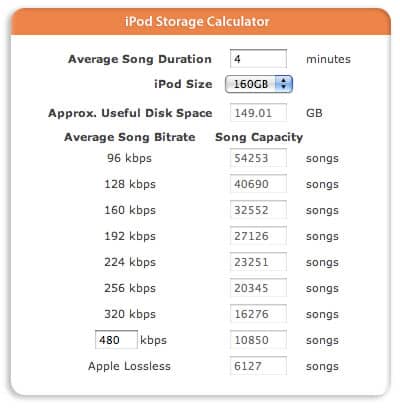
Calculate song file sizes

A: The amount of storage space that a given music file will take up on any digital music player is actually a function of the length of the song and the bitrate at which it is encoded.

Essentially, digital music formats specify a bit-rate measured in kilobits per second, abbreviated kbps. This specifies how much digital data is used to reproduce a single second of audio. For example, looking at a commonly-used bit-rate of 128 kbps, for each second of audio on the track, 128,000 bits of data are used. Higher bit-rates mean larger files, since more data is stored for each second of audio, but this also means additional quality, since there is more data present to reproduce a higher level of fidelity in the resulting audio.


Keep in mind that in this case we are talking about measurements in terms of computer bits rather than the more commonly-used storage measurement of bytes.

There are eight bits in a byte, so these numbers can be divided by eight to determine approximately how many kiloBYTES of data each second of audio will take up. So a 128 kbps audio file would take up approximately 16KB for each second of audio (this is not an exact measurement due to some unit differences, but will do fine for the purpose of getting an approximate measurement).


So, by applying some basic math, you can easily calculate the file size of any given audio track after conversion to an MP3 or AAC file. Simply take length of the track in seconds, multiply it by the bit-rate, and then divided by eight to get the result in kbps.

So if you have a 5 minute song, encoding at 128kbps, you would do this as follows:

5 minutes = 300 seconds
128kbps * 300 seconds = 38,400 kilobits of data
38,400 kilobits / 8 = 4,800 kb

To take this one step further, you could then convert this into megabytes simply by dividing the result by 1,024.


Note that the key here is the bit-rate that you are encoding at, rather than the format itself.

There are no significant size differences between MP3 and AAC formats inherently, for example—a 128 kbps MP3 and a 128 kbps AAC should result in files that are approximately the same size. There will be some additional space taken up in each file to store metadata such as track, album, artist, genre, and things like album artwork, but this is generally insignificant compared to the size of the audio data itself.

Further, the ratios between the bit-rates can be used to determine the approximate size differences. 256 kbps tracks will naturally take up twice the storage space as 128 kbps files.

One other important consideration to keep in mind is that the above formula will only work for “Constant Bit Rate” or CBR files. There is another type of encoding, known as “Variable Bit Rate” (VBR) which uses an average or variable bit-rate throughout the file.



Latest News
The 14-inch MacBook Pro with M5 Chip 16GB RAM/512GB is $250 Off
1 Min Read
Noise and Static on AirPods Pro 3 Still Unfixed
1 Min Read
New iMac with 24-inch OLED Display May be Brighter With 600 Nits
1 Min Read
The 15-inch M4 MacBook Air 256GB Is $250 Off
1 Min Read
Internal Kernel Debug Kit from Apple Reveals Tests for a MacBook with A15 Chip
1 Min Read
Apple Currently In Talks With Suppliers for Chip Assembly & Packaging of iPhones in India
1 Min Read
Apple Allows Easier Battery Replacement For M5 MacBook Pro with 14-inch Display
1 Min Read
The Apple Watch SE 3 44mm GPS is $50 Off
1 Min Read
20th Anniversary iPhone May Launch in Two Years
1 Min Read
Better Image Generation Capabilities and Apple Music Integration Coming to ChatGPT
1 Min Read
A20 Pro Chip Coming to Next Gen iPad Mini OLED
1 Min Read
Amazon has the AirTag 4 Pack Marked $29 off
1 Min Read

iLounge logo

iLounge is an independent resource for all things iPod, iPhone, iPad, and beyond. iPod, iPhone, iPad, iTunes, Apple TV, and the Apple logo are trademarks of Apple Inc.

This website is not affiliated with Apple Inc.
iLounge © 2001 - 2025. All Rights Reserved.
  • Contact Us
  • Submit News
  • About Us
  • Forums
  • Privacy Policy
  • Terms Of Use
Welcome Back!

Sign in to your account

Lost your password?








