
iLoungeiLounge
  • News
    • Apple
      • AirPods Pro
      • AirPlay
      • Apps
        • Apple Music
      • iCloud
      • iTunes
      • HealthKit
      • HomeKit
      • HomePod
      • iOS 13
      • Apple Pay
      • Apple TV
      • Siri
    • Rumors
    • Humor
    • Technology
      • CES
    • Daily Deals
    • Articles
    • Web Stories
  • iPhone
    • iPhone Accessories
  • iPad
  • iPod
    • iPod Accessories
  • Apple Watch
    • Apple Watch Accessories
  • Mac
    • MacBook Air
    • MacBook Pro
  • Reviews
    • App Reviews
  • How-to
    • Ask iLounge
Font ResizerAa
iLoungeiLounge
Font ResizerAa
Search
  • News
    • Apple
    • Rumors
    • Humor
    • Technology
    • Daily Deals
    • Articles
    • Web Stories
  • iPhone
    • iPhone Accessories
  • iPad
  • iPod
    • iPod Accessories
  • Apple Watch
    • Apple Watch Accessories
  • Mac
    • MacBook Air
    • MacBook Pro
  • Reviews
    • App Reviews
  • How-to
    • Ask iLounge
Follow US

How-to › Ask iLounge

Ask iLoungeiCloudiPadiPhone

Automatically backing up photos via cellular data

Last updated: May 16, 2021 4:20 pm UTC
By Jesse Hollington
Automatically backing up photos via cellular data

Q: I’m wondering if there’s some way that I’m missing to get iCloud Photo Stream to work over a cellular data connection or if there’s some alternative out there. I’m on the road a lot, and snap a lot of important photos on my iPhone, and hate the idea of losing everything if something happened to my iPhone before I got near a Wi-Fi connection. I know I can manually upload them somewhere using other apps, but that seems like a big hassle to do one at a time. Any ideas?


– Dan
Automatically backing up photos via cellular data

A: Unfortunately, Apple still doesn’t allow the iCloud Photo Stream feature to work over a 3G or LTE data connection, presumably for bandwidth reasons, so in terms of the built-in feature, you’re basically stuck waiting until you’re near a Wi-Fi network. Note that Shared Photo Streams do in fact work over a cellular data connection, but you not only have to select and upload photos to a shared stream manually, but the uploaded photos are scaled down to a lower resolution, since the feature is designed for sharing photos rather than backing them up.


The somewhat good news is that alternative solutions do exist in the form of third-party apps. However, since Apple doesn’t allow third-party apps to simply run in the background, the process is somewhat less automated than the built-in Photo Stream feature. Essentially, even apps that provide automated photo transfer capabilities require that you actually open the app in order to begin transferring your photos. Further, if you have a large number of photos to transfer or a slower data connection, you may have to leave the app running to ensure everything gets uploaded; Apple only allows third-party apps to remain in the background for ten minutes, so if you close the app and it takes longer than that to transfer your photos, the process will simply stop and you’ll basically have to open it back up again to continue.


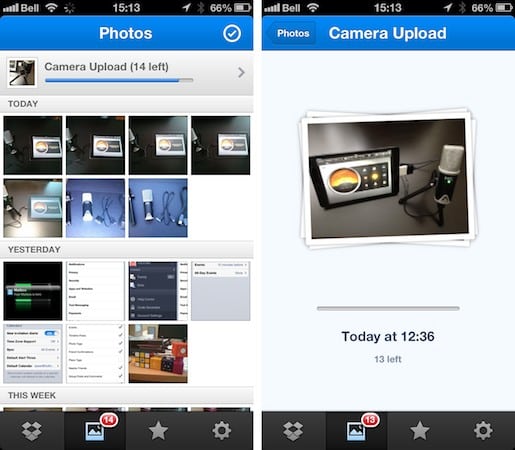
For example, Dropbox provides this capability as part of its native iOS app.

You’ll need to sign up for at least a free Dropbox account to use this feature, however that includes 2GB of storage and the ability to automatically sync your files back to your PC or Mac.

Within the Dropbox app you have the option of enabling Camera Uploads for photos over either a Wi-Fi or Cellular Data connection. Photos are uploaded by the Dropbox app in full resolution, and stored in a “Camera Uploads” folder that will by default sync back to your Mac or PC as long as the Dropbox desktop app is running. Dropbox can also upload videos automatically—something that Photo Stream doesn’t support at all—however this is only available when using a Wi-Fi connection. A badge count also appears on the Dropbox app while it’s uploading in the background so you can keep track of how many images it still needs to deal with.



Latest News
The 14-inch MacBook Pro with M5 Chip 16GB RAM/512GB is $250 Off
1 Min Read
Noise and Static on AirPods Pro 3 Still Unfixed
1 Min Read
New iMac with 24-inch OLED Display May be Brighter With 600 Nits
1 Min Read
The 15-inch M4 MacBook Air 256GB Is $250 Off
1 Min Read
Internal Kernel Debug Kit from Apple Reveals Tests for a MacBook with A15 Chip
1 Min Read
Apple Currently In Talks With Suppliers for Chip Assembly & Packaging of iPhones in India
1 Min Read
Apple Allows Easier Battery Replacement For M5 MacBook Pro with 14-inch Display
1 Min Read
The Apple Watch SE 3 44mm GPS is $50 Off
1 Min Read
20th Anniversary iPhone May Launch in Two Years
1 Min Read
Better Image Generation Capabilities and Apple Music Integration Coming to ChatGPT
1 Min Read
A20 Pro Chip Coming to Next Gen iPad Mini OLED
1 Min Read
Amazon has the AirTag 4 Pack Marked $29 off
1 Min Read

iLounge logo

iLounge is an independent resource for all things iPod, iPhone, iPad, and beyond. iPod, iPhone, iPad, iTunes, Apple TV, and the Apple logo are trademarks of Apple Inc.

This website is not affiliated with Apple Inc.
iLounge © 2001 - 2025. All Rights Reserved.
  • Contact Us
  • Submit News
  • About Us
  • Forums
  • Privacy Policy
  • Terms Of Use
Welcome Back!

Sign in to your account

Lost your password?








