
iLoungeiLounge
  • News
    • Apple
      • AirPods Pro
      • AirPlay
      • Apps
        • Apple Music
      • iCloud
      • iTunes
      • HealthKit
      • HomeKit
      • HomePod
      • iOS 13
      • Apple Pay
      • Apple TV
      • Siri
    • Rumors
    • Humor
    • Technology
      • CES
    • Daily Deals
    • Articles
    • Web Stories
  • iPhone
    • iPhone Accessories
  • iPad
  • iPod
    • iPod Accessories
  • Apple Watch
    • Apple Watch Accessories
  • Mac
    • MacBook Air
    • MacBook Pro
  • Reviews
    • App Reviews
  • How-to
    • Ask iLounge
Font ResizerAa
iLoungeiLounge
Font ResizerAa
Search
  • News
    • Apple
    • Rumors
    • Humor
    • Technology
    • Daily Deals
    • Articles
    • Web Stories
  • iPhone
    • iPhone Accessories
  • iPad
  • iPod
    • iPod Accessories
  • Apple Watch
    • Apple Watch Accessories
  • Mac
    • MacBook Air
    • MacBook Pro
  • Reviews
    • App Reviews
  • How-to
    • Ask iLounge
Follow US

How-to › Ask iLounge

Ask iLoungeiCloudiTunesReviews

Audiobooks and iTunes Match

Last updated: May 16, 2021 4:29 pm UTC
By Jesse Hollington
Audiobooks and iTunes Match

Q: I was wondering if iTunes Match or iCloud supports audiobooks?


– Paul
Audiobooks and iTunes Match

A: The short (and official) answer is no; iTunes Match is only for music at this point, although that does include music videos as well.

That said, however, the only real difference between a music track and an audiobook track is how it’s tagged in iTunes, so reclassifying your audiobooks as Music tracks will cause iTunes to treat them the same way as it would any other music track, making them potentially eligible for iTunes Match.

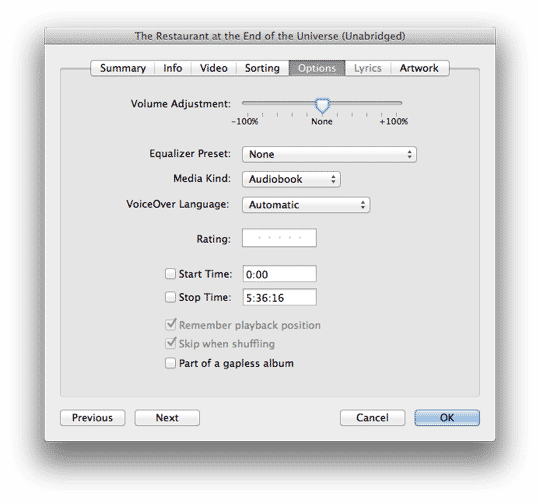
You can do this simply by opening the track properties using File, Get Info, choosing the Options tab and changing the “Media Kind” to “Music.”


This will cause these tracks to appear in the Music section in iTunes and iOS rather than the Audiobooks section, however you can still use artist, album and genre tags to help locate and classify them and add them to playlists. The downside is that you will lose access to audiobook specific features such as variable speed playback, chapter markers and bookmarks; the Remember Playback Position can still be set on a music track but this does not sync between devices via iCloud.


As long as these reclassified “music” tracks otherwise meet the criteria for iTunes Match—a bit-rate greater than 96kbps and maximum size of 200 MB—iTunes will attempt to match them with music on the iTune Store (and fail of course) and then upload them to iCloud in the same way as any other unmatched music track.

The most common problem you’re likely to run into with this trick is that most audiobooks use a lower bit-rate and are therefore ineligible for iTunes Match. In this case, however, you can convert these tracks to a higher bit-rate if you really want them available in iTunes Match; you won’t gain any quality but it will allow the tracks to be uploaded. Note that this will not work for audiobooks purchased from the iTunes Store or Audible.com as the DRM protection on these files will prevent them from being converted to an iTunes Match eligible format.


Further, iTunes will not convert tracks to a higher bit-rate in the same format, although you can get around this by converting MP3 tracks to AAC or vice-versa or simply using an external audio conversion tool.

The 200 MB limitation may also be an issue for longer audiobooks, although at 128kbps you should be able to get around three hours of audio in a single file. If your audiobooks are divided into chapters anyway this is unlikely to be a problem; larger audiobooks can also be split manually using any number of freely available tools and then organized into playlists for listening.

The bottom line is that how effective this workaround is will depend on the type of audiobooks you have in your library.



Latest News
The 14-inch MacBook Pro with M5 Chip 16GB RAM/512GB is $250 Off
1 Min Read
Noise and Static on AirPods Pro 3 Still Unfixed
1 Min Read
New iMac with 24-inch OLED Display May be Brighter With 600 Nits
1 Min Read
The 15-inch M4 MacBook Air 256GB Is $250 Off
1 Min Read
Internal Kernel Debug Kit from Apple Reveals Tests for a MacBook with A15 Chip
1 Min Read
Apple Currently In Talks With Suppliers for Chip Assembly & Packaging of iPhones in India
1 Min Read
Apple Allows Easier Battery Replacement For M5 MacBook Pro with 14-inch Display
1 Min Read
The Apple Watch SE 3 44mm GPS is $50 Off
1 Min Read
20th Anniversary iPhone May Launch in Two Years
1 Min Read
Better Image Generation Capabilities and Apple Music Integration Coming to ChatGPT
1 Min Read
A20 Pro Chip Coming to Next Gen iPad Mini OLED
1 Min Read
Amazon has the AirTag 4 Pack Marked $29 off
1 Min Read

iLounge logo

iLounge is an independent resource for all things iPod, iPhone, iPad, and beyond. iPod, iPhone, iPad, iTunes, Apple TV, and the Apple logo are trademarks of Apple Inc.

This website is not affiliated with Apple Inc.
iLounge © 2001 - 2025. All Rights Reserved.
  • Contact Us
  • Submit News
  • About Us
  • Forums
  • Privacy Policy
  • Terms Of Use
Welcome Back!

Sign in to your account

Lost your password?








