
iLoungeiLounge
  • News
    • Apple
      • AirPods Pro
      • AirPlay
      • Apps
        • Apple Music
      • iCloud
      • iTunes
      • HealthKit
      • HomeKit
      • HomePod
      • iOS 13
      • Apple Pay
      • Apple TV
      • Siri
    • Rumors
    • Humor
    • Technology
      • CES
    • Daily Deals
    • Articles
    • Web Stories
  • iPhone
    • iPhone Accessories
  • iPad
  • iPod
    • iPod Accessories
  • Apple Watch
    • Apple Watch Accessories
  • Mac
    • MacBook Air
    • MacBook Pro
  • Reviews
    • App Reviews
  • How-to
    • Ask iLounge
Font ResizerAa
iLoungeiLounge
Font ResizerAa
Search
  • News
    • Apple
    • Rumors
    • Humor
    • Technology
    • Daily Deals
    • Articles
    • Web Stories
  • iPhone
    • iPhone Accessories
  • iPad
  • iPod
    • iPod Accessories
  • Apple Watch
    • Apple Watch Accessories
  • Mac
    • MacBook Air
    • MacBook Pro
  • Reviews
    • App Reviews
  • How-to
    • Ask iLounge
Follow US

News › Apple TV

Apple TVAsk iLounge

Apple TV not showing Descriptions

Last updated: May 16, 2021 4:41 pm UTC
By Jesse Hollington
Apple TV not showing Descriptions

Q: After the 4.2 update, my Apple TV no longer shows the metadata for description on any of my movies or TV shows. Have you noticed this change?


– Gene
Apple TV not showing Descriptions

A: It appears that with the Apple TV 4.2 update, Apple actually changed the display of description information to be more in-line with how the first-generation Apple TV worked, but didn’t quite get it right.

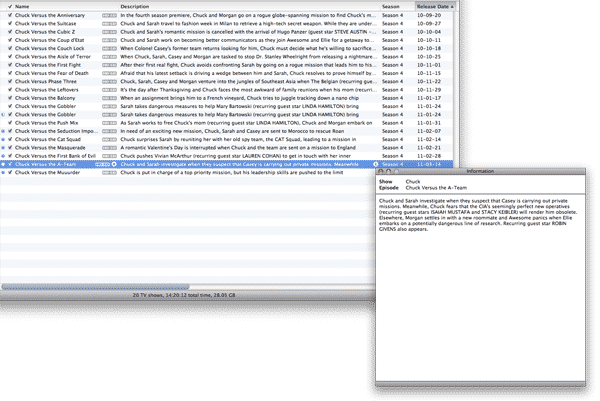
There are actually two description fields stored in each video file: A Description and a Long Description. The Description field is limited to 255 characters and is the field that you can edit in the Video tab within iTunes. The content of this field is normally displayed in the “Description” column in your iTunes library. The Long Description field provides effectively unlimited length but cannot be edited directly in iTunes, although it can be modified via an AppleScript (for Mac users) or via external tagging tools such as AtomicParsley.


iTunes displays the content of the Long Description, if available, in a separate pop-up window that appears when clicking the small “info” icon that shows up in the Description column.

Note that all content purchased from the iTunes Store contains a full-length description in the Long Description field and a shorter one or two-sentence summary in the Description field.

With the first-generation Apple TV, the Long Description was always shown by default, however in situations where the Long Description was empty, the Description field would be shown instead. In fact, some older versions of the first-generation Apple TV firmware even fell back to using the Comments field from iTunes if nothing else was filled in—a concession to iTunes 7 where the Description field could not be edited. Since the Long Description field could generally contain a much longer description than the more limited Description field, it made sense that the Apple TV should default to showing the most detailed field available.


When the second-generation Apple TV was released, however, it seems that Apple’s programmers forgot all about the Long Description field and reverted to using the standard “Description” field instead.

This actually worked to the disadvantage of those with iTunes-purchased content or those who had taken special effort to add long descriptions to their other content, as this information was suddenly not available on the Apple TV at all. Further, even much of the iTunes Store content appeared with oddly truncated standard description fields—a problem that had existed for some time but only became noticeable with the second-generation Apple TV.


With the 4.2 update, it appears that Apple has “fixed” this earlier problem by going back to using the Long Description field, but have neglected to fall back to anything else in the event that this field is empty—which it will be for many users who have imported and tagged their own content.

The good news is that if you’re Mac user, this is actually pretty easy to fix. You can fill in the Long Descriptions easily via AppleScript, and even simply copy the Descriptions over so that the same content is in both fields. Once the Long Description is properly filled in, it should appear on your Apple TV.



Latest News
The 14-inch MacBook Pro with M5 Chip 16GB RAM/512GB is $250 Off
1 Min Read
Noise and Static on AirPods Pro 3 Still Unfixed
1 Min Read
New iMac with 24-inch OLED Display May be Brighter With 600 Nits
1 Min Read
The 15-inch M4 MacBook Air 256GB Is $250 Off
1 Min Read
Internal Kernel Debug Kit from Apple Reveals Tests for a MacBook with A15 Chip
1 Min Read
Apple Currently In Talks With Suppliers for Chip Assembly & Packaging of iPhones in India
1 Min Read
Apple Allows Easier Battery Replacement For M5 MacBook Pro with 14-inch Display
1 Min Read
The Apple Watch SE 3 44mm GPS is $50 Off
1 Min Read
20th Anniversary iPhone May Launch in Two Years
1 Min Read
Better Image Generation Capabilities and Apple Music Integration Coming to ChatGPT
1 Min Read
A20 Pro Chip Coming to Next Gen iPad Mini OLED
1 Min Read
Amazon has the AirTag 4 Pack Marked $29 off
1 Min Read

iLounge logo

iLounge is an independent resource for all things iPod, iPhone, iPad, and beyond. iPod, iPhone, iPad, iTunes, Apple TV, and the Apple logo are trademarks of Apple Inc.

This website is not affiliated with Apple Inc.
iLounge © 2001 - 2025. All Rights Reserved.
  • Contact Us
  • Submit News
  • About Us
  • Forums
  • Privacy Policy
  • Terms Of Use
Welcome Back!

Sign in to your account

Lost your password?








