
As expected, Apple today introduced the second new member of its Holiday 2005 iPod lineup, the 5th Generation iPod. This iPod, although still music-centric, has the capability to view videos, and a larger screen to do so with.
How, then, is this new type of content delivered to the iPod? A new version of iTunes, of course, and an updated iTunes Music Store featuring video content, as well! iTunes 6, released earlier today and available for free download for both Mac and Windows here. Today’s integer increase in iTunes’ version number is bold, as today’s release could have easily been named iTunes 5.1 – the program itself sports few improvements beyond the many features introduced only a month ago in iTunes 5.
Instead, most of the major improvements introduced today are actually improvements to the Music Store itself. What are they? Download iTunes 6 and follow along in our brief overview of what’s new in iTunes and the Music Store.
iTunes Improvements:
Video Source List
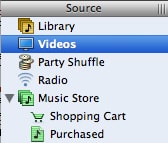
The first thing one will notice upon launching iTunes 6 is the presence of a new “Videos” icon in the “Source” column in the left hand side of iTunes:

Click on this icon, and you’ll be presented with a classy black tray displaying all videos in your iTunes Library at the moment. Our library had four videos displayed, which we had acquired in a “special” deal with a new Gorillaz single. Notice the reflection of the video preview:

Toggle the view icons in the top right hand corner of the video window to switch between the default “preview” mode and the basic text list. Note that in “List” view, one can add new text fields to the display, such as “Season” and “Episode,” used for television shows purchased from the iTunes Music Store. To enable the display of these fields, choose “View Options” from iTunes’ “Edit” menu.
How are videos played? This has not changed since video playback was made available in iTunes 4.9. That is, you can choose whether iTunes plays videos in the Album Art Box (in the bottom left corner of iTunes), in a separate Quicktime-like window, or full-screen. To change this setting, access the final option of the “Playback” tab of iTunes’ “Preferences” window:

Then, simply double-click on a video in either Preview or List mode, and it will begin to play in the selected manner.
iTunes Music Store Improvements:
Music Videos, Shorts, and TV Shows
Sure, a video iPod sounds like a neat idea, but how will it be useful? DVD’s are still today too large for the average user to catalog, and too long and taxing is the process that it takes to import them into a portable format. Apple’s answer lies in smaller, shorter, pre-encoded video content in the form of TV Shows, Music Videos, and Pixar shorts – and they’re delivering them through their popular iTunes Music Store.
To access this content, click on “Music Store” from iTunes 6’s “Source” column. Along the left hand side of the main window, you’ll see the main Music Store navigation column, with three new links at the bottom:

Music Videos, previously presented in a rudimentary interface (for free), are now presented in the standard iTunes three-column interface, and now cost $1.99 each. However, the music videos (and all video content on the iTunes Music Store), is now presented in H.264 format, keeping file sizes down without reducing video quality.
The Pixar category offers several of Pixar Animation Studios’ wonderfully funny short videos, also at $1.99 each.
Currently, only five TV Shows are available: “Lost”, “Desparate Housewives”, “Night Stalker”, “The Suite Life”, and “That’s So Raven.” In each case, single episodes sell for $1.99 each, and entire seasons are available in single-button-click packages, at a significant per-episode discount (25 episodes from Season 1 of “Lost” are available for $34.99). TV shows are presented commercial-free.
All video content weighs in at approximately 5MB (approximately the file size taken by one song) per minute – a hefty download for anyone but broadband users. All video is subject to digital rights management similar to that of music purchased from the Music Store – 5 computers may play the videos. However, they cannot be burned to CD or DVD as video.
Any video content downloaded from the iTunes Music Store will reside alongside any of your existing videos obtained from other sources in the previously-discussed “Video” panel. Here’s a photo of our video panel with our test short, music video, and TV episode:

Just for You
Video was not the only new feature added to the music store, however. “Just for You” is a new feature first presented in the middle of the main iTunes Music Store interface that gives the user a customized set of music recommendations:

Click on the text “Just for You” or “See All”, and this feature is expanded into a larger Netflix-style computerized recommendation interface. Click “Already Own It” or “Don’t Like It” to ‘train’ the recommendation algorithm to your tastes.

Gifting
Apple has also expanded their “Gift Certificate” feature to enable one to purchase specific music for someone else. This feature, dubbed “Gifting,” is available when viewing any Album on the Music Store. Simply click “Gift This Music” to begin the gifting process, where you can select any album (click “Gift Album”), track (click “Gift Song”), or playlist.


To gift a playlist, create a playlist of either your own music or iTunes Music Store links, and click the arrow next to the playlist title in the Source column.











