
iLoungeiLounge
  • News
    • Apple
      • AirPods Pro
      • AirPlay
      • Apps
        • Apple Music
      • iCloud
      • iTunes
      • HealthKit
      • HomeKit
      • HomePod
      • iOS 13
      • Apple Pay
      • Apple TV
      • Siri
    • Rumors
    • Humor
    • Technology
      • CES
    • Daily Deals
    • Articles
    • Web Stories
  • iPhone
    • iPhone Accessories
  • iPad
  • iPod
    • iPod Accessories
  • Apple Watch
    • Apple Watch Accessories
  • Mac
    • MacBook Air
    • MacBook Pro
  • Reviews
    • App Reviews
  • How-to
    • Ask iLounge
Font ResizerAa
iLoungeiLounge
Font ResizerAa
Search
  • News
    • Apple
    • Rumors
    • Humor
    • Technology
    • Daily Deals
    • Articles
    • Web Stories
  • iPhone
    • iPhone Accessories
  • iPad
  • iPod
    • iPod Accessories
  • Apple Watch
    • Apple Watch Accessories
  • Mac
    • MacBook Air
    • MacBook Pro
  • Reviews
    • App Reviews
  • How-to
    • Ask iLounge
Follow US

How-to › Ask iLounge

Ask iLounge

Alarm Clock apps for iPhone

Last updated: May 16, 2021 4:53 pm UTC
By Jesse Hollington
Alarm Clock apps for iPhone

Q: Thanks for your review on the iHome+Sleep app. However, there is something I haven’t seen covered anywhere, including in your review. Is the app usable with other alarm clocks, or JUST the IA5/IA100? The most impressive, useful and appealing feature for me is the ability to set custom alarms. My work schedule does not follow the standard weekdays/weekends that most 5+2 or 7+5+2 alarm clocks follow.


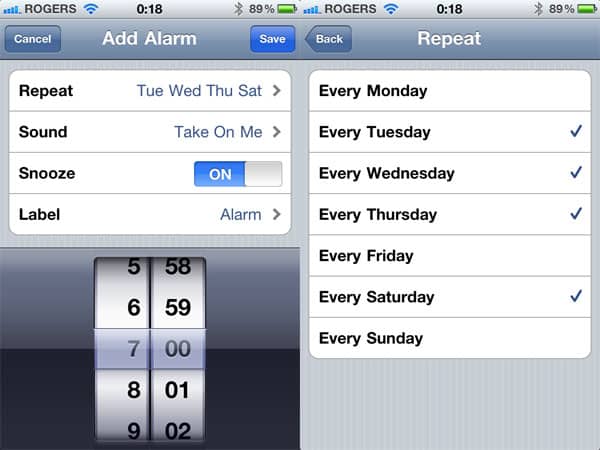
So having the ability to set an alarm for Tuesdays, Wednesdays, Thursdays, and Saturdays but NOT Sundays, Mondays and Fridays (for example) is the most helpful feature of the app, with the sleep cards. The problem is, the IA5 is not appealing to me at all, from a hardware standpoint, and while the IA100 looks much better (both in terms of layout and hardware), I’m afraid it will be overkill for my needs. So, the question is, will the iHome+Sleep app work with other alarm clocks and docks, particularly the alarm feature…either other iHome clocks/docks, or other brands in general? I would greatly appreciate it if you have any info about this!

Alarm Clock apps for iPhone

– Matthew

A: Although the iHome+Sleep app is designed to be used with iHome’s app-enabled alarm clocks, it also works as a standalone app in which case it simply begins playing your alarm sound at the scheduled time. You will need to ensure that the app is left running before you go to bed as it does not yet provide any background notification support, but this would be the case even if you’re using it with iHome’s app-enabled speakers as the app cannot be triggered by an external accessory due to Apple’s SDK restrictions.


Without the iA5 or iA100 speakers, the iHome+Sleep app works in much the same way as any other iPhone alarm app and as long as it’s running will play your scheduled alarms at the appropriate time, either through the iPhone’s own speaker or through whatever other speakers are attached. If you’re docking with a speaker system you simply need to ensure that the speakers are on and the app is running before you go to bed and when the alarm goes off in the morning it should sound through the speakers.


Note that if you’re simply looking for an alarm that can be scheduled to repeat on specific days of the week you may want to just check out the iPhone’s own Clock app, which offers this capability and has the advantage of running in the background so that it goes off regardless of whether you leave the app running or not. While not as flexible as the iHome+Sleep app in terms of sleep timers, alarm sounds and snooze times, the Clock app will allow you to choose one or more weekdays to repeat and allow you to use any built-in or custom ringtone as your alarm sound and also includes a basic sleep timer function.



Latest News
The 14-inch MacBook Pro with M5 Chip 16GB RAM/512GB is $250 Off
1 Min Read
Noise and Static on AirPods Pro 3 Still Unfixed
1 Min Read
New iMac with 24-inch OLED Display May be Brighter With 600 Nits
1 Min Read
The 15-inch M4 MacBook Air 256GB Is $250 Off
1 Min Read
Internal Kernel Debug Kit from Apple Reveals Tests for a MacBook with A15 Chip
1 Min Read
Apple Currently In Talks With Suppliers for Chip Assembly & Packaging of iPhones in India
1 Min Read
Apple Allows Easier Battery Replacement For M5 MacBook Pro with 14-inch Display
1 Min Read
The Apple Watch SE 3 44mm GPS is $50 Off
1 Min Read
20th Anniversary iPhone May Launch in Two Years
1 Min Read
Better Image Generation Capabilities and Apple Music Integration Coming to ChatGPT
1 Min Read
A20 Pro Chip Coming to Next Gen iPad Mini OLED
1 Min Read
Amazon has the AirTag 4 Pack Marked $29 off
1 Min Read

iLounge logo

iLounge is an independent resource for all things iPod, iPhone, iPad, and beyond. iPod, iPhone, iPad, iTunes, Apple TV, and the Apple logo are trademarks of Apple Inc.

This website is not affiliated with Apple Inc.
iLounge © 2001 - 2025. All Rights Reserved.
  • Contact Us
  • Submit News
  • About Us
  • Forums
  • Privacy Policy
  • Terms Of Use
Welcome Back!

Sign in to your account

Lost your password?








