
Q: My brother purchased the new iPhone 3G and is giving me his old iPhone. What do I need to do, if anything, to transfer the phone to my name? Do I just insert my current SIM card?
– Adriana
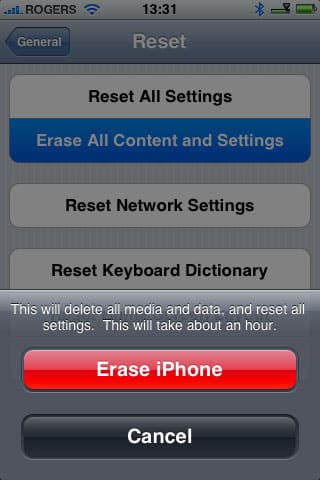
A: This is a question that is best raised with your wireless carrier in terms of ensuring that you will be able to use your existing SIM card in the iPhone. Some carriers will require that you obtain a new SIM card, and you may also need to sign up for an iPhone plan.
These requirements aside, however, transferring your account to the iPhone really is technically as simple as inserting your SIM card, as long as you have a proper SIM card that the iPhone will accept.
To otherwise reinitialize the iPhone for your own use, you can simply select Settings, General, Reset from the iPhone menus and then choose Erase all Content and Settings.
This will basically return the iPhone to a new “out-of-the-box” configuration, and you can then connect it to iTunes, activate it with your SIM card, and load your own content onto it.
Note that if the iPhone has already been updated to the iPhone v2.0 firmware, the “Erase all Content and Settings” option will take about an hour to run, as it does an actual wipe of the data on the iPhone for security purposes. On prior versions of the iPhone firmware, the option will normally only take a few seconds.
Q: Now that Rogers has brought the iPhone 3G to Canada, does this mean that I can buy an original first-generation iPhone from eBay and use it on the Rogers network? I don’t really want to sign a three-year contract and would rather just buy the iPhone outright. 3G also doesn’t interest me, as I live in Northern Ontario where there are barely decent EDGE services. Will features like Visual Voicemail now work up here with the original with the original iPhone?
– Gilles
A: Unfortunately, first-generation iPhones may normally only be activated on carriers/networks that they were originally available on. This means that if you have an AT&T iPhone, you will not be able to activate it on the Rogers network legitimately—you will still need to jailbreak and unlock the iPhone the same way you would have previously needed to do.
The problem is that before you can use your iPhone, it must be “activated” by iTunes (this is also sometimes referred to as “unbricking”). During this process, iTunes looks up your IMEI (phone serial number) and ICCID (SIM card serial number) in its database to determine if these are valid and if they match an authorized model and combination of iPhone and SIM card. Connecting a first-generation iPhone in this case, even with a perfectly valid iPhone 3G SIM card inserted into it will result in iTunes reporting that it cannot activate your iPhone as you do not have a valid carrier-supported SIM card.
This back-end database used by iTunes appears to be tied into the supported carrier networks, and there have been reports of some carriers “activating” first-generation iPhones. Presumably if the carrier adds your first-gen iPhone IMEI into their system, iTunes would be able to activate your iPhone. However, Rogers has at this point stated that it is against their policy to do this and that they will not activate any first-generation iPhones on their network.











