
iLoungeiLounge
  • News
    • Apple
      • AirPods Pro
      • AirPlay
      • Apps
        • Apple Music
      • iCloud
      • iTunes
      • HealthKit
      • HomeKit
      • HomePod
      • iOS 13
      • Apple Pay
      • Apple TV
      • Siri
    • Rumors
    • Humor
    • Technology
      • CES
    • Daily Deals
    • Articles
    • Web Stories
  • iPhone
    • iPhone Accessories
  • iPad
  • iPod
    • iPod Accessories
  • Apple Watch
    • Apple Watch Accessories
  • Mac
    • MacBook Air
    • MacBook Pro
  • Reviews
    • App Reviews
  • How-to
    • Ask iLounge
Font ResizerAa
iLoungeiLounge
Font ResizerAa
Search
  • News
    • Apple
    • Rumors
    • Humor
    • Technology
    • Daily Deals
    • Articles
    • Web Stories
  • iPhone
    • iPhone Accessories
  • iPad
  • iPod
    • iPod Accessories
  • Apple Watch
    • Apple Watch Accessories
  • Mac
    • MacBook Air
    • MacBook Pro
  • Reviews
    • App Reviews
  • How-to
    • Ask iLounge
Follow US

How-to › Ask iLounge

Ask iLoungeiPadiPhone

Accessing the Internet from an iPad using an iPhone

Last updated: May 16, 2021 4:28 pm UTC
By Jesse Hollington
Accessing the Internet from an iPad using an iPhone

Q: I have an iPad 2 which uses O2 as its carrier. I am about to buy an iPhone 4S on O2 as well, and am wondering if I can get rid of the iPad 2 connection and drive it off my iPhone?


– Philip
Accessing the Internet from an iPad using an iPhone

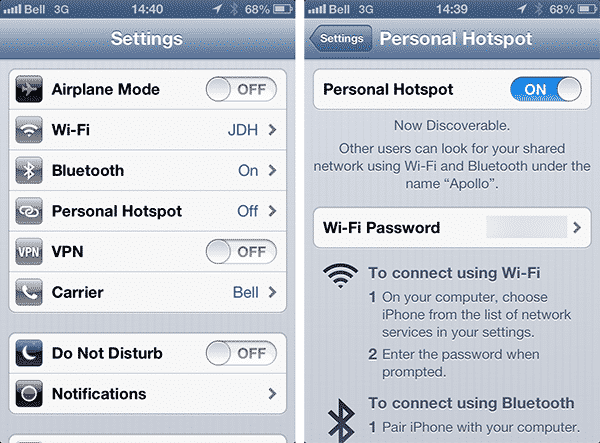
A: From a technical point of view this is definitely possible via a feature known as Personal Hotpot, introduced about two years with iOS 4. The Personal Hotspot feature allows you to share your iPhone’s data connection via Wi-Fi or Bluetooth with up to five devices, or with your computer via a wired USB connection.

To use the feature, you simply need to go into Settings and look for Personal Hotspot; if you’ve never configured the feature before, it may initially be hidden under General, Network, but once you’ve enabled it at least once it should appear on the main Settings screen, as shown above.


Once enabled, your iPad should be able to find a Wi-Fi access point with the name of your iPhone; simply connect to this Wi-Fi access point and use the password shown on the iPhone Personal Hotspot screen and you’re good to go.

The catch here is that not all carriers offer the Personal Hotspot feature, and some carriers charge additional fees above and beyond basic data usage fees. According to Apple’s article on Locating Wireless Carriers, O2 appears to support Personal Hotspot; the feature is also colloquially known as “tethering” and many carriers simply include tethering as part of your normal data allotment while others require a special plan to make use of the feature. It is best to contact your carrier to determine if you need to have a specific data plan on your iPhone in order to access the feature or to avoid specific fees.


Barring any additional fees from your carrier, using Personal Hotspot to access the Internet on your iPad can be much more economical than paying for a separate data plan, but there are some considerations that you should be aware of. Firstly, you’ll be consuming the battery on two devices while doing this, thereby shortening the battery life of your iPhone for other uses such as phone calls. Depending on how much you plan to use your iPad with Personal Hotspot, you may want to consider an additional battery case or pack for your iPhone. Secondly, you’ll also be using your iPhone data plan for both devices; with larger data plans this is unlikely to be a problem unless you’re streaming a lot of video or downloading large files, but it’s something you’ll need to keep an eye on, particularly if you’re on a 1GB or lower plan.



Latest News
The 14-inch MacBook Pro with M5 Chip 16GB RAM/512GB is $250 Off
1 Min Read
Noise and Static on AirPods Pro 3 Still Unfixed
1 Min Read
New iMac with 24-inch OLED Display May be Brighter With 600 Nits
1 Min Read
The 15-inch M4 MacBook Air 256GB Is $250 Off
1 Min Read
Internal Kernel Debug Kit from Apple Reveals Tests for a MacBook with A15 Chip
1 Min Read
Apple Currently In Talks With Suppliers for Chip Assembly & Packaging of iPhones in India
1 Min Read
Apple Allows Easier Battery Replacement For M5 MacBook Pro with 14-inch Display
1 Min Read
The Apple Watch SE 3 44mm GPS is $50 Off
1 Min Read
20th Anniversary iPhone May Launch in Two Years
1 Min Read
Better Image Generation Capabilities and Apple Music Integration Coming to ChatGPT
1 Min Read
A20 Pro Chip Coming to Next Gen iPad Mini OLED
1 Min Read
Amazon has the AirTag 4 Pack Marked $29 off
1 Min Read

iLounge logo

iLounge is an independent resource for all things iPod, iPhone, iPad, and beyond. iPod, iPhone, iPad, iTunes, Apple TV, and the Apple logo are trademarks of Apple Inc.

This website is not affiliated with Apple Inc.
iLounge © 2001 - 2025. All Rights Reserved.
  • Contact Us
  • Submit News
  • About Us
  • Forums
  • Privacy Policy
  • Terms Of Use
Welcome Back!

Sign in to your account

Lost your password?








