
iLoungeiLounge
  • News
    • Apple
      • AirPods Pro
      • AirPlay
      • Apps
        • Apple Music
      • iCloud
      • iTunes
      • HealthKit
      • HomeKit
      • HomePod
      • iOS 13
      • Apple Pay
      • Apple TV
      • Siri
    • Rumors
    • Humor
    • Technology
      • CES
    • Daily Deals
    • Articles
    • Web Stories
  • iPhone
    • iPhone Accessories
  • iPad
  • iPod
    • iPod Accessories
  • Apple Watch
    • Apple Watch Accessories
  • Mac
    • MacBook Air
    • MacBook Pro
  • Reviews
    • App Reviews
  • How-to
    • Ask iLounge
Font ResizerAa
iLoungeiLounge
Font ResizerAa
Search
  • News
    • Apple
    • Rumors
    • Humor
    • Technology
    • Daily Deals
    • Articles
    • Web Stories
  • iPhone
    • iPhone Accessories
  • iPad
  • iPod
    • iPod Accessories
  • Apple Watch
    • Apple Watch Accessories
  • Mac
    • MacBook Air
    • MacBook Pro
  • Reviews
    • App Reviews
  • How-to
    • Ask iLounge
Follow US

How-to › Ask iLounge

ArticlesAsk iLoungeiTunes

About iTunes and ID3 tags

Last updated: May 16, 2021 5:12 pm UTC
By Jesse Hollington
About iTunes and ID3 tags

Q: Due to my PC being fairly old and iTunes’ rather heavy reliance on resources, I tend to use iTunes primarily for managing my library/syncing my iPod, and a simpler application for playback when I’m working at the PC. However, I keep running into a problem with changes that I make to a song in iTunes (like genre or year changes) not taking effect when I play the file using a different application or when I load songs onto a different brand MP3 player.


I always assumed that when you use the ‘Get Info’ option to modify the information about a song, iTunes made the changes not only to its database, but also to the tag within the specific MP3 file itself; but this doesn’t always seem to be the case.
About iTunes and ID3 tags

Are there certain fields within an audio file’s tag that iTunes will not change, or do I have something set incorrectly?

– Rachel

A: Your assumption that iTunes should update the ID3 tags within the media files themselves is absolutely correct. Unfortunately, however, there are some factors that can prevent this from working as it should.


This problem occurs most commonly with MP3 files, and is often the result of either corrupted ID3 tags, or simply the fact that the files are using an older version of the ID3 tag standard, known as ID3v1 tags (ie, version 1).

ID3v1 tags stored a very limited amount of data in a fixed-length format, and made no provisions for extended information such as album artwork or any of the more advanced metadata in iTunes (ie, album artist, disc number, grouping, composer, etc).


Compatibility with ID3v1 tags was further complicated as many programs adopted their own (often-incompatible) standards for encoding this additional metadata into the file using the ID3v1.1 format, which allowed for some basic extensions to the ID3 data area.

While iTunes is normally supposed to update whatever tags are already in the file, we have observed problems working with ID3v1.1 tags over the years, most frequently due to this additional non-standard data that may have been added by other applications which may have touched the files in the past.


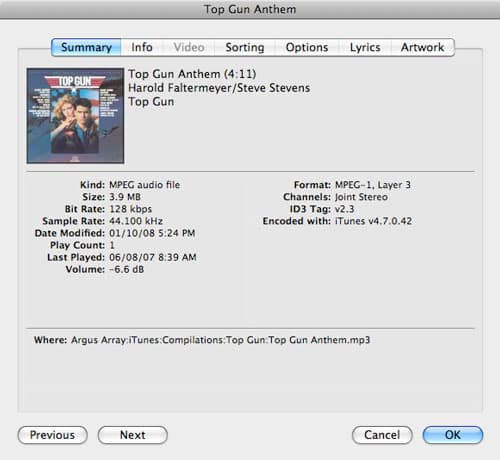
You can check which version of ID3 tag is contained in the file and being used by iTunes simply by viewing a track’s properties.

Select an MP3 track, and choose File, Get Info from the iTunes menu, and check the “Summary” tab:

About iTunes and ID3 tags

Note that an MP3 file can have both ID3v1 and ID3v2 tags contained within it. iTunes will normally use the latest version of the tags it finds to populate the information in its database, although it will try to update both versions. However, iTunes does not attempt to rewrite the entire tag header—it merely updates those fields that it finds within the tag.

The simplest way to fix this issue is to convert the ID3 tags within your MP3 files to the newer ID3v2 standard. There are several sub-versions of this, but you should generally use ID3v2.4 (the latest) provided your other applications support it, which almost all modern MP3 playback and management applications should.



Latest News
The 14-inch MacBook Pro with M5 Chip 16GB RAM/512GB is $250 Off
1 Min Read
Noise and Static on AirPods Pro 3 Still Unfixed
1 Min Read
New iMac with 24-inch OLED Display May be Brighter With 600 Nits
1 Min Read
The 15-inch M4 MacBook Air 256GB Is $250 Off
1 Min Read
Internal Kernel Debug Kit from Apple Reveals Tests for a MacBook with A15 Chip
1 Min Read
Apple Currently In Talks With Suppliers for Chip Assembly & Packaging of iPhones in India
1 Min Read
Apple Allows Easier Battery Replacement For M5 MacBook Pro with 14-inch Display
1 Min Read
The Apple Watch SE 3 44mm GPS is $50 Off
1 Min Read
20th Anniversary iPhone May Launch in Two Years
1 Min Read
Better Image Generation Capabilities and Apple Music Integration Coming to ChatGPT
1 Min Read
A20 Pro Chip Coming to Next Gen iPad Mini OLED
1 Min Read
Amazon has the AirTag 4 Pack Marked $29 off
1 Min Read

iLounge logo

iLounge is an independent resource for all things iPod, iPhone, iPad, and beyond. iPod, iPhone, iPad, iTunes, Apple TV, and the Apple logo are trademarks of Apple Inc.

This website is not affiliated with Apple Inc.
iLounge © 2001 - 2025. All Rights Reserved.
  • Contact Us
  • Submit News
  • About Us
  • Forums
  • Privacy Policy
  • Terms Of Use
Welcome Back!

Sign in to your account

Lost your password?








