
As a heavy Apple Music user since the service’s infancy, I’ve found the app’s recent redesign in iOS 10 has been a positive in every sense, compared to where it was less than a month ago. But that’s not to say it’s perfect — far from it. Here are a few thoughts from my recent experiences with Apple Music, compared to where it was in iOS 9.
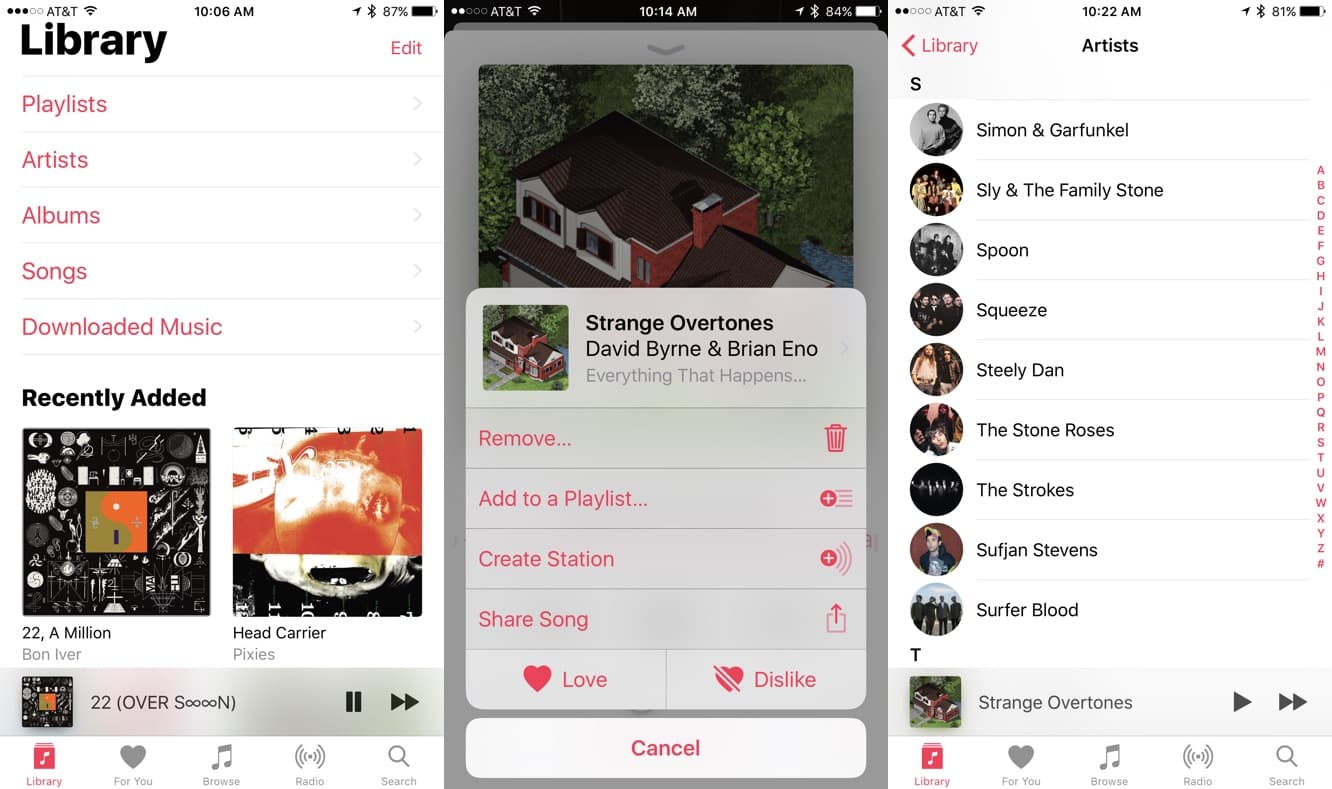
Apple Music’s new look is brighter, more youthful, with — as a designer friend pointed out — a mess of different typography sizes. It’s not really my cup of tea, but it’s better than it was before, so I don’t have too many complaints about the overall vibe.
Most importantly, Apple Music is now easier to navigate. The larger text does make it easier to jump from a song to an artist, or an album, and Apple has finally figured out how to make titles and artists more easily tappable. You used to have to find the tiny ellipsis to navigate through what felt like a long series of menus just to get from one song to an album — that’s much easier now, thank goodness. There are still a lot of menus, but they’re mostly on separate “paths,” if you will, depending on where you started first.

Layout still seems to benefit the more casual music fan, and it probably always will: if you select an artist, you’ll find top songs and recent releases above a list of albums, for instance. I’d prefer a list of albums first, but without any customization, Apple’s approach is understandable considering the wide audience it’s trying to reach. The same nod to a casual, wide audience is found in Search — below recent searches, there’s a list of Trending searches. (I do not care which top 40 act is currently trending at the time.) Artists are also listed by first name alphabetically, which is annoying.
Then there’s the tale of typos. On the bright side, Apple Music can actually search your own typos now. Before, I’d often get absolutely no results if there was a typing mistake. No suggestions, nothing. Now the app gives you a list of possibilities, so “pxies” will indeed find results for Pixies. But Apple still has its own typo problems. The song titles of Bjork’s “Triumph of a Heart” and Beulah’s “What Will You Do When Your Suntan Fades” have had obvious typos for months and months…probably for as long as Apple Music’s existed, because as you might expect, those same errors can be found in the iTunes Store. Based on the iTunes guidelines, it appears these typos are likely coming straight from the labels themselves — nevertheless, it’s on Apple to double check and fix these things. Errors can be found within Apple Music’s own album descriptions, as well. Björk’s masterful Homogenic has two inaccurate song titles in its otherwise glowing description — but scroll down and you’ll see the song titles spelled properly in the track list. Perhaps you’ve seen typos and errors of your own. This sort of thing makes Apple Music seem amateurish; certainly not something that would appeal to the music lover.
Most people would never notice this sort of stuff, perhaps, but to a hardcore music geek, it’s embarrassing.

It’s worth noting, though, that Apple does seem to be working on this. Not long ago, I found R.E.M.‘s classic song “So. Central Rain” had a typo — but that typo’s no longer there as of this writing. Maybe they’re catching on, listening to complaints, and paying more attention to detail. (On the other hand, if you do an Apple Music search for “Hall and,” the first two results are “Hall and Oats” and “Hall and Oats greatest hits.” Now, maybe most Apple Music users are searching for “Hall and Oats” instead of Hall and Oates, but the service should know the actual name of the group and direct users that way. So there’s still work to be done. Poor John Oates.)

It’s good that Apple Music now puts Downloaded Music right there in the Library section — this was a necessary change — though I’ve learned to delete downloaded Apple-made playlists more often. If you download playlists to your iPhone, as I often do, and then remove the downloads without deleting the playlist from your phone, it can create confusion later: you might re-download one particular song, and Apple will put it right back into that playlist. That starts to get messy after a while, with a bunch of playlists only containing one or two songs that are actually stored on your phone. Best to reduce the clutter, and delete Apple’s playlists when you’re done with them. (I haven’t felt the need to delete any of my own created playlists, though.











