
In this week’s apps roundup we’re taking a break from just looking at what’s new in traditional iPhone apps, with a look instead at the interesting things that some developers have done with their Apple Watch apps. While we expect to see even more intriguing uses for Apple’s wearable device when watchOS 2 arrives this fall, developers are still implementing some pretty nifty ideas.
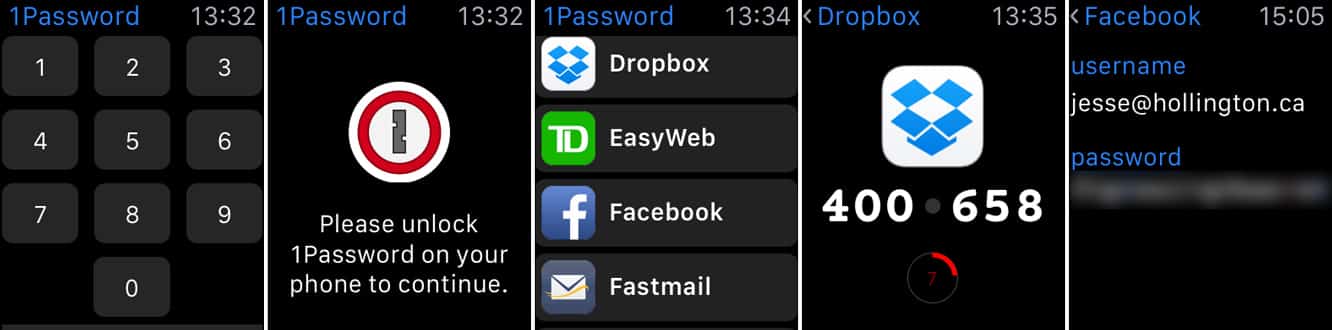
1Password (free*) — The folks at AgileBits were pretty quick to add Apple Watch support right out of the gate last spring, and have been making some gradual tweaks to their venerable password manager along the way. The Apple Watch app for 1Password allows you to designate individual passwords from your vault to be available on your wrist, without risking your entire password database—you control what’s there while keeping everything else safely locked away on your device with your Master Password . AgileBits recommends the Apple Watch app as best used for things like one-time-passwords for two-factor authentication, or locker combinations, but specifically recommends against using it for online banking passwords or nuclear missile launch codes. The Apple Watch app can be secured with a four-digit PIN, and 1Password is unforgiving about mistakes in this regard—one wrong PIN entry and you’ll be sent back to the iPhone app to unlock 1Password for real before you can get into it.
We found the time-based one-time-password (TOTP) support to be especially handy, however, considering the number of sites that are now implementing two-factor authentication—it’s handy to be able to simply glance at your wrist when logging into Dropbox or Evernote from a strange web browser. While 1Password 5 is a free download from the App Store, you’ll need to purchase the “Pro” in-app upgrade to take advantage of the Apple Watch features.

Calcbot (free) — Tapbots has always been at the leading edge of iOS app design, and is well known for the unique approach it takes to its iPhone and iPad apps. Although we’re still sad that the company’s flagship Tweetbot client hasn’t made it to our wrists, their Calcbot app is a nice implementation of wrist calculator, providing quick access to general calculations, conversions, and even a tip calculator. Four pre-defined conversions can be set from the iPhone app and then quickly accessed from the wrist with a force-touch, and we found the tip calculator particularly smooth. It’s not the most powerful calculator we’ve seen on the iOS platform, but it gets the job done in a simple yet elegant way, and is likely all that most users are really going to need.

Pennies ($4) — After failing to resist the lure of a shiny new Apple Watch, some of us may need more help with budgeting our money than ever, and Emile Bennett’s simple envelope budgeting app may provide at least some solace to rationalize the big purchase—at least now you can get your finances in order, right? While the app doesn’t yet have a desktop component, its presence on the wrist makes it really easy to see whether you should really be going out for that steak dinner or perhaps just settling for a cheeseburger instead.
The app provides a Glance to let you view your favourite budget category quickly from the clock face, and you can not only record amounts spent but also dictate notes for a given expenditure. Budgets can be setup on a one-time, weekly, or monthly basis and can even rollover across time periods, and each budget is broken down into daily spending limits to help you stay on track, and colored in green or red to show you whether you’re running over or under budget. If you want to keep track of your spending on the go, this is one of the quickest and easiest ways to do it.

Twitterrific 5 (free) — Twitterrific still ranks among our favourite Twitter clients out there, particularly for the very elegant design that The Iconfactory has poured into it. While it hasn’t gotten as much press in recent years as other iOS Twitter clients, it’s a very nice alternative to the official Twitter client, and pretty much the only other option for Apple Watch users. With Twitter’s official app focusing more and more on showing us trending topics, it’s nice that Twitterrific still emphasizes the personal Twitter experience.











