iLoungeiLounge
  • News
    • Apple
      • AirPods Pro
      • AirPlay
      • Apps
        • Apple Music
      • iCloud
      • iTunes
      • HealthKit
      • HomeKit
      • HomePod
      • iOS 13
      • Apple Pay
      • Apple TV
      • Siri
    • Rumors
    • Humor
    • Technology
      • CES
    • Daily Deals
    • Articles
    • Web Stories
  • iPhone
    • iPhone Accessories
  • iPad
  • iPod
    • iPod Accessories
  • Apple Watch
    • Apple Watch Accessories
  • Mac
    • MacBook Air
    • MacBook Pro
  • Reviews
    • App Reviews
  • How-to
    • Ask iLounge
Font ResizerAa
iLoungeiLounge
Font ResizerAa
Search
  • News
    • Apple
    • Rumors
    • Humor
    • Technology
    • Daily Deals
    • Articles
    • Web Stories
  • iPhone
    • iPhone Accessories
  • iPad
  • iPod
    • iPod Accessories
  • Apple Watch
    • Apple Watch Accessories
  • Mac
    • MacBook Air
    • MacBook Pro
  • Reviews
    • App Reviews
  • How-to
    • Ask iLounge
Follow US

Articles

Articles

How To Know If Someone Blocked You On iMessage 

Last updated: Jun 10, 2023 10:08 am UTC
By James Patterson
How To Know If Someone Blocked You On iMessage 

iMessage is a popular messaging app known for its convenience and features. If you’re facing issues sending messages and suspect being blocked on iMessage, this article will guide you through various ways to determine if someone has blocked you on iMessage.


Understanding the Signs

When someone blocks you on iMessage, certain signs indicate their action. Check the bubble color, delivery notifications, message status updates, and try making a call to gather clues. By observing these signs, you can confirm if someone has indeed blocked you on iMessage.
How To Know If Someone Blocked You On iMessage 

Checking Bubble Color

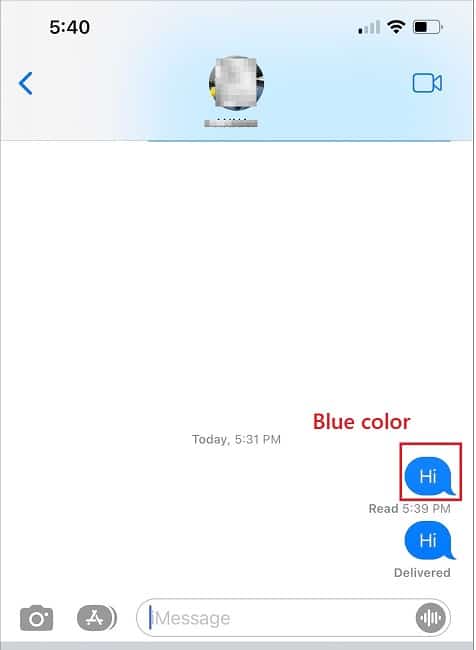
Check Bubble Color on iMessage

Normally, iMessage conversations display blue chat bubbles. However, if your sent messages turn green, it could indicate being blocked. Yet, it’s essential to consider other possibilities such as iMessage turned off or a lack of internet connectivity.
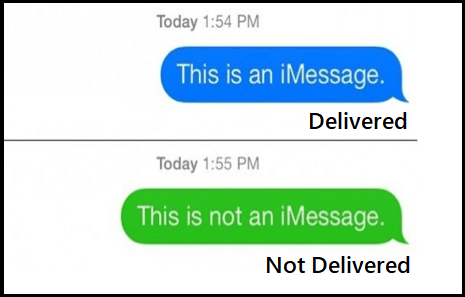

Green message on iMessage

Delivery Notifications

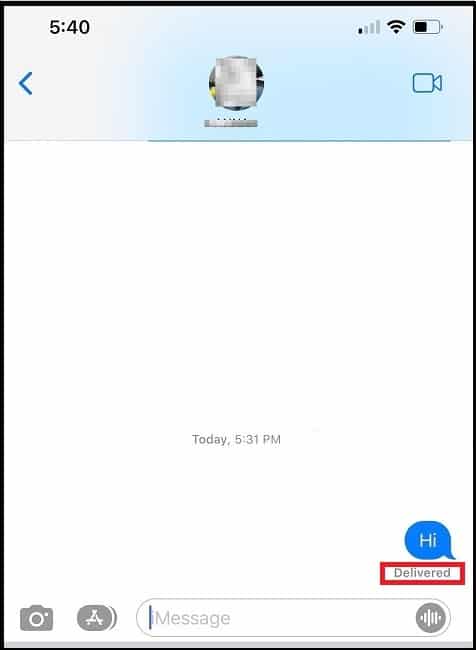
Delivery Notifications

The “Delivered” indication beneath your sent message confirms successful delivery. If you don’t receive this notification, it suggests a block. Remember, no notification could also result from the recipient’s phone being offline or out of service, so patience is advised.

Message Status Updates
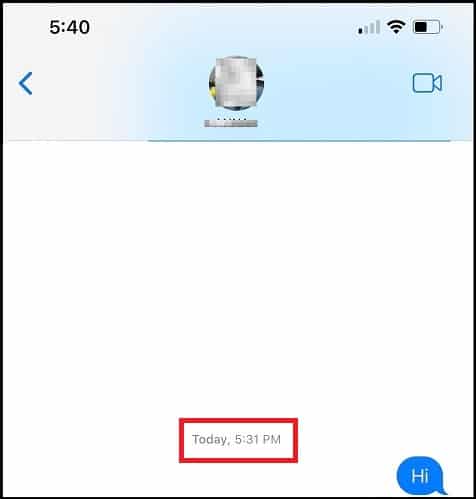
Message Status Updates on iMessage

iMessage provides status updates for sent, delivered, and read messages. Once blocked, you won’t receive these updates for new messages. Reviewing the status updates of previous messages can provide further evidence of being blocked.

Making a Call

If all previous methods indicate a block, try making a call. When blocked on an iPhone, your call won’t ring on the recipient’s phone; instead, it’ll redirect to voicemail. A failed call attempt suggests a block.


Calling from a Different Number

To ensure the recipient isn’t intentionally avoiding your calls, hide your caller ID or make an anonymous call from a different number. If the call goes through and rings multiple times, it confirms your number is blocked.

Conclusion

While being blocked on iMessage is unfortunate, this article has provided five effective methods to determine if someone has blocked you. Remember to wait or try alternative communication methods before jumping to conclusions. Share this information with others who may find it helpful, and feel free to comment below with any questions or feedback.



TAGGED: How to know If Someone Blocked You On iMessage, iMessage
Latest News
The 14-inch MacBook Pro with M5 Chip 16GB RAM/512GB is $250 Off
1 Min Read
Noise and Static on AirPods Pro 3 Still Unfixed
1 Min Read
New iMac with 24-inch OLED Display May be Brighter With 600 Nits
1 Min Read
The 15-inch M4 MacBook Air 256GB Is $250 Off
1 Min Read
Internal Kernel Debug Kit from Apple Reveals Tests for a MacBook with A15 Chip
1 Min Read
Apple Currently In Talks With Suppliers for Chip Assembly & Packaging of iPhones in India
1 Min Read
Apple Allows Easier Battery Replacement For M5 MacBook Pro with 14-inch Display
1 Min Read
The Apple Watch SE 3 44mm GPS is $50 Off
1 Min Read
20th Anniversary iPhone May Launch in Two Years
1 Min Read
Better Image Generation Capabilities and Apple Music Integration Coming to ChatGPT
1 Min Read
A20 Pro Chip Coming to Next Gen iPad Mini OLED
1 Min Read
Amazon has the AirTag 4 Pack Marked $29 off
1 Min Read

iLounge logo

iLounge is an independent resource for all things iPod, iPhone, iPad, and beyond. iPod, iPhone, iPad, iTunes, Apple TV, and the Apple logo are trademarks of Apple Inc.

This website is not affiliated with Apple Inc.
iLounge © 2001 - 2025. All Rights Reserved.
  • Contact Us
  • Submit News
  • About Us
  • Forums
  • Privacy Policy
  • Terms Of Use
Welcome Back!

Sign in to your account

Lost your password?