
If you’re searching for the top DNS servers to improve your gaming experience, you’ve come to the right place! In this article, we’ll introduce you to the 11 best DNS servers for gaming in 2023. When engaging in online gaming, your in-game ping is influenced by the distance to your server’s location.
However, it’s important to note that DNS servers can also have an impact on gaming performance, affecting upload and download speeds as well as causing lag. Before we delve into the list, let’s first understand the role of DNS servers.

DNS, which stands for Domain Name System, is often likened to the “Phonebook of the internet.” Instead of relying on IP addresses, humans find it easier to remember domain names such as Google.com or Wikipedia.org.
However, web browsers communicate through IP addresses. This is where DNS servers come in, translating domain names into IP addresses so that browsers can efficiently load the desired content.
Now, let’s explore the 11 best DNS servers for gaming in 2023. These servers have been carefully selected to optimize your gaming performance, providing faster response times and improved reliability:
1. Google DNS Server

Google DNS Server is the world’s leading and largest DNS server. Trusted by billions of people worldwide, it is considered the best DNS for gaming. It offers enhanced security, a lag-free gaming experience, and can be easily configured using the following IP addresses:
Preferred DNS Server: 8.8.8.8
Alternate DNS Server: 8.8.4.4
2. Cloudflare DNS

Cloudflare DNS provides excellent coverage across 250 cities globally. It is widely used as a reverse proxy for web server protection and offers additional load-bearing capacity. With features like built-in DNSSEC, fast lookup speed, and optional WARP app for added security, Cloudflare DNS is a great choice for gaming.
Preferred DNS Server: 1.1.1.1
Alternate DNS Server: 1.0.0.1
3. OpenDNS

OpenDNS is a free cloud-delivered network security service that protects against network attacks. It offers solutions like OpenDNS Family Shield and OpenDNS Home for personal customers, ensuring faster and safer internet access while providing a smooth gaming experience.
Preferred DNS Server: 208.67.222.222
Alternate DNS Server: 208.67.220.220
4. Comodo Secure DNS

Comodo Secure DNS is known for delivering reliable and fast internet browsing experiences. By using Comodo Secure DNS, you can expect a speedier gaming experience with increased security.
Preferred DNS Server: 8.26.56.26
Alternate DNS Server: 8.20.247.20
5. Level3

Level3 is a popular DNS service provider, ranking alongside Google and OpenDNS. By configuring your DNS settings with Level3, you can enjoy a reliable gaming experience.
Preferred DNS Server: 209.244.0.3
Alternate DNS Server: 209.244.0.4
6. Quad9 DNS

Quad9 DNS comes with an in-built filter and monitor that blocks malicious activities on the network. With its extensive network coverage across 90 countries, Quad9 DNS offers reduced latency and maximum speed.
Preferred DNS Server: 9.9.9.9
Alternate DNS Server: 149.112.112.112
7. OpenNic

OpenNic is a privacy-focused alternative DNS server that protects your laptop/PC from attackers and government surveillance, ensuring a high level of privacy.
Preferred DNS Server: 46.151.208.154
Alternate DNS Server: 128.199.248.105
8. DYN

DYN provides fast and secure web browsing experiences, protecting your information from phishing attacks and hackers.
Preferred DNS Server: 216.146.35.35
Alternate DNS Server: 216.146.36.36
9. SafeDNS

SafeDNS is a well-known DNS service that offers protection against attacks. It is an ideal choice for users who prioritize their laptop/PC’s security.
Preferred DNS Server: 195.46.39.39
Alternate DNS Server: 195.46.39.40
10. DNS.watch
DNS.watch is a free DNS service that provides uncensored, fast, and stable web browsing experiences at no cost.
Preferred DNS Server: 84.200.69.80
Alternate DNS Server: 84.200.70.40
11. Verisign Public DNS

Verisign Public DNS is a free DNS service offered by a telecom giant. It focuses on privacy and security, ensuring no personally identifiable information is stored.
Preferred DNS Server: 64.6.64.6
Alternate DNS Server: 64.6.65.6
Now that you know the best DNS servers for gaming, let’s see how you can change your DNS server on different devices.
How to Change DNS Server for Gaming on Windows 10
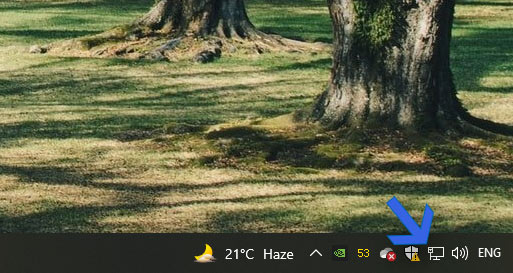
- Locate the network icon on your taskbar and right-click on it.
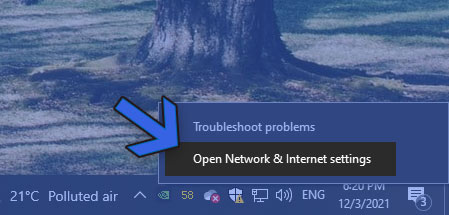
2. Select “Open Network and Internet Settings.”
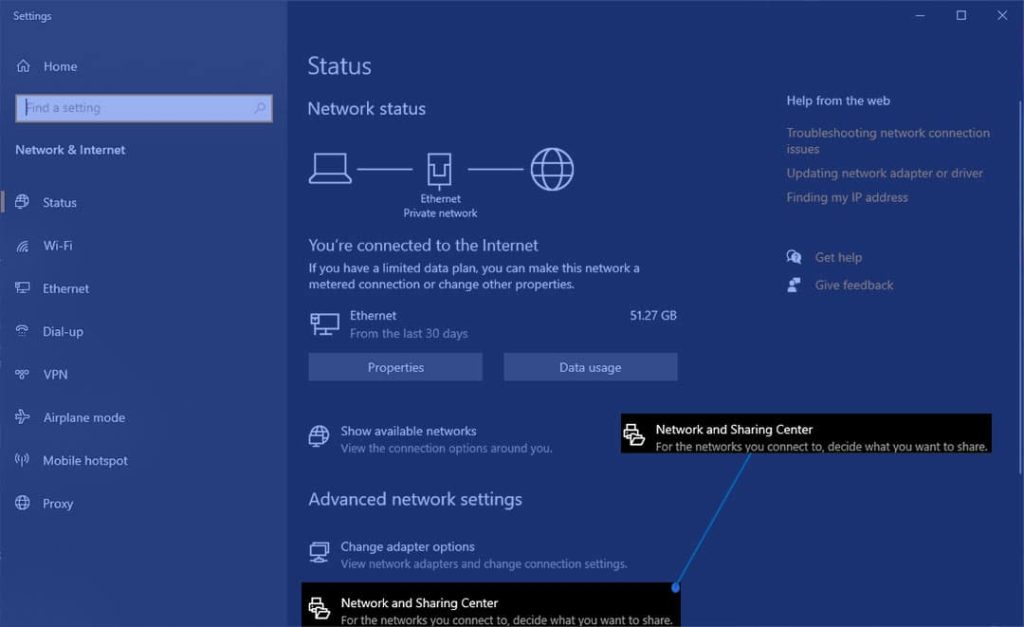
3. In the advanced network settings, click on “Network and Sharing Center.”
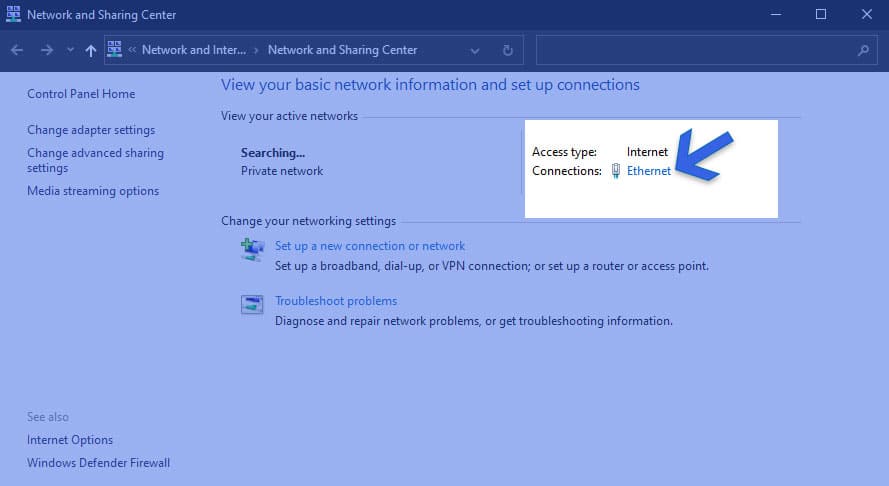
4. In the network properties, select your network connection (Ethernet or Wi-Fi).
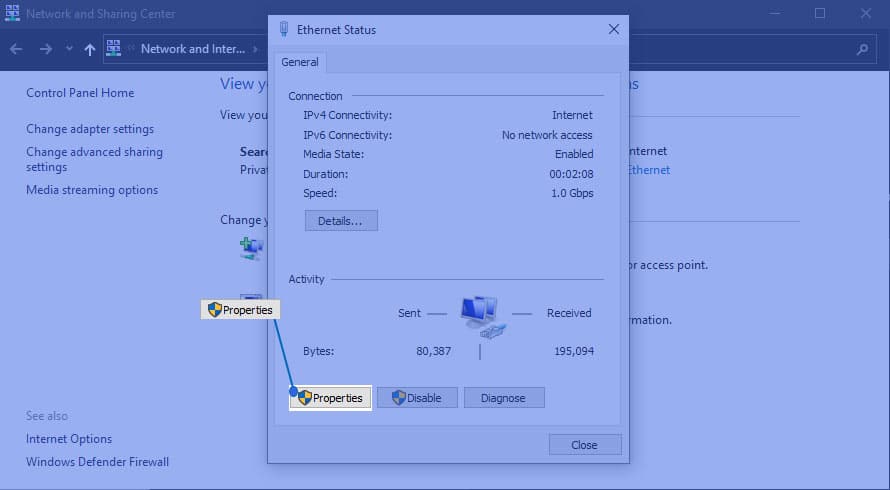
5. Open the properties of your selected connection.
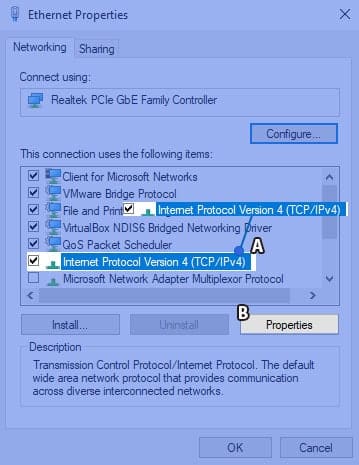
- Select “Internet Protocol Version 4 (TCP/IP)” and click on its properties.
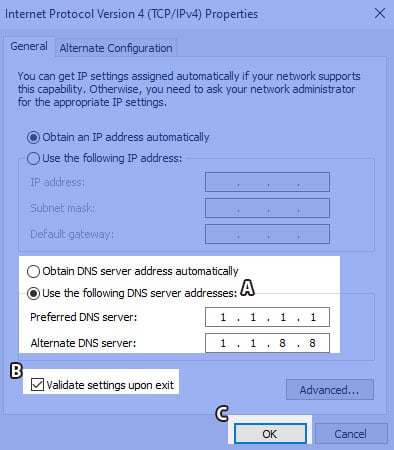
7. Tick the box that says “Use the following DNS addresses” and enter the preferred and alternate DNS server addresses. Validate the settings upon exit and click OK to save the changes.
How to Change DNS Server for Gaming on a Router
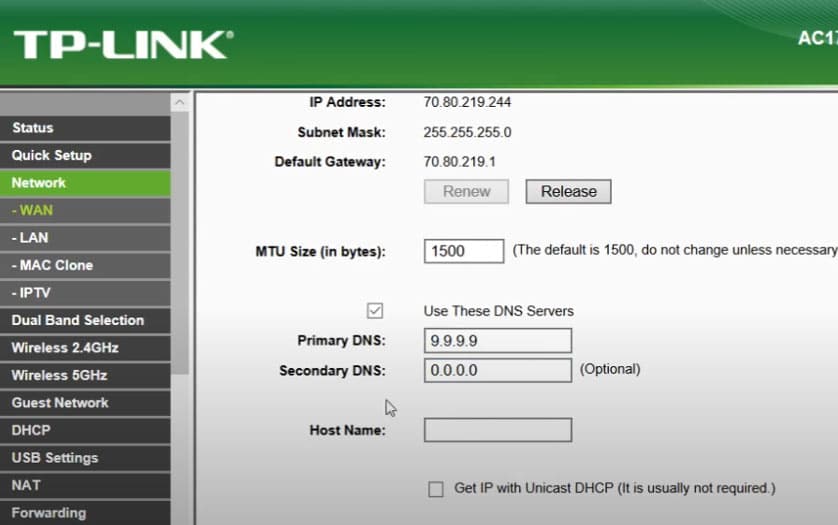
If you have multiple devices that require DNS for gaming, changing the DNS server on your router is a convenient option. The DNS settings can usually be found in the Network > WAN section of your router’s configuration.
How to Change DNS Server for Gaming on Smartphone
Optimizing your DNS server for gaming is essential on smartphones as well. Here’s how to change the DNS server on both Android and iPhone:
A. Change DNS on Android:
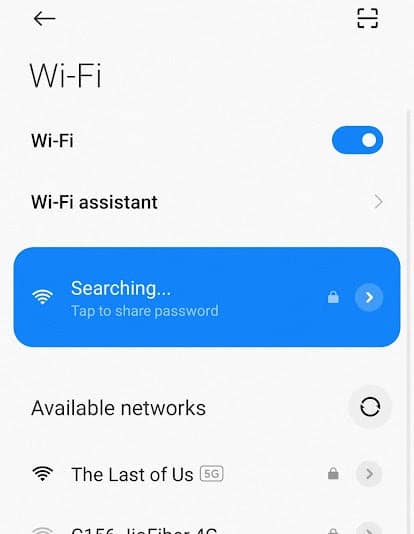
1. Open the quick settings bar and long-hold on the Wi-Fi icon to access Wi-Fi settings.
2. Tap on the connected Wi-Fi network or the arrow next to it.
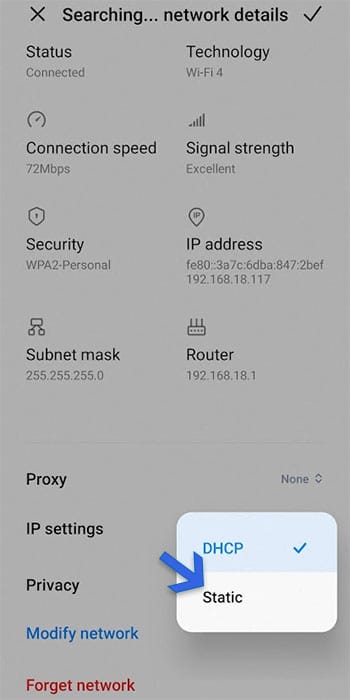
3. Scroll down and tap on “IP Settings” and select “Static.”
4. Enter the primary and secondary DNS server addresses.
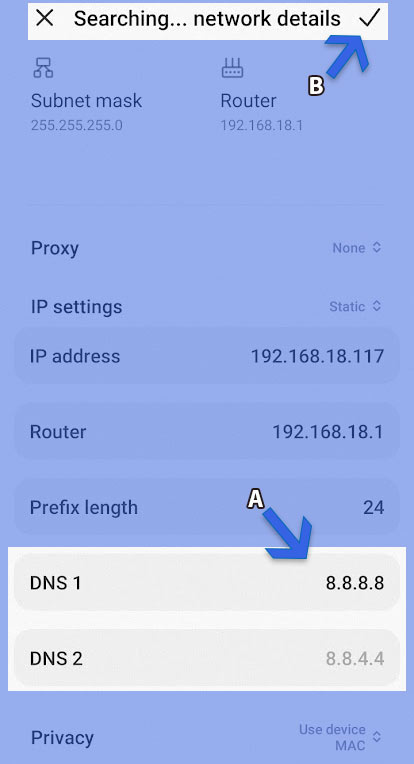
5. Save the changes.
B. Change DNS on iPhone:
1. Go to Settings and tap on “Wi-Fi.”
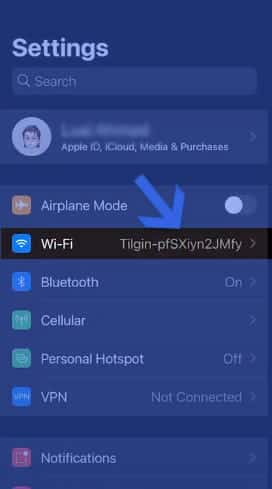
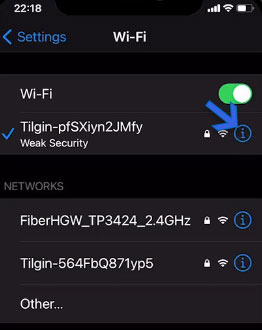
2. Tap on the connected Wi-Fi network.
3. Tap on the blue “i” button to access Wi-Fi settings.
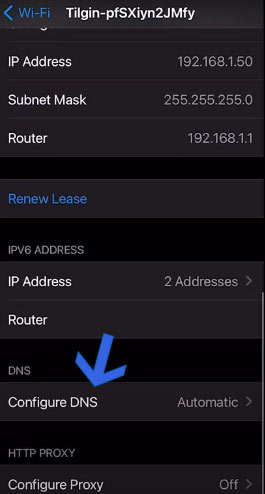
4. Scroll down and tap on “Configure DNS.”
5. Select “Manual” and delete existing DNS addresses if any.
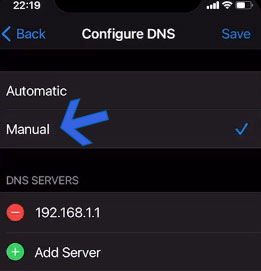
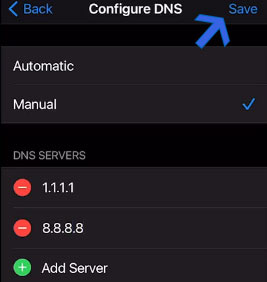
6. Add primary and secondary DNS server addresses.
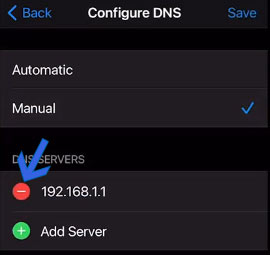
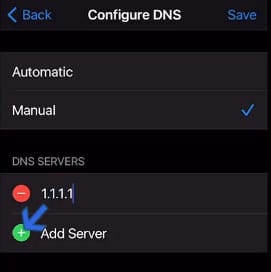
7. Save the changes.
Conclusion
These are the 11 best DNS servers for gaming in 2023. By choosing the right DNS server and following the instructions to change DNS settings on your devices, you can enhance your gaming experience with improved speed, security, and reduced lag. Give them a try and enjoy a smoother gaming journey!











