
Before answering the question “Why,” let’s focus on what actually a transnational email means and how it differs from other emails. As a company that runs consistent email marketing, you might be sending your subscribers and customers the following emails: marketing (bulk and triggered) and transactional.
Bulk emails are mass mailing you send to your whole contact base. These are typically promo campaigns, announcements and event invitations. Triggered campaigns are emails sent in response to user’s actions (triggers) on the website or in previous campaigns. For example, people who browsed the corresponding product category on your website can receive abandoned browse emails with the corresponding product recommendations.

Transactional emails are emails sent in response to user’s account activity or any order-related transactions like password reset, order confirmation, payment approval, etc. They can also include notifications on changes on the privacy policy, terms of use, etc.
Transactional emails are sent for informative rather than marketing purposes. Their task is to provide detailed information and not to generate sales. While marketing emails are permission-based, triggered and transactional messages can be sent to your clients regardless of whether they are subscribed to you or not.
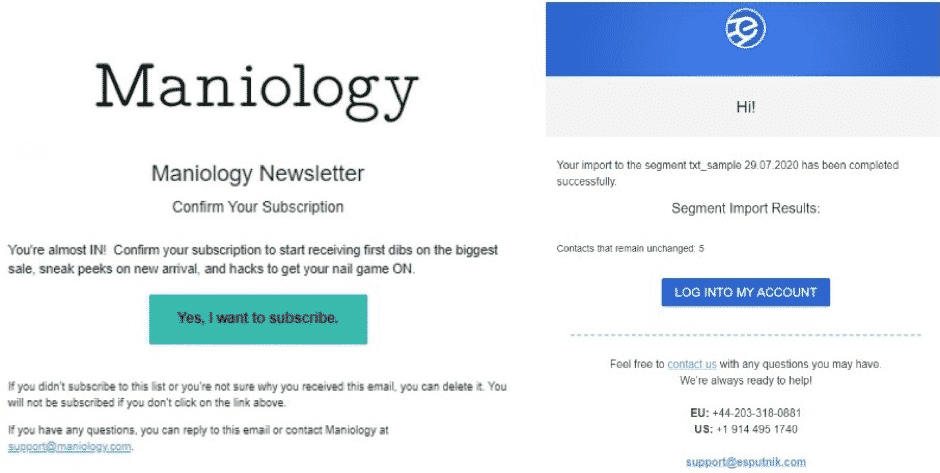
Examples of transactional emails
Types of Transactional Messages and Why You Need Them
Each company has a set of transactional emails that fit their needs depending on the services and business type. It’s not necessarily that you have all of the below messages implemented in your email marketing strategy. It’s also quite possible that you send some emails unique to your brand, and they aren’t listed in this article. However, the basic messages typical of most companies are as follows:
Subscription/registration confirmation. When a new user subscribes to your newsletter or registers in your system or app, they need to confirm their email address to prove they are real people and not fake addresses or spam traps.
Such confirmation is essential for your contact list hygiene and further email deliverability. What’s more, it’s an official requirement by the GDPR and other data protection policies. You need to comply with it to run legally safe marketing in the countries covered by these policies.
Password confirmation and reset. With many accounts around numerous platforms, people forget logins and passwords very often. An automated password reset is what helps them reconnect with your service in a fast and convenient manner.
Order confirmation. Sending an order confirmation is important to let people know they’ve successfully completed their order on your site. Such an email also includes purchase details, payment method, total amount of money, and allows to adjust their order if needed.
Invoice. After the payment transaction is ready, send people a receipt with all the financial details. Don’t forget to include contacts a person can use in case of any payment-related questions.
Payment confirmation. Similarly to order confirmation, payment confirmation is necessary to inform users they’ve done everything right and paid successfully for what they’ve ordered.
Shipment confirmation. Once the order has been completed and paid for, let people know it’s on the way and they can expect it on a due date.
Service update. It may seem that nobody reads those long and heavy service updates, but it’s your responsibility to send them, especially if they directly affect the further interaction with your platform.
Security alert. Set a series of automated messages that will notify users when somebody makes a non-authorized attempt to enter their account and get access to restricted data. Not only it helps prevent data breach but also protects you from potential legal claims.
Reminders. Busy lives and multi-tasking make many forget about a due payment, planned subscription auto-renewal, free trial ending, etc. Fix this issue by sending a friendly reminder that can help.
How to Compose a Good Transactional Email
Although there is no single template or recipe applicable to all transactional emails, there is general advice that’s recommended to follow.
. State the purpose straight in the subject line.
Today, people receive many emails of different types that can land to different folders depending on the email client algorithms. As a rule, transactional emails have a priority and are more likely to be delivered to Primary. However, even in this case, they should be easily spotted.
A short and relevant subject line is what helps it happen. Confirm your email, Password reset, Order order #12345 has been shipped, Your subscription has been auto-renewed – these are the subject lines for the corresponding emails. Save creativity and expressive language for other messages of yours.
. Write a friendly copy.
Your transactional emails don’t have to be bland or too official. Even if the copy consists of several lines only, make them sound human-like.

Password reset email example
. Make it informative.
Transactional emails aren’t a place for your hottest offers, promo codes or invitations to check new arrivals. Their main purpose is to provide extensive information on the completed transaction that should include transaction details, its result, and contacts a user can reach you at if needed.
. Automate transactional emails.
Hope you know that marketers nowadays don’t have to address each user with a separate email sent manually. Modern professional ESPs (email service providers) allow to build workflows of different complexity that will automatically send the corresponding messages upon completion of a certain transaction.
The whole automation process works as follows: you create one email, add to it variables (that will be substituted by personal data on each contact at the moment of email launch), build a workflow for it, and assign it with a segment of particular contacts, for example, unconfirmed users or password reset requests. This workflow will automatically send the created email to each new contact who has subscribed to your newsletter or requested a password reset.
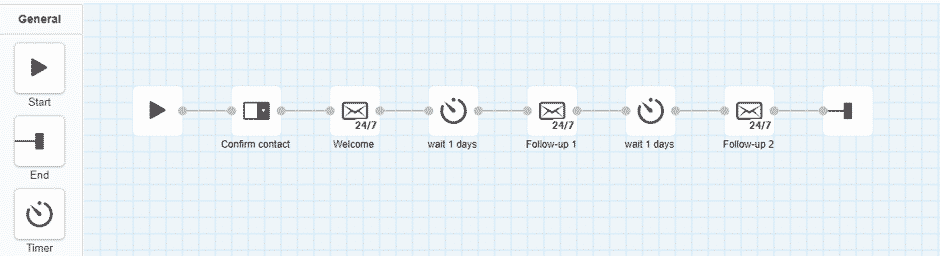
Example of a confirmation workflow with a welcome series
To sum up, transaction emails are important for any business because they:
- Deliver the important information;
- Help people understand they’ve successfully completed a transaction;
- Direct them to the next stage of a transaction;
- Improve the customer experience;
- Build you a reputation of a caring and trustworthy brand.
Study your customer funnel and see what stages require transactional emails. Add them to your marketing strategy to provide your customers with a quality service and shopping experience.











