

Watermarks on videos can be distracting and take away from the overall quality of your content. If you’re looking for a way to remove watermarks without losing video quality, you’re in the right place! In this article, we’ll compare two popular tools:
Video Converter Studio and Wondershare Filmora to help you decide which software is best for your needs. Both offer simple and effective ways to edit videos, but they differ in features, ease of use, and pricing. Keep reading to learn how to remove watermarks from videos using the best free editing software with no watermark, and choose the one that fits you best.

Part 1: How to Remove Watermarks from Videos with Filmora
Wondershare Filmora is the best free video editing software without watermarks. It is known for its intuitive interface and extensive features, making it ideal for both beginners and advanced users looking to enhance their video projects. It’s particularly effective for removing unwanted elements from videos using AI technology.
Features:
- AI Object Remover: Filmora’s advanced AI technology detects and removes unwanted elements like watermarks or text, ensuring a clean and polished appearance for your videos.
- Remove Anything You Want: Easily erase any unwanted elements, including people, logos, watermarks, text, and more, from your videos.
- Simultaneous Removal: Remove multiple elements at once, streamlining the editing process and saving time.
Thanks to its AI Object Remover feature, Wondershare Filmora is an excellent tool for removing watermarks from videos. It can erase watermarks without leaving any noticeable traces, ensuring your video looks clean and professional. Follow these steps:
Step 1: Download and install free editing software, no watermark Filmora, then launch the software. Log in or register for a Wondershare account. Choose “Create Project” > “New Project” and upload your video.
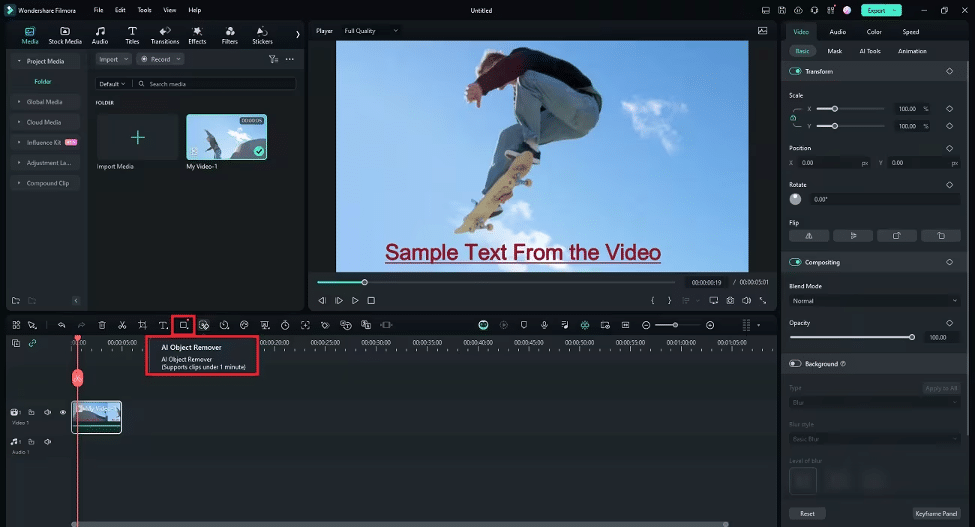
Step 2: Place the video onto the timeline at the position where you wish to remove the watermark. In the timeline panel, choose the AI Object Remover from the watermark-free video editor options.

Step 3: Use the brush tool to highlight the area where the watermark appears on the video. Wait for Filmora’s AI to process and remove the watermark.
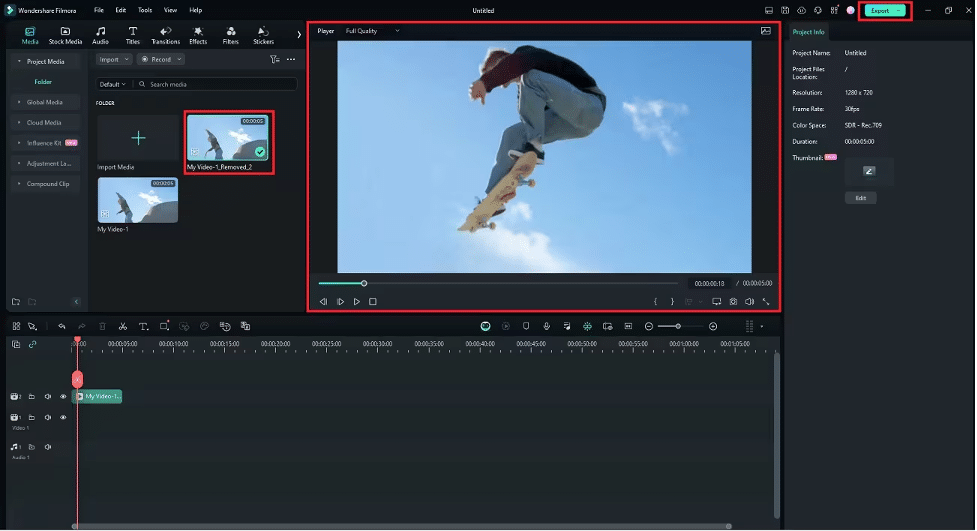
Step 4: A new version of your video will be saved in your Project Media Folder. When you’re satisfied with the result, click the “Export” button at the top right and save your edited video in your preferred format.
Part 2: How to Remove Watermarks from Videos with Video Converter Studio
There are some online tools that can help remove watermarks from videos without needing to download anything. One such tool is Video Watermark Remover Online. As the name suggests, you can use it directly on the website, which makes it super convenient!
This online tool is designed to make removing watermarks from videos as easy as possible. Here’s how you can do it in three simple steps:
Visit the Website: Go to Video Watermark Remover Online and upload the video file from your computer.

Remove the Watermark: Once your video is uploaded, click on “Remove Watermark.” The tool will take some time to process, depending on the size of your video.
Download the Video: When it’s done, download the video back to your device. The watermark will be gone!

With the free version, you can remove watermarks from up to five videos per month.
Features:
- Easy to Use: The platform is user-friendly, with a simple process that anyone can follow to remove watermarks from videos.
- Fast Watermark Removal: Utilizes advanced software to quickly remove watermarks, saving you time.
- Supports Multiple Formats: Compatible with a wide range of video file formats, including MP4, AVI, MOV, and more.
- No Download Required: Works entirely online, so you don’t need to install any software on your device.
Part 3: Comparison
| Tools | Compatibility | Best for | Reviews and Rating |
| Wondershare Filmora | Windows / Mac / iOS / Android | users with beginner to intermediate editing skills | Trust Radius: 7.5 Get App: 4.5 Gartner: 4.3 |
| Video Converter Studio | Online | users with basic to intermediate editing needs | Tech Radar Rating: 4.3 |
Conclusion
Watermarks on videos can detract from your content’s quality, but they can be easily removed with the right tools. Wondershare Filmora stands out as an excellent choice, featuring an AI Object Remover that effectively eliminates watermarks for a polished, professional look. Its user-friendly interface ensures that even beginners can navigate the software effortlessly.
Another option is Video Converter Studio, an online tool that removes watermarks without requiring downloads. Each tool has its strengths, but Filmora stands out for its comprehensive features and seamless user experience.











