
iLoungeiLounge
  • News
    • Apple
      • AirPods Pro
      • AirPlay
      • Apps
        • Apple Music
      • iCloud
      • iTunes
      • HealthKit
      • HomeKit
      • HomePod
      • iOS 13
      • Apple Pay
      • Apple TV
      • Siri
    • Rumors
    • Humor
    • Technology
      • CES
    • Daily Deals
    • Articles
    • Web Stories
  • iPhone
    • iPhone Accessories
  • iPad
  • iPod
    • iPod Accessories
  • Apple Watch
    • Apple Watch Accessories
  • Mac
    • MacBook Air
    • MacBook Pro
  • Reviews
    • App Reviews
  • How-to
    • Ask iLounge
Font ResizerAa
iLoungeiLounge
Font ResizerAa
Search
  • News
    • Apple
    • Rumors
    • Humor
    • Technology
    • Daily Deals
    • Articles
    • Web Stories
  • iPhone
    • iPhone Accessories
  • iPad
  • iPod
    • iPod Accessories
  • Apple Watch
    • Apple Watch Accessories
  • Mac
    • MacBook Air
    • MacBook Pro
  • Reviews
    • App Reviews
  • How-to
    • Ask iLounge
Follow US

Articles

Articles

Useful tools that you can use when are you Travelling

Last updated: Nov 16, 2019 2:01 am UTC
By Lucy Bennett
Useful tools that you can use when are you travelling

Have you ever traveled by yourself on someplace that you have never been to before? If yes, then you know that this can be challenging, especially if you are in a rush and you need to find your hotel, rent a car company or the next airport from which you need to fly.


These days we live in the era of technology. Every day we are discovering and starting to use some new applications that are helping us with everyday activities.

Useful tools that you can use when are you travelling

Where Am I

In this article, we will share with you a useful online tool that you can use while you are traveling. This tool is awesome because everyone from us can use it free, you just need to connect on your internet network.

When you are traveling and you do not know where you are, go ahead and try to use where am i tool for free. What you need to do is to allow application to know your location when you enter first time on the page.


Useful tools that you can use when are you Travelling

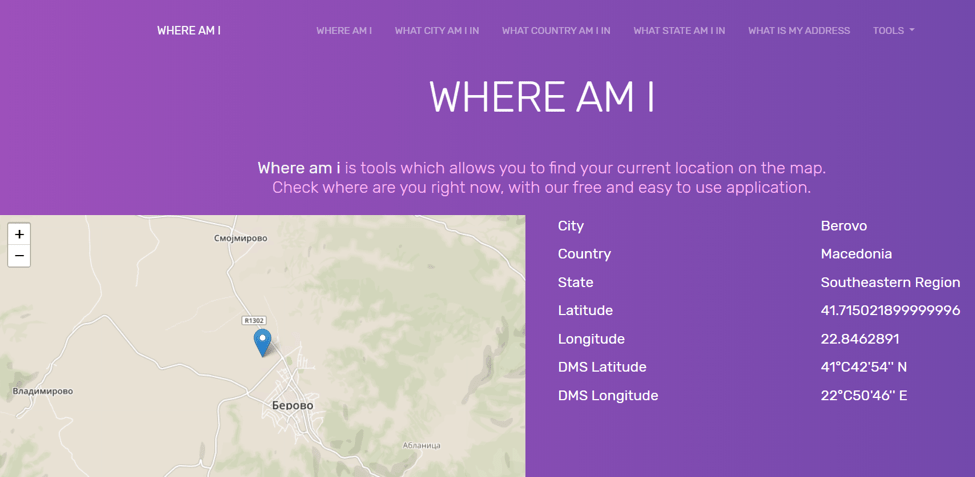
When you click “Allow”, the application will bring your location immediately. On the first screen you will be able to find information about your City, Country, State and Coordinates.
Useful tools that you can use when are you Travelling

This tool has many more features and options, we will go and explain a few of them. First one and the best one is that if you want they can track your movement, while you are running or walking. When you are done you can send the record on your email or on your calendar. That is awesome right?


What is my address

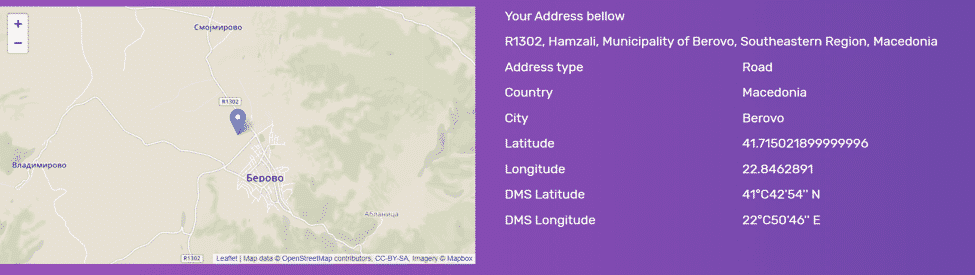
Besides the landing page, there are many more of them. For example, if you go on My Address page from the main menu you will be able to access the page where you will find all the details about your current address. Example is shown below:
Useful tools that you can use when are you Travelling

This tool is providing you your full address together with City, Country and address type. For example if you are in your home your address type will be Building, but if you are somewhere on with your car, your address type will be Road.


What is my ZIP code

Have you ever look and can’t find zip code of your current location? If yes, then this is solved. This tool with their very new feature providing you option to check and record the zip code of your current location. Here is how you can use this feature. From the menu choose Tools and after that click on What is my Zip code link. This will bring you on the Zip code tool.

Useful tools that you can use when are you Travelling

On the main screen you will see map with your current position along with the zip code, city, country and coordinates.

This is in short what features this tool has, you can go around and try another one that are listed  in the main menu, we do not want to explain all of them to keep this post sweet and short. Enjoy your traveling!



Latest News
The 14-inch MacBook Pro with M5 Chip 16GB RAM/512GB is $250 Off
1 Min Read
Noise and Static on AirPods Pro 3 Still Unfixed
1 Min Read
New iMac with 24-inch OLED Display May be Brighter With 600 Nits
1 Min Read
The 15-inch M4 MacBook Air 256GB Is $250 Off
1 Min Read
Internal Kernel Debug Kit from Apple Reveals Tests for a MacBook with A15 Chip
1 Min Read
Apple Currently In Talks With Suppliers for Chip Assembly & Packaging of iPhones in India
1 Min Read
Apple Allows Easier Battery Replacement For M5 MacBook Pro with 14-inch Display
1 Min Read
The Apple Watch SE 3 44mm GPS is $50 Off
1 Min Read
20th Anniversary iPhone May Launch in Two Years
1 Min Read
Better Image Generation Capabilities and Apple Music Integration Coming to ChatGPT
1 Min Read
A20 Pro Chip Coming to Next Gen iPad Mini OLED
1 Min Read
Amazon has the AirTag 4 Pack Marked $29 off
1 Min Read

iLounge logo

iLounge is an independent resource for all things iPod, iPhone, iPad, and beyond. iPod, iPhone, iPad, iTunes, Apple TV, and the Apple logo are trademarks of Apple Inc.

This website is not affiliated with Apple Inc.
iLounge © 2001 - 2025. All Rights Reserved.
  • Contact Us
  • Submit News
  • About Us
  • Forums
  • Privacy Policy
  • Terms Of Use
Welcome Back!

Sign in to your account

Lost your password?








