
When Tidal has been a great place for music lovers to stream High-Fidelity music, it also applies certain limitations in accessing or downloading music tracks. For example, you are not allowed to download Tidal music on computer, and all your Tidal downloads can only be playable within the Tidal Mobile App. Once you cancel your Tidal subscription, all your downloaded music tracks become unplayable. In order to keep Tidal downloads forever on your devices, you may consider to convert Tidal music to MP3 for offline listening at the best quality, many music lovers looking for a tool to convert Tidal music to MP3 for flexible playback anywhere and anytime.
Fortunately, UkeySoft Tidal Music Converter offers you the best way to convert Tidal music to MP3, WAV, and more format for users to offline listening at the best quality, it is a safe and reliable tool for users looking to download and convert Tidal music to MP3. So in this comprehensive review, we’ll focus on introducing UkeySoft Tidal Music Converter from its features, compatibility, installation and usage security. Using it, you can keep Tidal music forever after unsubscribing, and enjoy Tidal music on any devices. Next, let’s dive into more details.
UkeySoft Tidal Music Converter Review
UkeySoft Tidal Music Converter is a desktop software, well designed for all Tidal users. It allows users to access the full Tidal music library in the built-in Tidal web player. This tool empowers users to download Tidal music to computer without the Tidal App. Apart from this, it can convert Tidal music to MP3, M4A, FLAC, AAC, FLAC, WAV, or AIFF audio formats, making it possible to play Tidal music on other players and devices. Even if you cancel your Tidal subscription, you can still keep these converted Tidal music files permanently and enjoy them outside Tidal App without restrictions!
Standout Features of UkeySoft Tidal Music Converter
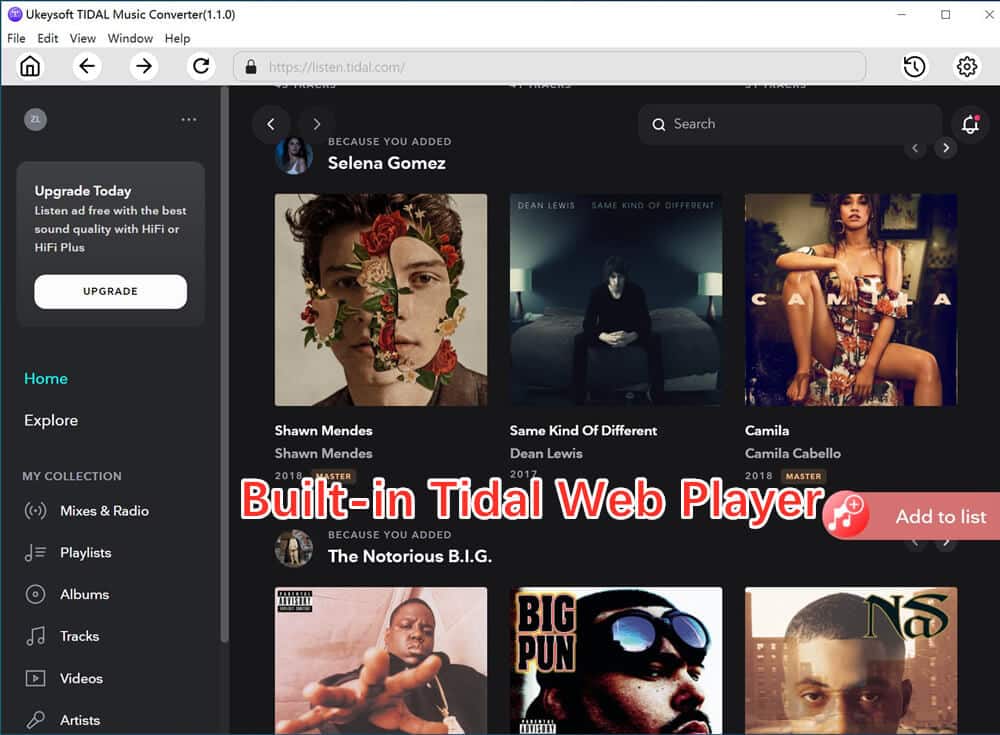
#1. Built-in Tidal Web Player to Simplify Conversion Process
Built-in Tidal Web Player – To simplify the conversion process and boost download efficiency, UkeySoft Tidal Music Converter has embed the Tidal Music Web Player, enabling users to directly access any Tidal song/playlist/album/podcast after logging in via their Tidal accounts. Don’t need to install the Tidal app or other extra app/software, you are able to searching, adding and converting any Tidal music content to MP3 with simple clicks!
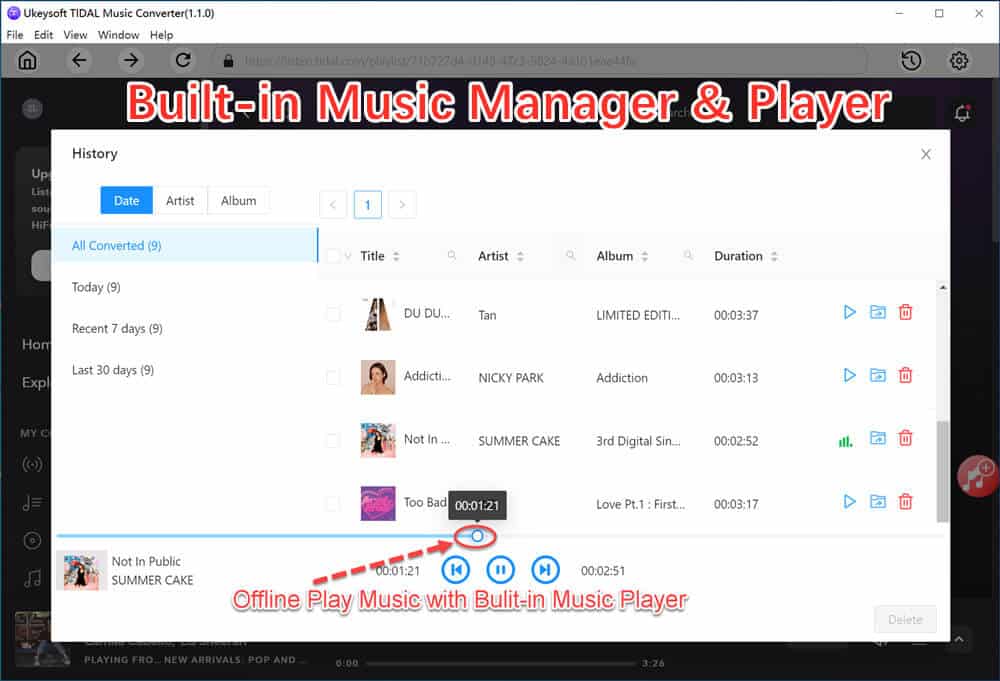
Built-in Music Manager and Music Player – Through integrating the music player and music manager inside the software, users can directly play all downloads without installing the Tidal app or other music player! After downloading completed, all downloaded songs will be classified by Date, Album and Artist automatically, so that re-built your music library. In addition, it will keep original ID3 tags & metadata information, so that you can easily to manage, control them in the software, and even enjoy them on other devices.
#2. Customized Parameter Settings to Boost Listening Experience
Adjustable Output Quality – UkeySoft Tidal Music Converter is able to maintain the original music quality of Tidal songs during the conversion process. To convert Tidal music to MP3, you can define the output quality to 320kbps to ensure the best listening experience. It also adds two lossless formats to output Tidal music, namely WAV and AIFF.
Classify Output Songs – UkeySoft Tidal Music Converter offers a classification function for users to organize out the output Tidal songs. Users are allowed to sort out the converted Tidal songs by Artist, Album or Date. Moreover, it also detect and remain the original ID3 tags for each Tidal song, making it easy to access, organize and manage your music library.
#3. 16X Faster Speed to Improve Conversion More Efficiency
16X Conversion Speed – The newly-released UkeySoft Tidal Music Converter V1.6.5 in December, 2024 concentrated the on the conversion stability and efficiency improvement. This time, UkeySoft has adopted a top-ranking conversion core, greatly improves the music conversion process to 10X faster.
Batch Conversion – The brand-new UkeySoft Tidal Music Converter V1.6.5 also allows you to add entire Tidal album or playlist for batch conversion simultaneously, delivering you a hassle-free experience! To convert a 1-hour Tidal playlist, now it only takes 10 minutes to complete.
How to Convert Tidal Music to MP3?
Step 1. Launch the Program and Sign in Tidal Account
To begin with, download the UkeySoft Tidal Music Converter on a Windows 7, 8, 8.1, 10, 11, macOS 10.11 or above. Then, install the program and launch it, and then log in via your Tidal account.

Tips: The free Tidal account is available, it means that you can use this tool to download Tidal music for free.
Step 2. Select Output Format – MP3
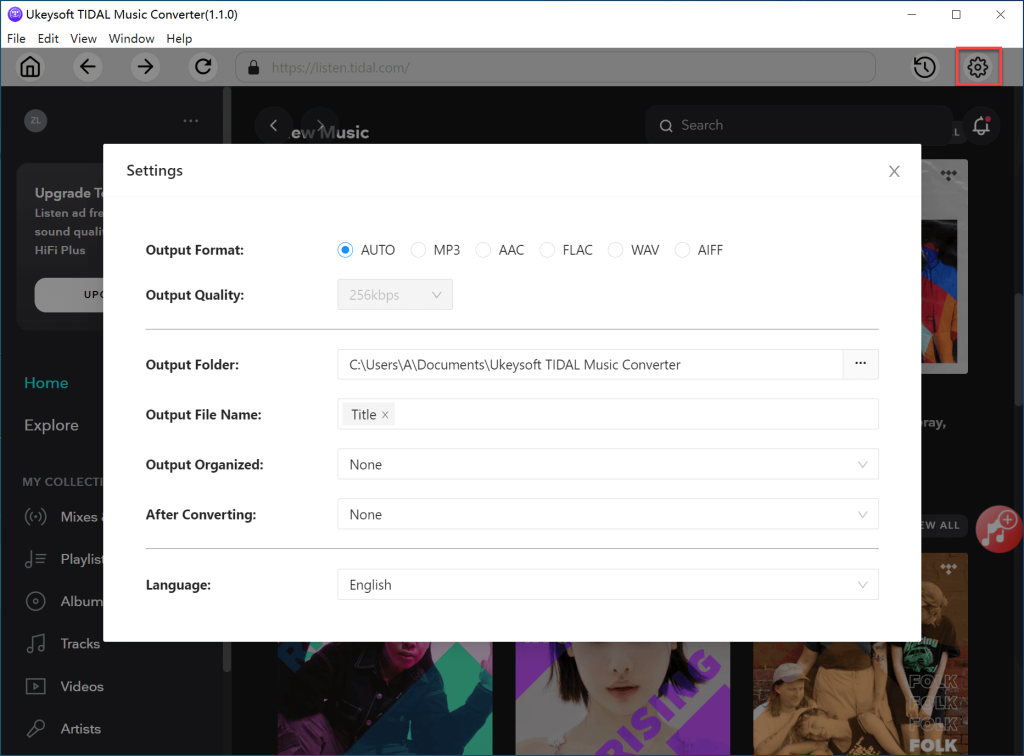
Subsequently, click the “Gear” icon at the upper right corner. In the pop-up window, you are able to choose the output format, including MP3, M4A, FLAC, AAC, FLAC, WAV, or AIFF. In addition, you also can modify other output profile, including output quality, output folder, output file name, etc.
Step 3. Add and Select Tidal Songs/Playlists/Albums
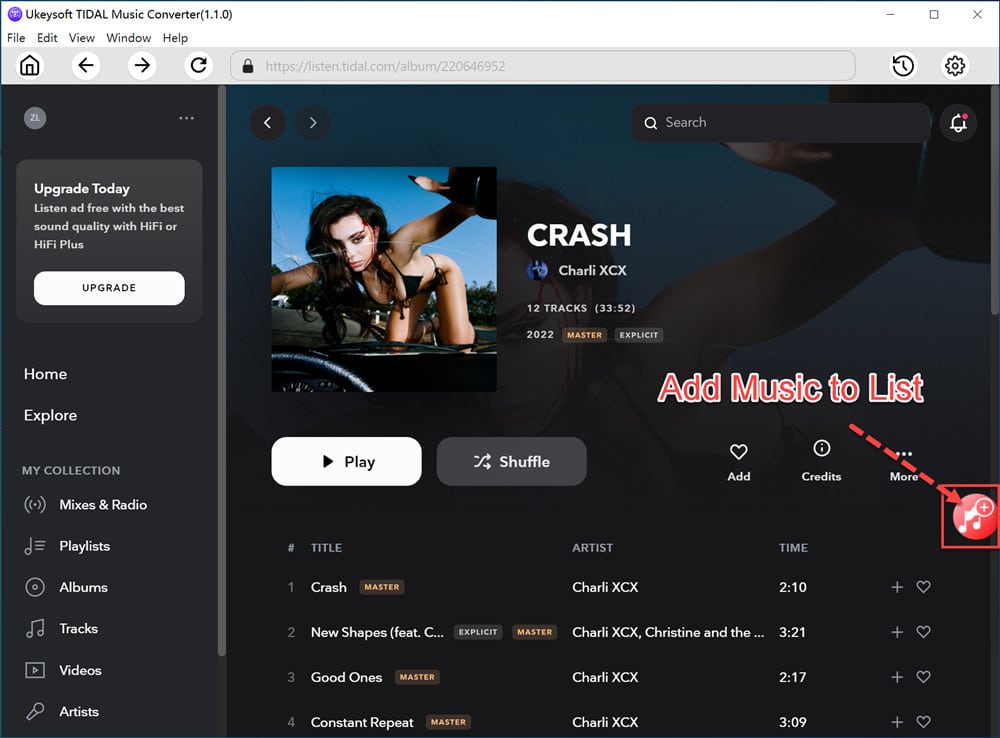
Simply select the Tidal single, album, podcast or playlist on the home page. Adding them to the converting list by clicking the “+” icon in the right side.
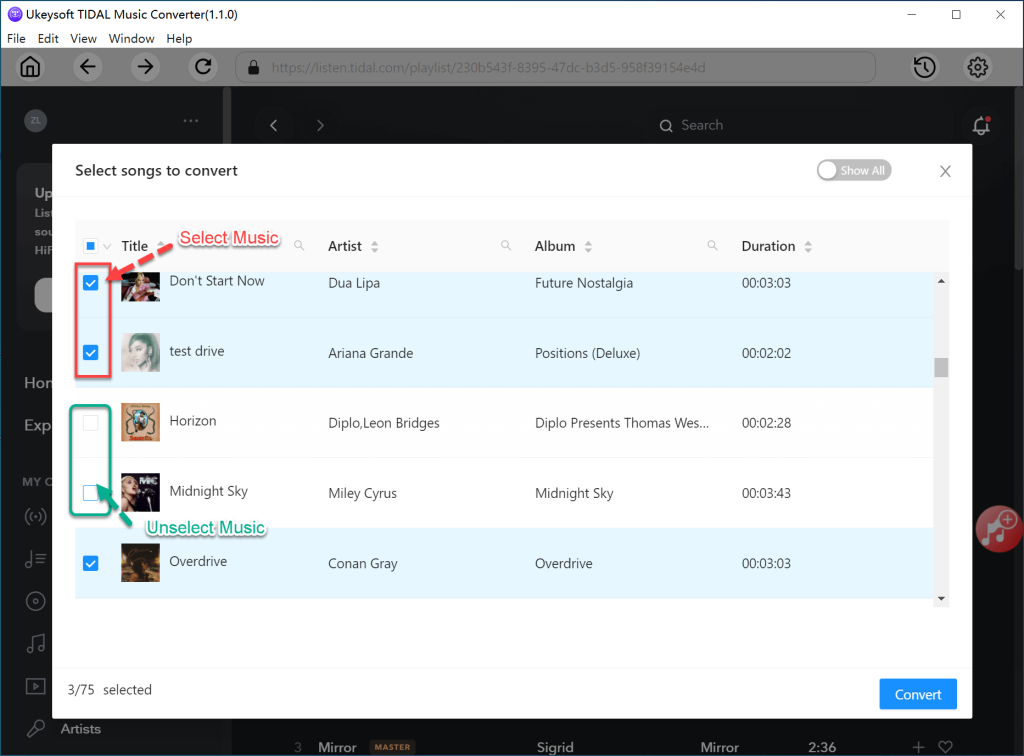
Then the Tidal songs will be added to the conversion list right away, check and confirm your desired Tidal songs you desire to convert to MP3.
Step 4. Begin to Convert Tidal Music to MP3
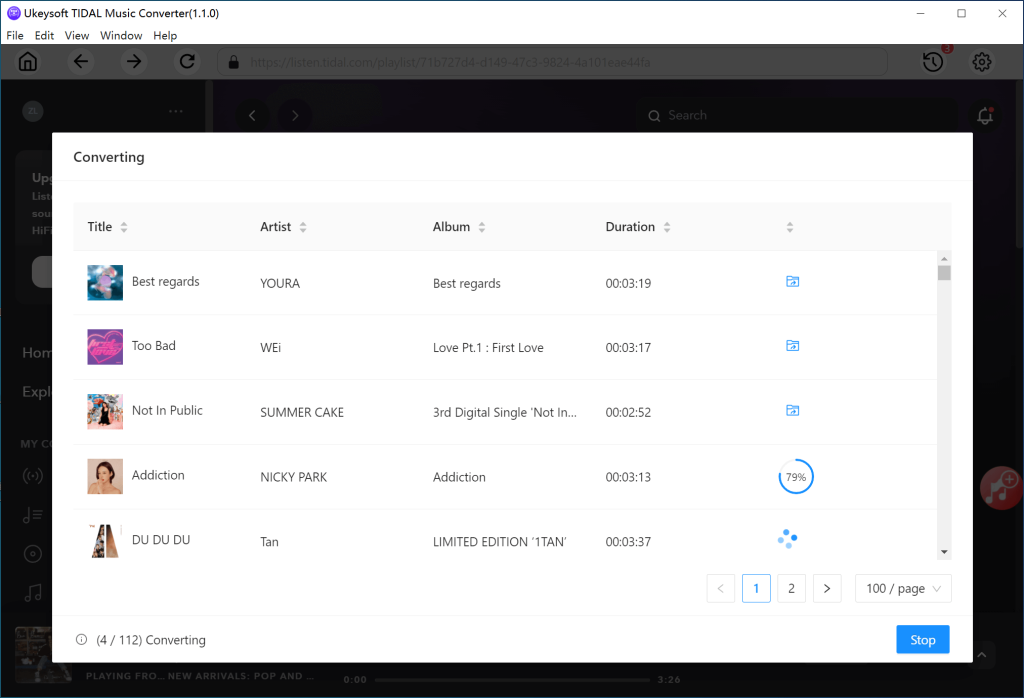
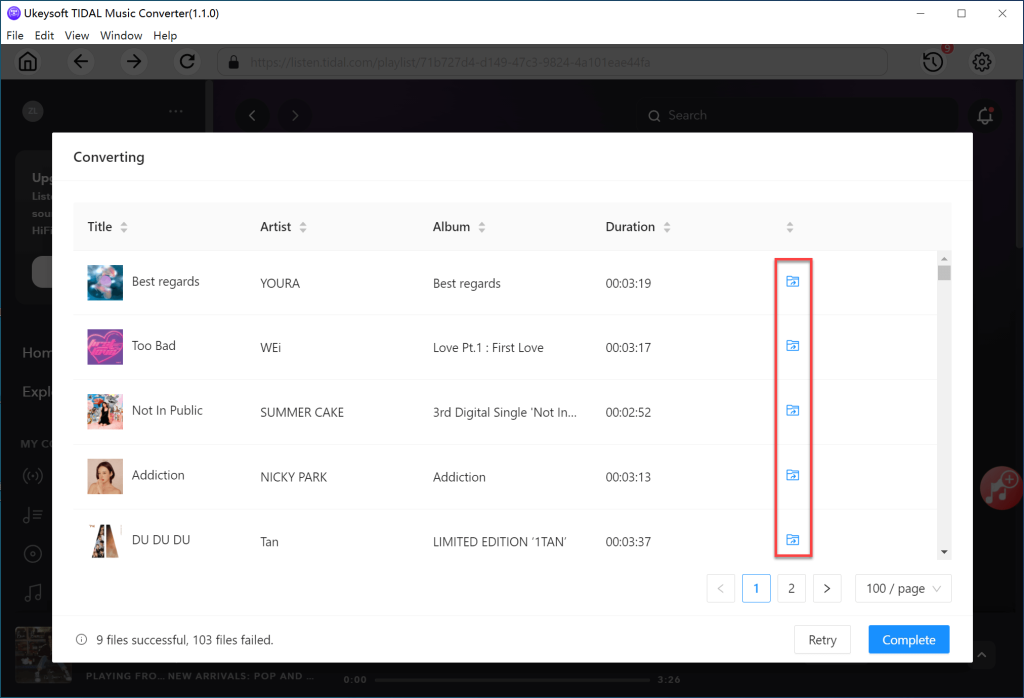
Finally, give a click on the “Convert” button, and UkeySoft Tidal Music Converter will process the Tidal music to MP3 conversion immediately.
Step 5. View MP3 Music Files
After the conversion is finished, click the “History” icon to view the downloaded songs.
Pricing and Plans of UkeySoft Tidal Music Converter
UkeySoft Tidal Music Converter works on both Windows and Mac computers in two versions: free trial version and registered version. The free trial version is available to all new users, allowing you to convert the first 3 minute of each Tidal song. To enjoy unlimited conversions, you can upgrade to registered version. UkeySoft Tidal Music Converter deliver a straightforward and convenient way to convert your Tidal music tracks into MP3 files.
● 1-Month Subscription: US$14.95 a month for 1 PC/Mac
● 1-Year Subscription: US$49.95 a month for 1 PC/Mac
● Single Lifetime Plan: US$89.95 a month for 1 PC/Mac
Safety of UkeySoft Tidal Music Converter
UkeySoft Tidal Music Converter is 100% reliable and safe to use. It offers a intuitive and clean user interface with no ads, plug-in or viruses. Many users have expressed positive feedback about UkeySoft Tidal Music Converter on social media platforms for its excellent features and stable performance. Additionally, it also provides 24/7 email support to enhance the user experience.
Conclusion
To convert Tidal Music to MP3, UkeySoft Tidal Music Converter offers the simplest but fast & effective way to you. It is an easy-to-use yet powerful Tidal music downoader for all music lovers who want to offline playback their favorite tunes. Only few clicks, you are able to save any Tidal songs/playlists you like for offline listening without limitations. Via UkeySoft Tidal Music Converter, you can easily get rid of all Tidal download and playback limitations. UkeySoft brings you faster performance, lossless audio quality and flexible control on downloading Tidal music to MP3 and other audio formats, so that you can play Tidal music on MP3 player, save Tidal songs to local computer, move Tidal songs to USB drive, burn Tidal music to CD, set Tidal music as phone ringtone, etc. UkeySoft Music Converter is a music download/conversion software worth having, let’s freely try it today!











