
According to Gartner, 77% of HR leaders say improving the employee experience is a top priority—yet most are working with reduced budgets and limited resources. In this environment, companies are under pressure to do more with less. One of the most effective and often overlooked strategies is repurposing existing devices—like iPads, Android tablets, or Windows machines—into intelligent HR kiosks. This approach not only saves costs on new hardware but also enables organizations to modernize their HR service delivery with AI-powered tools that boost efficiency and employee satisfaction.
That’s exactly what CloudApper hrPad makes possible. By transforming any standard device into an AI-powered HR kiosk, hrPad delivers significant cost savings, automates time-consuming HR processes, and empowers frontline workers with 24/7 self-service functionality.

In this article, we’ll explore how repurposing your iPads into HR kiosks with hrPad can help your organization enhance efficiency, reduce HR workload, and improve employee satisfaction—without expensive hardware investments.
Why Repurposing Devices Makes Sense
Let’s face it—many companies already have iPads, Android tablets, or even Windows devices lying around unused or underutilized. These devices were likely purchased for specific projects or pilot programs but are now collecting dust. Repurposing these into fully functional employee self-service kiosks is a cost-effective way to maximize your IT investments.
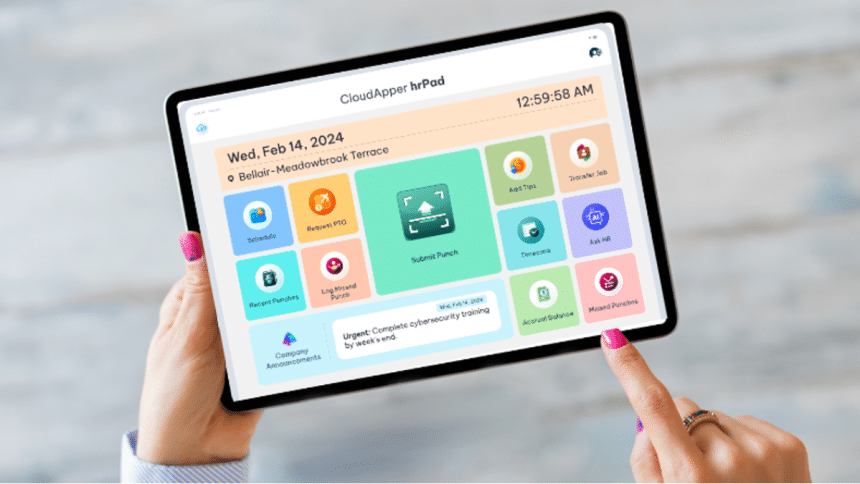
Here’s where CloudApper hrPad comes in. Instead of investing in expensive, dedicated kiosk hardware, companies can simply install hrPad on their existing devices—such as iPads or Android tablets—and instantly transform them into secure, AI-powered HR kiosks. With hrPad, organizations can automate a wide range of routine HR tasks, including clock-in/clock-out using Face ID, processing PTO requests and checking leave balances, calculating overtime, and managing shift bids or swaps. The platform also provides real-time answers to employee HR queries through an intelligent assistant, facilitates cost center transfers using geofencing, supports job satisfaction surveys and mental health check-ins, and even enables employee referrals. In essence, an iPad isn’t just a screen anymore—it becomes a smart, self-service HR kiosk tailored to your organization’s needs.
What Makes hrPad Different?
Most traditional HR kiosks are expensive, difficult to customize, and often restricted to certain systems. In contrast, hrPad is lightweight, system-agnostic, and deeply customizable. It’s built to integrate seamlessly with all major HR and HCM platforms, including:
- UKG
- ADP
- SAP
- Oracle
- Workday
- Paycom
- Ceridian
- Infor
- PeopleSoft
Whether your HR infrastructure is cloud-based or on-premise, hrPad acts as a flexible front-end tool that simplifies access to critical services. This makes it especially useful for distributed and deskless workforces in industries like manufacturing, logistics, healthcare, and retail.
Also Read: Rethinking HR Operations During U.S. Labor Shortages
Key Features That Turn Tablets Into HR Powerhouses
1. Face ID Timekeeping
hrPad enables secure, touchless employee check-ins via facial recognition—eliminating buddy punching and improving timekeeping accuracy.
2. Geofencing for Compliance
The system can automatically trigger cost center changes based on an employee’s physical location, supporting compliance and accountability across multiple sites.
3. 24/7 AI Assistant
Employees can ask questions and get instant responses from a policy-aware AI HR kiosk, reducing repetitive HR inquiries and improving access to information.
4. Custom Data Collection
Need to track tips, attestations, or union labor inputs? hrPad lets you design custom forms and workflows to capture data specific to your industry.
5. Employee Engagement Tools
From well-being surveys to real-time job satisfaction tracking, hrPad helps HR teams stay in tune with the needs of their workforce.
Real Cost Savings
Repurposing tablets instead of investing in expensive kiosks saves both upfront and ongoing costs. Companies using hrPad report savings of up to 75% compared to traditional HR kiosks. Even more importantly, the automation and self-service capabilities reduce the burden on HR staff, enabling them to focus on strategic initiatives.
Real-World Applications
Let’s look at a few examples of how organizations are using hrPad:
- Manufacturing Plants: Workers use mounted tablets to clock in via face ID and swap shifts on the floor—without needing a supervisor’s help.
- Retail Stores: Employees can instantly check PTO balances, request leave, and refer friends for job openings—right from the break room.
- Warehouses: Temporary workers can update cost center details based on job location through geofencing and access key HR info using AI queries.
- Healthcare Facilities: Nurses can log their time, get updates about overtime policy changes, and provide feedback on shift quality—all via hrPad.
Simple Setup, Massive Impact
Setting up hrPad on your devices takes just minutes. It supports iOS, Android, and Windows, meaning your existing inventory is likely already compatible. With centralized admin controls and cloud connectivity, hrPad provides a scalable solution that can grow as your organization does.
Whether you’re running a few tablets in a small facility or deploying hundreds across a multi-location enterprise, hrPad is ready to go.
Final Thoughts
The future of HR is automated, intelligent, and employee-centric—and it starts with tools like hrPad. Instead of letting your old devices sit idle, turn them into powerful HR kiosks that make life easier for employees and HR teams alike.
By leveraging AI-powered self-service on your existing hardware, you’ll not only save money—you’ll boost efficiency, ensure compliance, and transform the employee experience across your entire organization.
Ready to upgrade your HR experience?
Visit CloudApper to learn more about how to repurpose your iPads and devices with hrPad AI Agents for HR Service Delivery.











