
In recent years, podcast has been an increasingly popular way for people to grasp info or kill spare time. Especially after the outbreak of the COVID-19 pandemic, the rise of people’s demands on streaming podcasts has been getting more obvious. Here are some statistics showing you the popularity of podcasts of 2022 (data from Influencer MarketingHub):
- More than 2 million podcasts are provided on all streaming platforms today;
- More than 78% of Americans are listening to podcasts in daily life
- 160+ Million Americans Have Listened to a Podcast
- Almost 60% of US Consumers Listen to Podcasts
- Podcast Ad Revenues Expected to Exceed $2 Billion in 2023
…

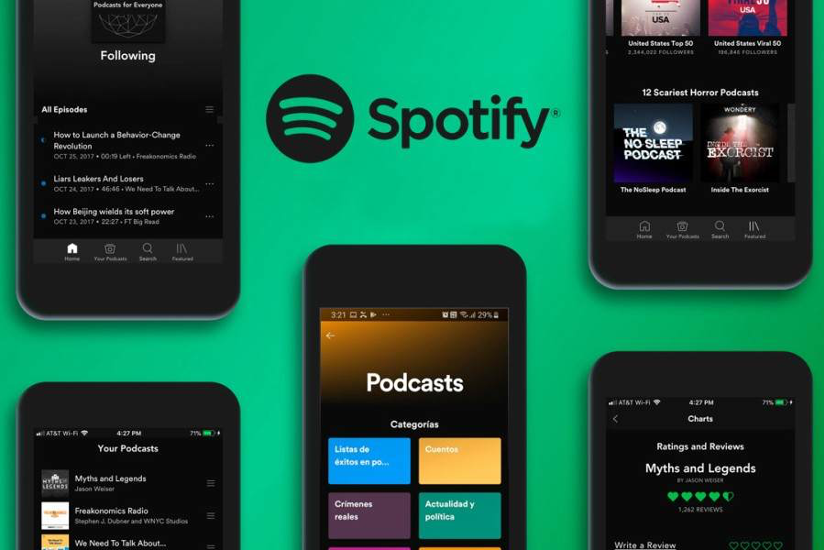
Based on the data, it is easily told that podcasts are becoming essential in people’s life. Especially on the largest music streaming provider, Spotify, there are rich podcasts resources provided for users to enjoy daily. Catering such trend, this review will also introduce two great podcast downloaders to help you have more flexible podcast streaming experience offline. Now, let’s take a grasp!
CONTENTS
MuConvert Spotify Music Converter – Download Podcasts on Spotify
MuConvert Apple Music Converter – Download Podcasts from iTunes
MuConvert Spotify Music Converter – Download Podcasts on Spotify
Though Spotify has been popular and well-known for its music streaming services, as its podcasts service has been much mature today, more users tend to use Spotify as their way to listen to podcasts in daily life. However, if users desire to enjoy ads-free podcasts or download the episodes offline, Spotify premium subscription is required. Hence, for Spotify free accounts, MuConvert Spotify Music Converter is absolutely the best tool to help download Spotify podcasts in batch offline.
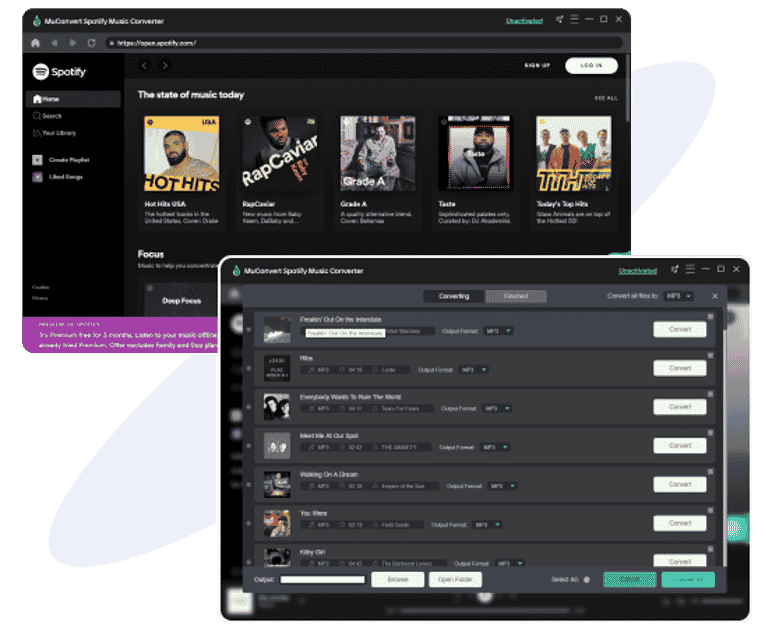
MuConvert Spotify Music Converter General Info
Supported OS: Windows, Mac
Pricing: Starts from US$14.95 (Free trial available)
Rating: 4.6 out of 5 stars
MuConvert Spotify Music Converter empowers the powerful Spotify singles, playlists, and podcasts download feature with hassle-free operations. By integrating the Spotify web player inside the software, it enables users to login the account and add the whole podcasts channels for processing the download in batch with quick speed. Thus, if you are a Spotify free user but desire a way to download Spotify podcasts for listening without limitations, MuConvert Spotify Music Converter is an ideal pick.
Pros and Cons of MuConvert Spotify Music Converter
Pros
- Workable to download Spotify singles, playlists, and podcasts;
- Integrated web player to auto-process the conversion replacing the traditional copy-and-paste method;
- Available to preserve lossless quality with up to 320kbps;
- Original ID3 tags and metadata info preservation available;
- Built-in hardware acceleration to ensure 5X faster speed while processing multiple tasks conversion simultaneously.
Cons
- Under the free trial period, it is only available to convert the first 3 minutes of the podcasts and music
MuConvert Spotify Music Converter Tutorial
The embedded Spotify web player has helped simplified the operation greatly. Now, let’s grasp the way to download Spotify podcasts offline via MuConvert Spotify Music Converter.
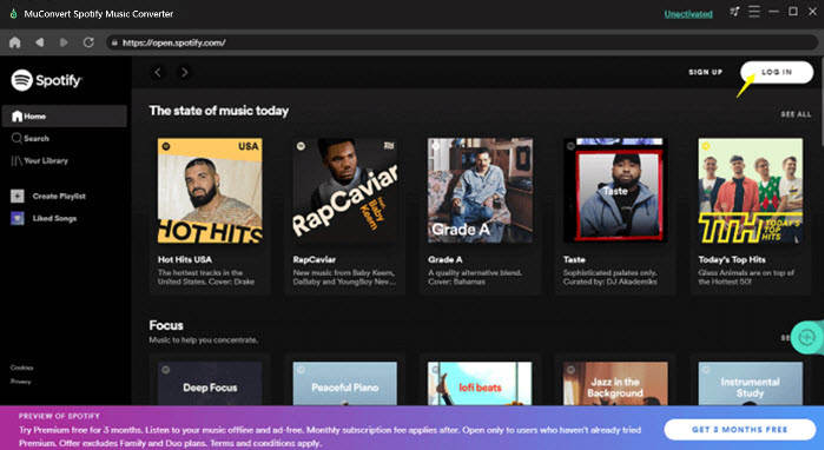
STEP 1. Launch MuConvert Spotify Music Converter once the installation completes. On the main interface, enter the Spotify web player and hit the “LOGIN” icon on the upper-right corner to login it via your Spotify account.
NOTE: It is available to use a free account to login for processing the podcast download.
STEP 2. Once login, you are able to search for the podcast channels you desire to download offline in Spotify’s database. When you discover the podcast playlist, directly drag to the floating “+” button and the episodes will all be added to the conversion queue right away.
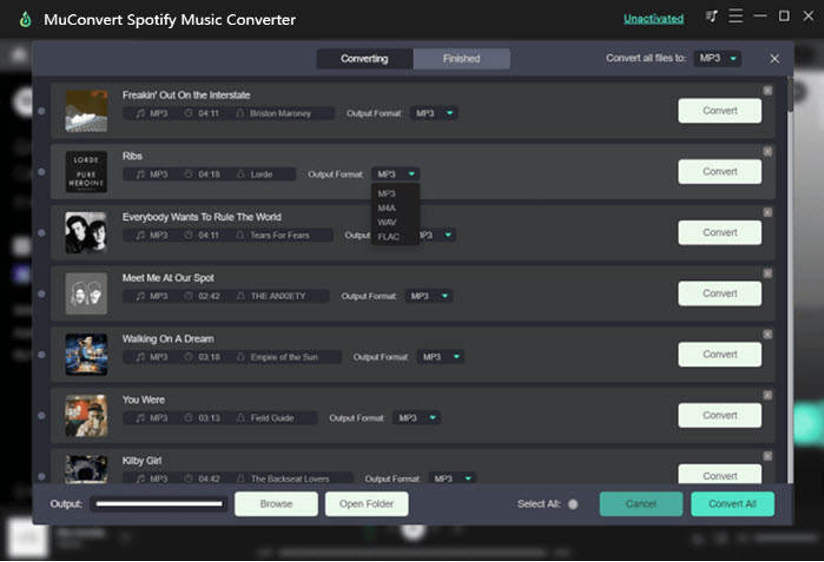
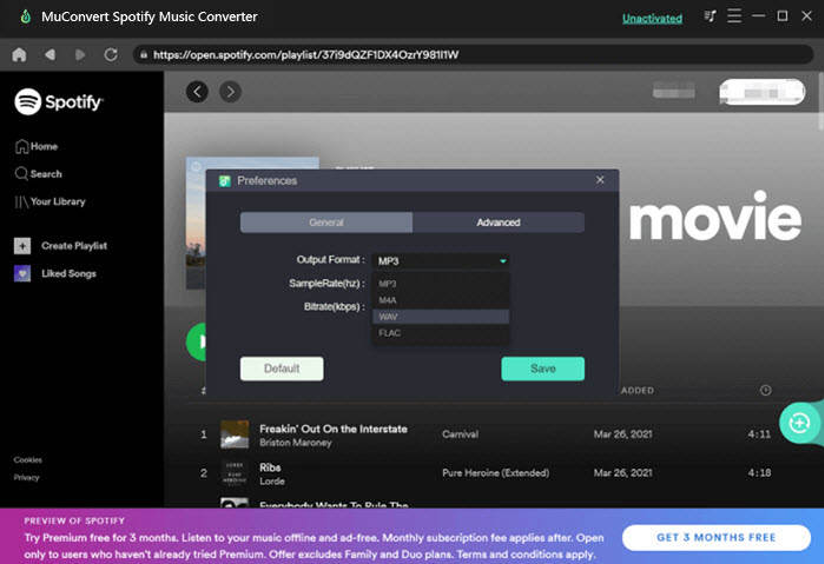
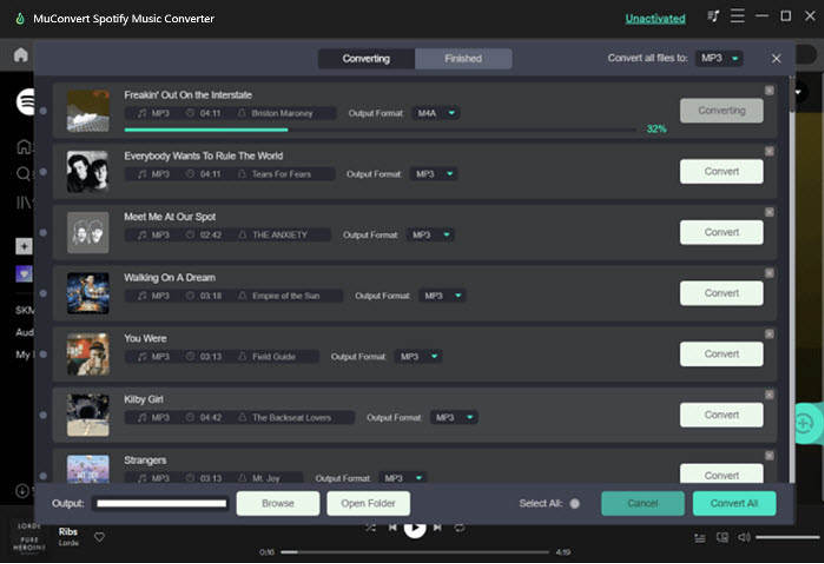
STEP 3. Now, it is available for you to select an output format to save the podcast episodes offline. Simply go to “Convert all files to” and choose the one you need to convert all of them at once.
NOTE: If you desire to customize the parameters such as sample rate and bitrate, navigating to “Menu” > “Preferences” > “Advanced” and they could be adjusted.
STEP 4. Finally, tap the “Convert All” icon, and MuConvert Spotify Music Converter will batch process the conversion to download the Spotify podcasts offline. Once complete, you are able to stream them offline without any limitation!
MuConvert Apple Music Converter – Download Podcasts from iTunes
Except for Spotify, Apple podcast is another access you are able to discover millions of podcast episodes for streaming during the spare time. Hence, in this section, the best podcast downloader for Apple and iTunes podcasts is recommended, which is MuConvert Apple Music Converter.
MuConvert Apple Music Converter General Info
Supported OS: Windows, Mac
Pricing: Starts from US$14.95 (Free trial available)
Rating: 4.7out of 5 stars
Sharing similarities as its Spotify Music Converter, MuConvert Apple Music Converter is also a multifunctional software, enabling users to download all types of Apple and iTunes content as audio files for offline listening. From the streaming music to audiobooks, users are able to use MuConvert Apple Music Converter for stripping the DRM encryption and realize the content download in a hassle-free way. With MuConvert Apple Music Converter, users are no longer required to use authorized Apple Music app or iTunes to stream podcasts with network connected.
Pros and Cons of MuConvert Spotify Music Converter
Pros
- Auto sync with iTunes library to load all tracks and podcast episodes for direct selection;
- Lossless quality maintained to process the podcasts download;
- Preservation of ID3 tags and metadata info to boost convenient offline podcast management;
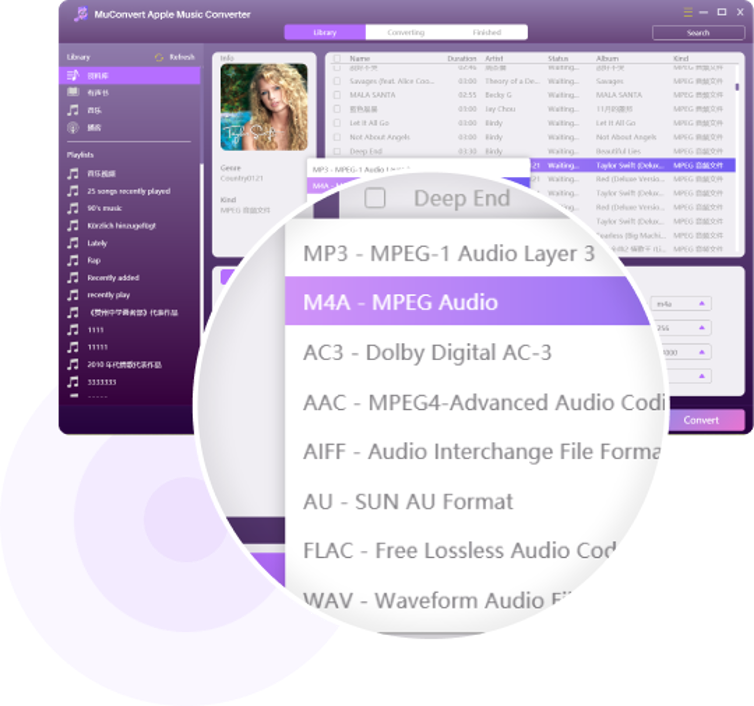
- Mainstream formats such as MP3, M4A, AAC, FLAC, AC3, AU, and AIFF to output downloaded podcasts;
- Boost the conversion speed to 10X faster for saving much time.
Cons
- Users are only allowed to convert the first 3 minutes of each Apple podcast episode under the free trial period.
MuConvert Apple Music Converter Tutorial
MuConvert Apple Music Converter is designed with an iTunes-like interface, enabling quite simple operation to download Apple and iTunes podcasts offline. Let’s also grasp its usage to learn how we can download Apple podcasts offline via MuConvert Apple Music Converter on desktops.
STEP 1. Once the MuConvert Apple Music Converter installation completes, launch it and wait for the software to sync with iTunes.
STEP 2. As the iTunes library is loaded now, simply select a playlist and also the preserved podcast episodes you desire to download for offline listening.
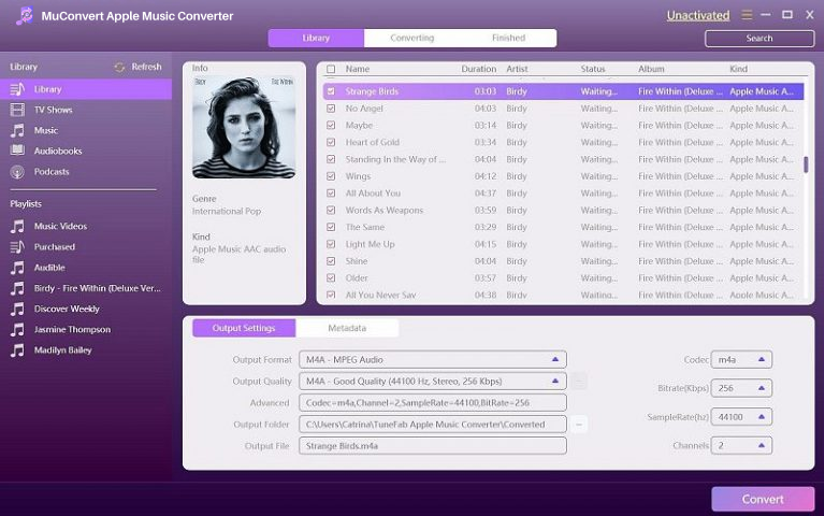
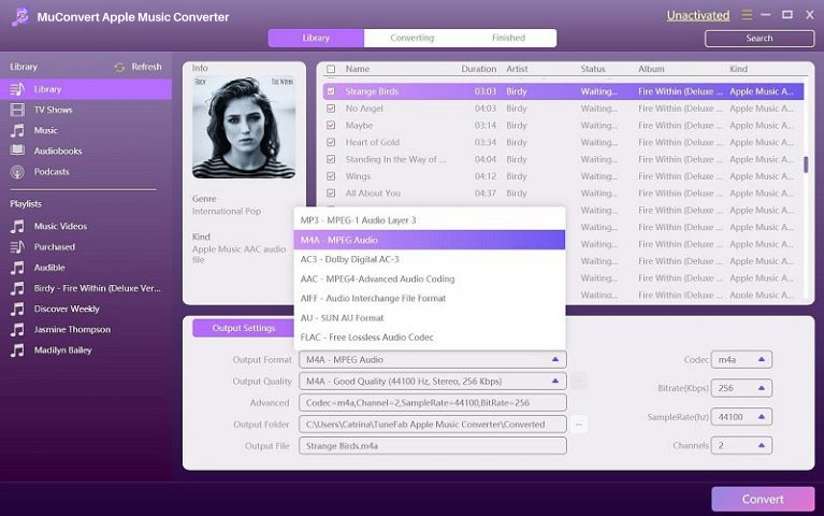
STEP 3. Move down to the “Output Settings” section and customize the parameters based on your requirements. You are available to freely adjust the output format, quality, and more advanced options such as codec, sample rate, bitrate, and channels to personalize your podcasts download freely.
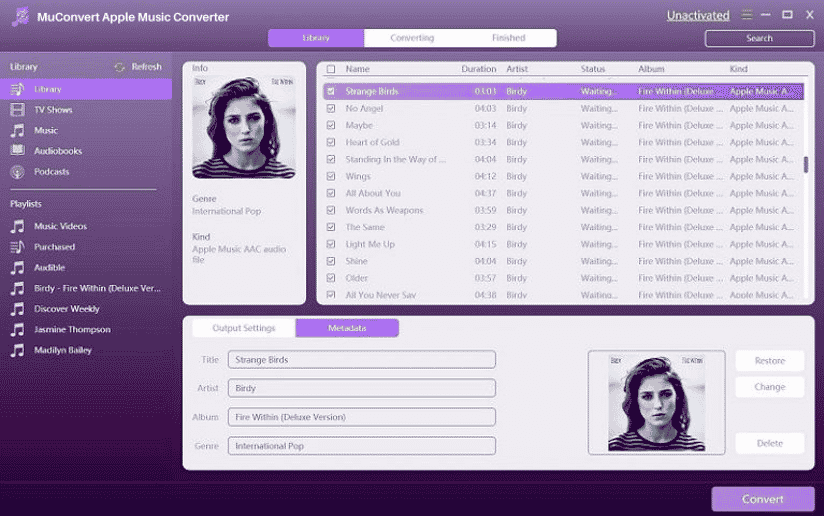
STEP 4. By navigating to the “Metadata” section, you are able to edit the ID3 info such as the title, artist, album, genre, album art, etc. before the podcasts download.
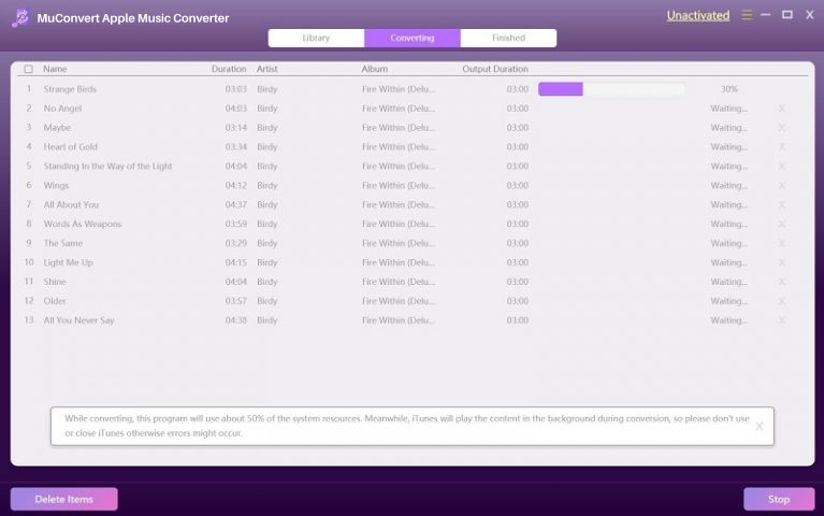
STEP 5. Finally, one click on the “Convert” icon, and MuConvert Apple Music Converter would start performing the podcast download for you. Wait for they to complete and you are able to enjoy the podcast playback offline!
When podcast streaming has been a trend today, MuConvert’s Spotify Music Converter and Apple Music Converter are both helpful to users for downloading the streaming podcast episodes for more convenient playback offline. They both deserve trying as their stable performance and reliable outputs. Why not give them a try?











