
iLoungeiLounge
  • News
    • Apple
      • AirPods Pro
      • AirPlay
      • Apps
        • Apple Music
      • iCloud
      • iTunes
      • HealthKit
      • HomeKit
      • HomePod
      • iOS 13
      • Apple Pay
      • Apple TV
      • Siri
    • Rumors
    • Humor
    • Technology
      • CES
    • Daily Deals
    • Articles
    • Web Stories
  • iPhone
    • iPhone Accessories
  • iPad
  • iPod
    • iPod Accessories
  • Apple Watch
    • Apple Watch Accessories
  • Mac
    • MacBook Air
    • MacBook Pro
  • Reviews
    • App Reviews
  • How-to
    • Ask iLounge
Font ResizerAa
iLoungeiLounge
Font ResizerAa
Search
  • News
    • Apple
    • Rumors
    • Humor
    • Technology
    • Daily Deals
    • Articles
    • Web Stories
  • iPhone
    • iPhone Accessories
  • iPad
  • iPod
    • iPod Accessories
  • Apple Watch
    • Apple Watch Accessories
  • Mac
    • MacBook Air
    • MacBook Pro
  • Reviews
    • App Reviews
  • How-to
    • Ask iLounge
Follow US

Articles

Articles

This App Claims It Can Organize Your Entire Mac Using AI

Last updated: May 28, 2025 9:54 am UTC
By Lucy Bennett
This App Claims It Can Organize Your Entire Mac Using AI

Pros:

● Organizes your Desktop, Downloads, Documents, or any folder on your Mac


● Works with cloud storage like Google Drive, Dropbox, and external hard drives
This App Claims It Can Organize Your Entire Mac Using AI

● Lets you pause, revert, or customize how organization happens

● Does not access your file contents, only filenames, stored temporarily for privacy

Cons:

● Sparkle must be running in the background to function

● May not be ideal for users who prefer complete manual control over file organization

What Is Sparkle?

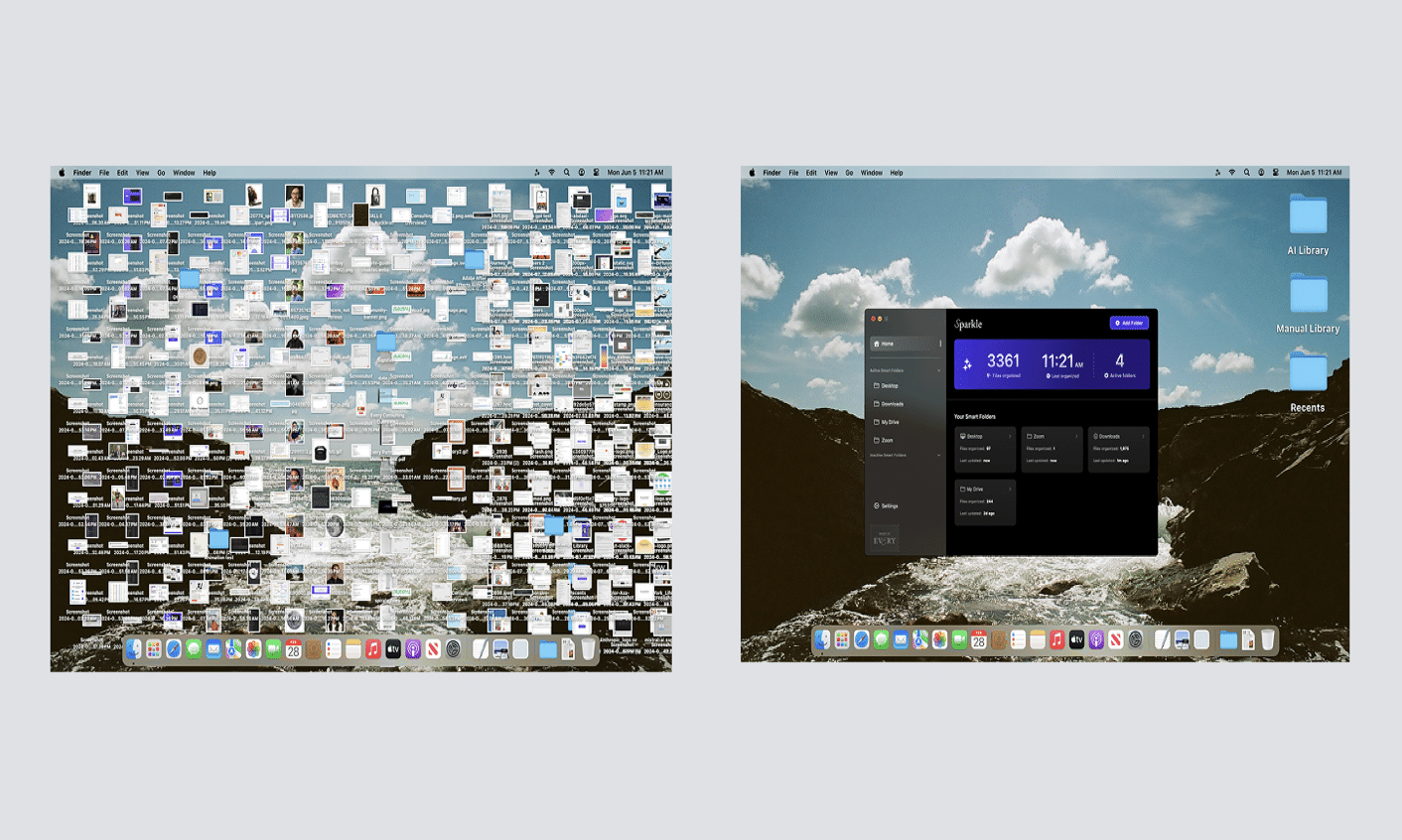
Is your Mac desktop overflowing with screenshots, PDFs, and random files? You’re not alone. Enter Sparkle, a sleek and lightweight Mac app designed to declutter your desktop effortlessly. Powered by GPT-4, Sparkle intelligently organizes files based on their names—not their contents—ensuring your documents stay private while your workspace remains tidy and efficient.


It can even organize nested folders several layers deep. It also works with cloud storage services like Dropbox, Google Drive, and Box, as long as the respective desktop apps are installed so Sparkle can access the local folders.

How Sparkle Works

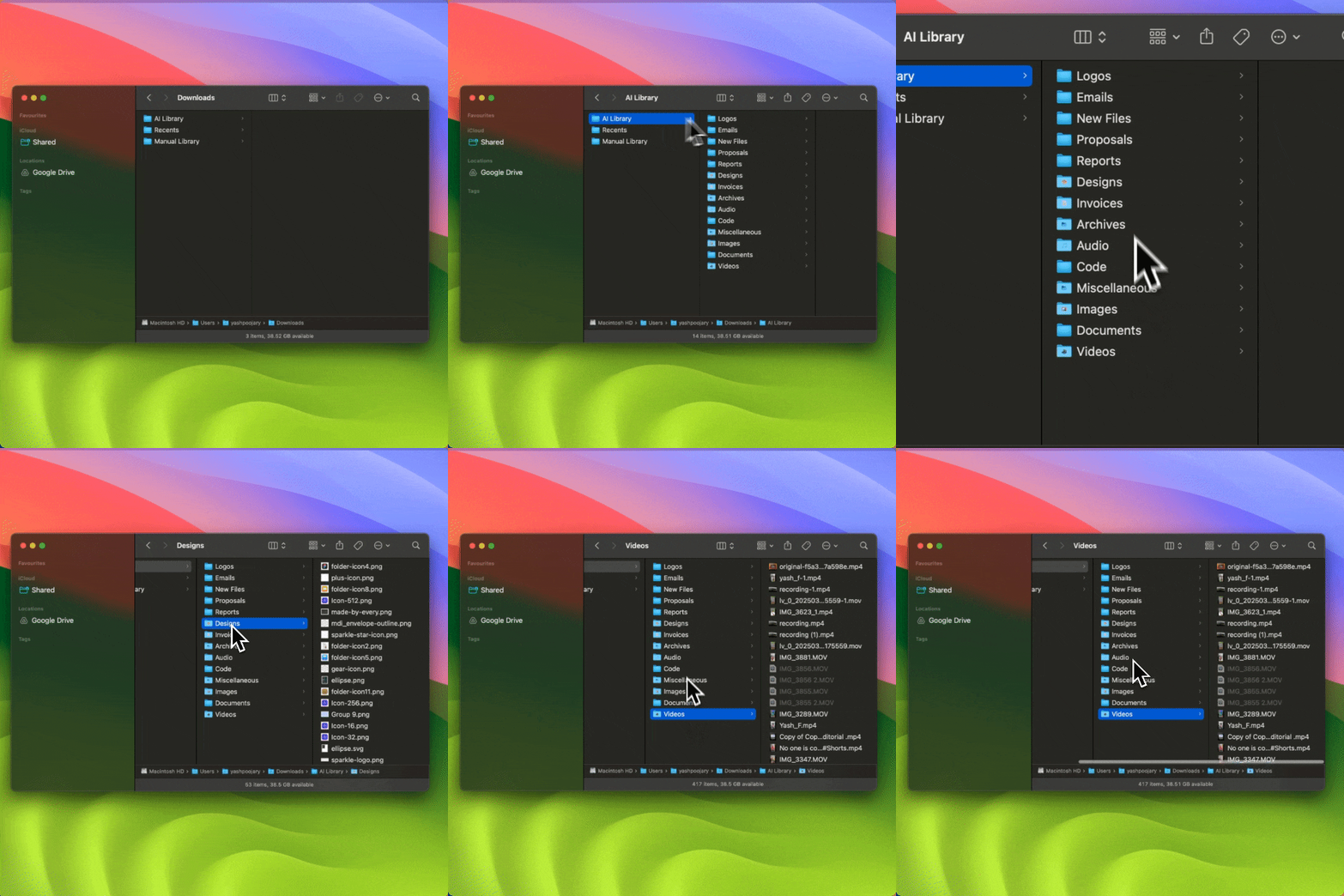
Sparkle organizes files into three zones:

● Recents: Files from the last three days

● AI Library: Older files, categorized automatically

● Manual Library: Files Sparkle will not touch
This App Claims It Can Organize Your Entire Mac Using AI

If Sparkle moves something you’d rather manage manually, simply drag it back to its original folder. Sparkle will remember your preference and ignore it moving forward. You can pause organization temporarily or indefinitely, adjust how frequently Sparkle runs, and even restore an entire folder to its original state with ease.


A visual log shows exactly how Sparkle organized your files. You can click to open any item directly in Finder.

Key Features

● Organize any folder on your Mac, not just Desktop or Downloads

● Works with cloud storage and external drives

● Automatically sorts files based on filename intelligence

● Lets you pause organization or revert changes

● Manual Library ensures full control over excluded files

● Privacy-friendly: only filenames are analyzed, never file contents

Whether you’re aiming to keep things minimal or just need help managing clutter, Sparkle gives you the tools to stay organized without micromanaging every file. Sparkle’s base plan includes a 15-day free trial and starts at just $5 per month.


Security and Privacy

Sparkle uses only filenames to categorize your files. These filenames are sent to secure servers and temporarily stored for up to 30 days. File contents are never accessed.

Final Verdict

Sparkle feels like having a quiet assistant for your Mac that keeps everything in its right place. With support for custom folders, cloud storage, and manual overrides, it offers the flexibility and intelligence needed to stay on top of digital clutter.

If your Mac needs a clean-up and you do not want to do it yourself, Sparkle is an easy, effective solution.

If you’re curious what a truly clean Mac looks like, you can download Sparkle from their website to learn more. As part of this feature, we’re offering iLounge readers an exclusive 20% off their lifetime plan with the code: ILOUNGESPARKLE.


Latest News
The Apple Watch Series 11 46mm GPS Is $100 Off
1 Min Read
Clamshell Style iPhone Being Looked Into By Apple
1 Min Read
Foldable iPhones May Have the Largest Battery Ever
1 Min Read
Apple and TSMC’s 10-Year Collaboration May Be Ending
1 Min Read
The 13-inch M5 iPad Pro 256GB Wi-Fi Is $149 Off
1 Min Read
M5 Pro and M5 Max Chips for the MacBook Pro could Roll Out with macOS 26.3
1 Min Read
Mac Ordering Process Revamped
1 Min Read
Check Signed By Steve Wozniak and Steve Jobs Sold For $2.4 Million
1 Min Read
The Anker 140W 4-Port GaN USB-C Charger is $35 Off
1 Min Read
No iPhone Air 2 This Year, according to Latest Report
1 Min Read
New Report Corroborates Split iPhone Release Dates
1 Min Read
Apple Losing More Researchers As They Plan To Release 2 Siri Versions
1 Min Read

iLounge logo

iLounge is an independent resource for all things iPod, iPhone, iPad, and beyond. iPod, iPhone, iPad, iTunes, Apple TV, and the Apple logo are trademarks of Apple Inc.

This website is not affiliated with Apple Inc.
iLounge © 2001 - 2025. All Rights Reserved.
  • Contact Us
  • Submit News
  • About Us
  • Forums
  • Privacy Policy
  • Terms Of Use
Welcome Back!

Sign in to your account

Lost your password?










