
Have you ever lost your favorite video out of the blue, like a heartfelt family gathering, your favorite travel moments, or an important project? Fortunately, it is not gone forever, and you can recover it with the repair tools available on the internet, even the most damaged files.
Such tools can help you get the video back without losing its quality and ensure that your video is safe in its original state. However, it can be tricky to choose the right one that offers all the necessary features to repair your video with ease. Hence, in this article, we’ll discuss the best video repair software and how to recover your lost files in a few minutes.
Part 1. What are the Potential Reasons Behind Video Corruption?
Part 2. Wondershare Repairit: A Detailed Introduction to Video Repairing
Part 3. Guide To Repairing Video With The Best Video Repair Software
Part 4. Other Features Offered by Wondershare Repairit
Part 1. What are the Potential Reasons Behind Video Corruption?
Video files can sometimes get damaged due to various reasons, leaving them distorted and unplayable. Let’s explore some of them before you try to apply fixes using the video repair free software:
- File Transfer Error: Interruption during the transfer process, such as device disconnection, can damage the file. Therefore, ensuring a stable connection while transferring files can prevent this issue.
- Storage Device Issue: Problems with the storage medium, like bad sector or physical damage to hard drives, memory cards, or USB, can corrupt video files. There, regular maintenance and proper handling of storage devices can minimize these risks.
- Malware or Viruses: Harmful software that targets the video files can alter or damage them and often leave them unplayable. With the help of antivirus software, you can update and scan the files and protect them against these threats.
- Sudden Power Loss: Unexpected power outages or abrupt system shutdown during video editing or transferring can disrupt the saving process, which leads to incomplete or damaged files. Using backup power sources can help lower the risk.

Part 2. Wondershare Repairit: A Detailed Introduction to Video Repairing
When it comes to repairing damaged data, Wondershare Repairit stands out as one of the well-known video repair free software that supports videos in up to 20 formats. Its advanced technology uses a sample library to identify and analyze the unique character of damaged video with accuracy. Moreover, the batch-repairing feature allows you to fix more than one video at once, which saves you time and effort.
Furthermore, users can preview and confirm that the video is fixed before saving it. It fixes HD, 4K, and 8K videos from different cameras or smartphones and ensures that the original quality remains flawless. In addition, with its advanced technology that consistently provides excellent results, this tool outperforms other tools with a higher success rate. To make accessibility easier, Repairit also comes with an online version for quick damage control.
Key Features
- Fix Broken Videos from Any Device: You can repair videos from any device, whether a camera of any brand, such as Canon, Nikon, or a smartphone. It works seamlessly with videos stored on various platforms, which makes the recovery simple and quick.
- Supports Any Format: Moreover, this tool supports a wide range of video formats and ensures that you can repair virtually any video file. This tool provides trustworthy repair to all of them from MOV, MP4, M2TS, M4V, and other common and rare formats.
- AI Video Enhancement: If you are not satisfied with the results, this tool uses advanced AI technology that enhances your video and increases its quality. This ensures that the damaged video is repaired and looks higher in quality than it was before.
Part 3. Guide To Repairing Video With The Best Video Repair Software
Before you learn about the other features of Wondershare video repair, let’s learn a detailed step-by-step guide on how to use this tool to restore the video:
Step 1. Import the Damaged File into the Video Repair Tool
Launch the software, locate the “Video Repair” tab on the left side, and tap the “+Add” button to import the damaged video from your device.

Step 2. Repair the Damaged Video and Proceed
On the next screen, the tool will show your damaged file under the “Unrepaired files” section. There, locate the desired one and hit the “Repair” button to start repairing your corrupted file.

Step 3. Download the Repaired File
Finally, press the “Save All” button, and a pop-up menu will open that says your video has been saved successfully. From there, click the “OK” button to end the process and migrate the repaired video with “Save All” button.

Part 4. Other Features Offered by Wondershare Repairit
Now that you know how to fix your videos, the following are a few features that can enhance the experience with this video repair-free software:
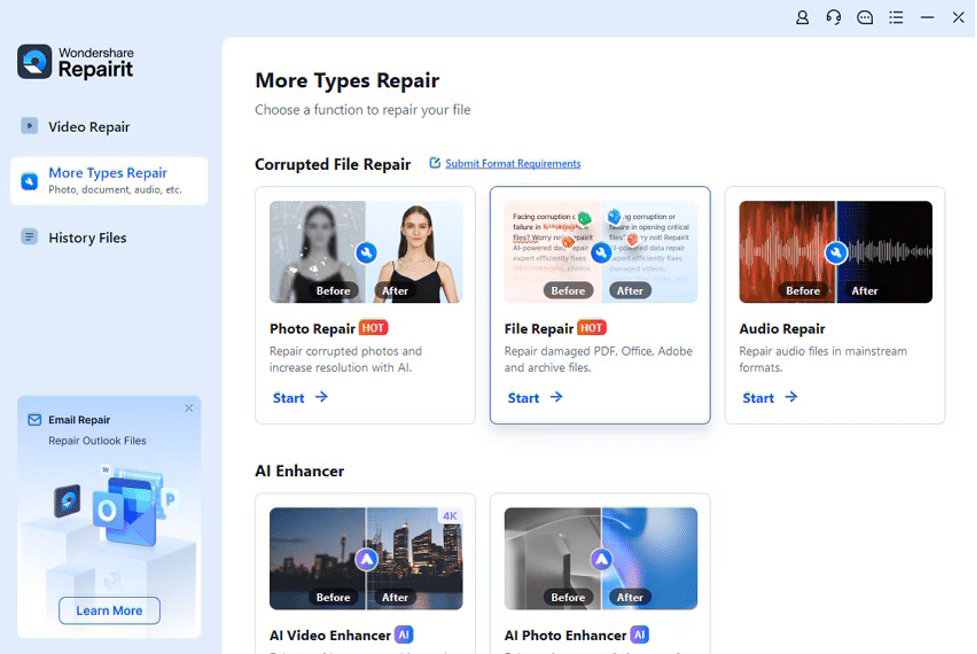
1. Photo Repair
With this feature, you can repair damaged or corrupted pictures and restore them to their original state. It supports common images such as JPG, PNG, and many other formats. Whether the problem is a broken pixel or an incomplete file transfer, you can fix it quickly without any effort using this tool.
2. Audio Repair
Users can fix damaged audio files and enhance the sound quality and clarity. Using this tool, you can rebuild various audio formats like MP3 and many others. The software ensures that files are restored without compromising their integrity.
3. File Repair
Using the Wondershare video repair tool, you can fix a wide range of file types, including Word documents, PowerPoints, and any PDF document. Furthermore, it lets you fix any ZIP files and restore your important data. This software allows you to repair many damaged files in one go with the help of the batch processing method.
4. AI Photo Colorizer
You can use its AI Photo Colorizer to add vibrant colors to black-and-white pictures after you restore your damaged photo. Its AI technology detects the photo’s context, applies realistic colors, and preserves natural details. This feature is perfect to make your old photos like memory book images or history pictures and turn them into new ones.
5. Gyroscope Data Repair
With the help of this software, users can revive gyroscope data in video files, which ensures that the shaky footage gets stabilized. This is especially useful for videos taken in motion, such as action shots or travel videos. Users can restore smooth and clear visuals of their blurred videos by correcting gyroscope data.
Conclusion
To sum up, you don’t have to worry if you lose important videos, as this guide has provided you with the best tool to get them back. With Wondershare Video Repair, you can fix your defective video and rebuild it in a few minutes without any difficulty.
Moreover, its simple interface makes it effortless for both experts and beginners to fix videos. Apart from repairing videos, you can utilize this multi-dimensional tool to get your photos and other files back.











