

PDF editing is quickly becoming essential for individuals and professionals managing reports, contracts, and study materials. However, finding an efficient PDF editor for that is easy to use and tailored for use on macOS can be quite challenging. Most of the tools available in the market often lack the essential functionalities that would make creating and editing PDF document on Mac quick and easy.
Enter PDNob PDF Editor, the best free PDF Editor for Mac. Designed with simplicity and effectiveness at the forefront, this game-changing software offers a seamless solution for all PDF management needs, while remaining affordable. It is the perfect choice whether you are editing PDF text, annotating documents, or merging files.

This article will highlight the main features of PDNob PDF Editor, compare it with similar tools, and show you how it can transform tedious PDF management into effortless, seamless, and even enjoyable tasks.
Challenges of Modifying PDFs on Mac
When it comes to PDF management, the market is littered with tools that are either too limited in functionality or too costly. MacOS native tool Preview, for instance, is a good PDF manager offering basic functions like annotations and PDF reading, but it is not a good solution for editing existing content, filling forms, or merging documents.
A more advanced alternative to the Preview App would be a robust solution like Adobe Acrobat, which comes with more advanced features. But its high cost puts it out of the reach of most individual users and small businesses. A single monthly subscription to Adobe Acrobat can be over the budget of most people.
There is therefore a real need for a free, comprehensive PDF tool that adequately balances accessibility and functionality with ease of use and advanced features. Such a tool would be an ideal solution for Mac users looking to create, edit, and manage PDFs without breaking the bank.
What Makes PDNob PDF Editor the Best Free PDF Editor for Mac?
PDNob PDF Editor is an easy-to-use, feature-packed and free PDF Editor for Mac and Windows designed to make PDF management easier. Its simple interface and robust tools make it an essential tool for anyone handling PDF documents on a regular basis. Unlike other free tools that skimp on functionality, it provides a suite of useful tools for both basic and advanced PDF editing.
The following are some of the main features you can expect from PDNob PDF Editor;
1. View PDF
If your goal is to read through a PDF document, you will find that PDNob PDF Editor provides a streamlined PDF reading experience like no other. It is one of the few PDF editors that supports high-resolution rendering, allowing you to see both text and images and read complex documents with ease. Additional reading features including zoom, page navigation, and multi-tab view work together to make the reading experience more convenient. You also get a variety of options for the background of the document when reading including day, night, eye protect and parchment, each beneficial to efficient reading.
2. Edit PDFs
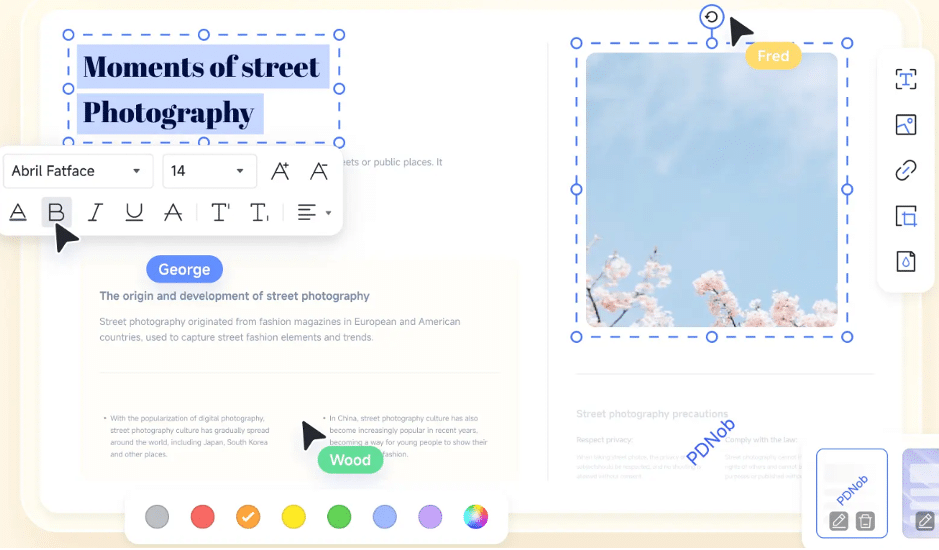
PDNob PDF Editor also comes with features designed to make it easy to edit existing content on a PDF. Its editing suite of tools allows you to modify text, images, and other elements directly on the document. The editing process is efficient, whether you are adding huge blocks of text or simply correcting a typo.
3. PDNob PDF AI
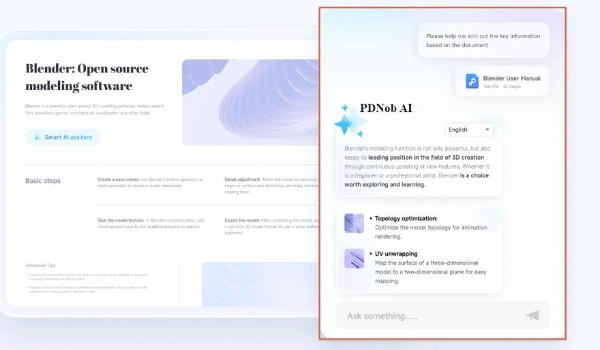
Of all its features, PDNob PDF AI is the most notable as it leverages artificial intelligence to help you manage complex PDF tasks. You can use it to summarize lengthy texts and automate repetitive tasks. It adds a layer of efficiency you will not find on any other free tool.
4. Annotate PDFs
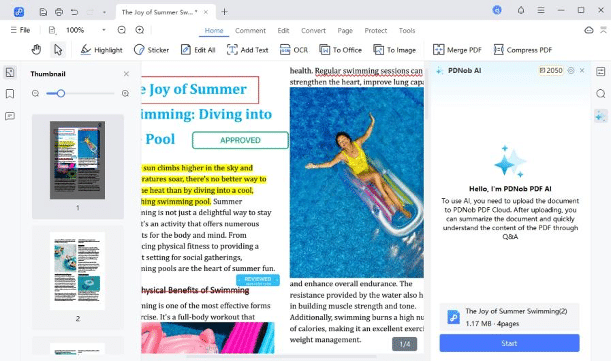
PDNob PDF Editor’s annotation tools make collaboration much easier and more efficient. With its 200+ annotation tools users can underline, highlight, and even add sticky notes to the document. These annotation tools are ideal for students or professionals needing to comment on or review a document in collaboration with others.
5. Merge PDFs
You can also easily and conveniently combine more than one PDF document into a single, coherent document. This feature is ideal for consolidating reports and study materials that have a similar goal or theme.
6. OCR PDF
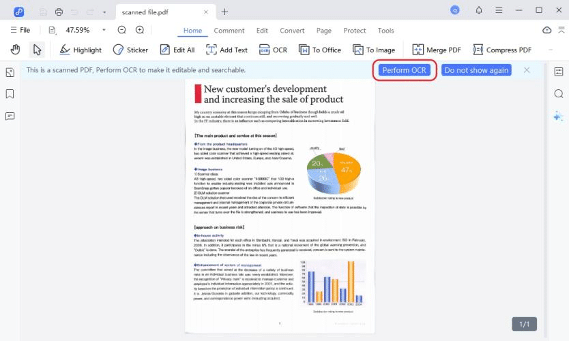
PDNob’s Optical Character Recognition (OCR) feature allows users to convert scanned documents to searchable and editable PDFs. This feature is valuable for the conversion of scanned documents into searchable and editable digital files.
7. Create & Convert PDF
You can use PDNob PDF Editor to create a PDF document from images, MS office formats or convert other file formats into PDF. It supports all the popular document formats and conversion is easy, seamless, and effective.
8. Protect PDF
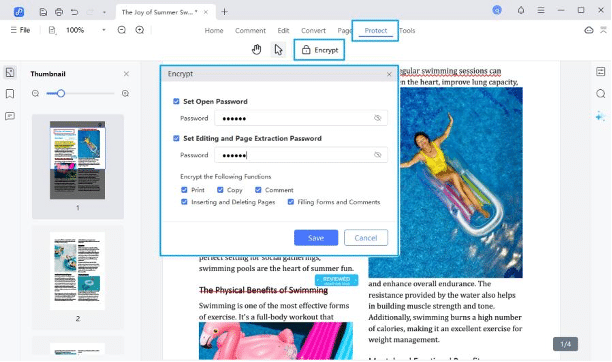
PDNob PDF Editor comes with security features aimed at protecting your PDF from unauthorized use. You can add a password to restrict the opening, editing, and printing of documents that contain sensitive information.
9. Organize PDF
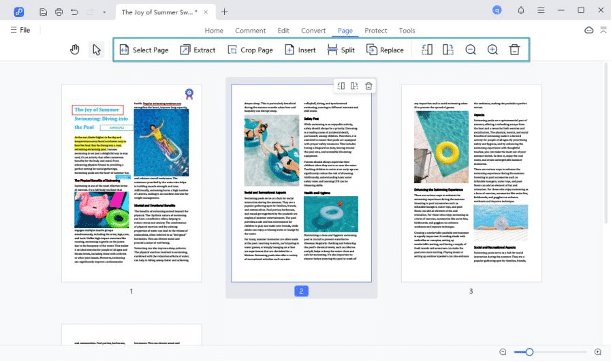
It is also one of the best tools for the management of large files allowing users to reorder pages, split large files into smaller documents, or combine various sections from multiple different files in just a few clicks.
How to Edit PDF Documents on Mac Using PDNob PDF Editor
As a free PDF editing software for Mac, PDNob PDF Editor allows you to edit PDF as easily as Word. Here’s how to use it to edit various aspects of the PDF document.
Step 1: Open the PDF File to Edit
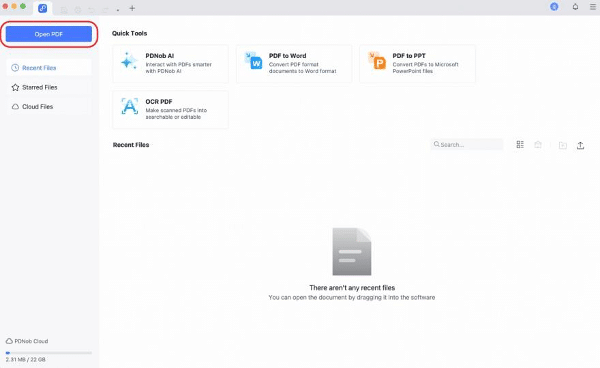
Start by installing PDNob PDF Editor on your computer. Open it after installation and then click on “Open PDF” to import the document you’d like to edit.
Step 2: Modify PDF on Mac
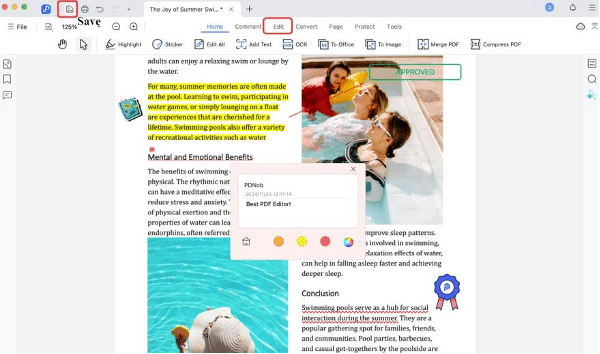
To edit the text on the document, click on “Edit” and click on the text you’d like to modify.
This will open a text box, allowing you to type in anything you’d like to add or modify the existing text in any way.
Step 3: Save the PDF file
After making a series of changes to your PDF document, you can save the document by clicking on the “Save” icon in the upper left corner.
Why PDNob PDF Editor is the Best Choice for Mac Users
Comprehensive Features
PDNob PDF Editor is an all-in-one solution designed to cater to all PDF needs including viewing, editing, annotating, converting, and protecting PDFs. Its simple user interface makes all these tasks simple.
Affordability and Accessibility
As a more affordable solution, PDNob PDF Editor removes the financial barriers imposed by more expensive premium tools. It is an ideal tool for small businesses and individuals looking for the same premium features without breaking the bank. Now users can enjoy the Big Deal on the website to get PDNob PDF Editor for free and access to all available features.
Conclusion
PDNob PDF Editor is one of the best free PDF editors for Mac that offers comprehensive features, affordability, and unmatched functionality. It is the ideal choice for editing, annotating, organizing, and securing PDFs. Download PDNob PDF Editor today and enjoy the ultimate PDF solution.











