

Ever found yourself in a pickle, wanting to send a WhatsApp message but the timing’s all wrong? Maybe you’re burning the midnight oil and don’t want to wake up your friend, or you need to message a client in a different time zone. Whatever the reason, all your want is to schedule WhatsApp message, and hope the message will be received by someone at the specified time. So, how to schedule messages on WhatsApp? Luckily, we’ve got some simple and quick solutions that can make your messaging a whole lot easier.
Schedule WhatsApp Message: Why Should You Care
Think of it as a time machine for your texts. You write the message now, but it gets sent later. Pretty cool, right? While WhatsApp itself doesn’t have this feature built-in (yet), there are some nifty WhatsApp scheduler tools out there that can help you become a scheduling wizard. We’ll talk about how to schedule a message in WhatsApp later. Now you are supposed to know the benefits of Schedule WhatsApp Message.

Timely Communication: Never miss an important date or anniversary again! Schedule WhatsApp Message like greetings and well wishes in advance, and you ensure they arrive precisely on time, making a memorable impact on your contacts.
Strategic Planning: Get ahead by using Schedule WhatsApp Message feature in advance. This way, you can strategically plan your WhatsApp communications, making your approach more organized and effective.
Time Zone Awareness: Reach out to your international contacts at just the right moment. With careful timezone management, you can ensure your messages are received at convenient times, avoiding any potential disruptions.
Work-Life Balance: Free up your personal time by preparing a scheduled WhatsApp message during work hours. This way, you can focus on enjoying your downtime without worrying about last-minute communication tasks.
Still have no idea about the Schedule WhatsApp Message feature? Try to send a timed message on WhatsApp under the guides. You may get a better understanding.
How to Schedule WhatsApp Message on Android – App Supported
Have a try on your phone first. For Android users, You’ll need a third-party app called SKEDit. Here’s the lowdown:
1. Download SKEDit and tap that blue “+” icon.
2. Choose WhatsApp and set up your message.
3. Pick your recipient, type your message, and set the send time.
4. Hit that checkmark, and you’re golden!
Just remember, you can’t schedule bulk messages, and you have to tweak some settings to get it working with WhatsApp. It seems like a complex way but other ways to schedule message in WhatsApp are waiting for you.👇
How to Schedule WhatsApp Message on iPhone – Apple Shortcuts
iPhone Users, We’ve got you covered too! It’s a bit trickier, but where there’s a will, there’s a way. You’ll be using Siri shortcuts:
1. Open Shortcuts and create a new Personal Automation.
2. Set your time and date.
3. Add an action for “Text” and then “Send Message Through WhatsApp”.
4. Choose your contact and you’re all set!
How to Schedule WhatsApp Message on WhatsApp Web – Chrome Extension
Here is a WhatsApp scheduler on WhatsApp Web for PC users. Now, if you’re more of a desktop person or you’re looking for something with a bit more oomph, let us introduce you to a Chrome extension – WAPlus CRM. This WhatsApp CRM tool is about to become your new best friend and assistant.
Plus, this WhatsApp scheduler continues to evolve. It has come to our attention that WAPlus updates the feature which allows users to send multiple scheduled messages to one contact/group once a time. The message type includes text, doc, video, image and voice.
Here’s how to use it:
1. Head to the Chrome Web Store and install WAPlus CRM.
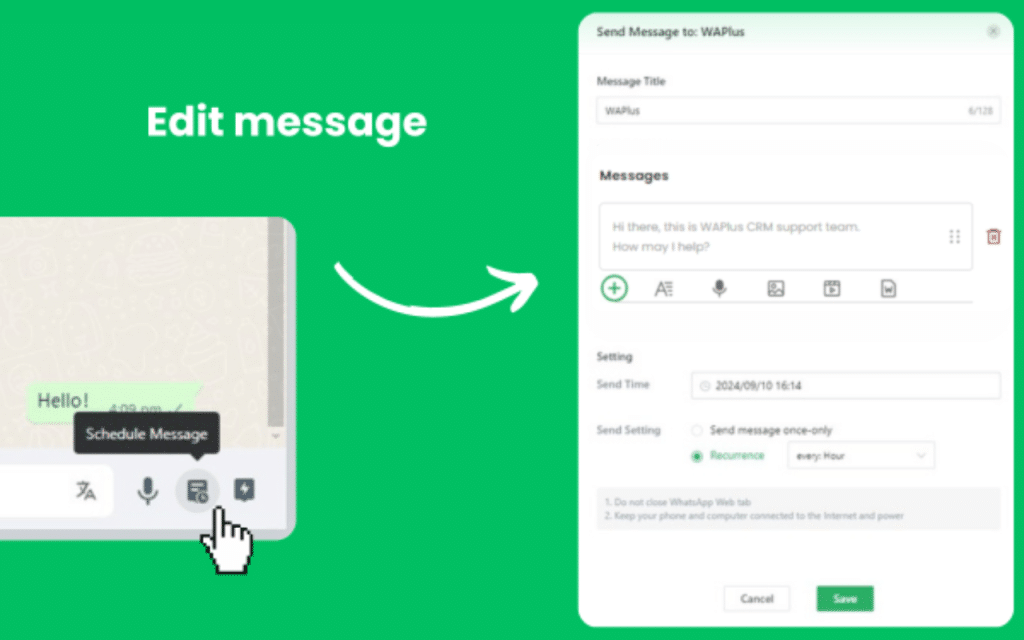
2. Open a chat on WhatsApp Web and look for Schedule Message in the bottom right corner.
3. Set up your message: give it a title, write your first default message as text, then click “+” to edit your second scheduled message. At this time, you can choose any message type: image, doc, video, etc. When you finish multiple messages, you can drag them to change the order in which they are sent. If you want to send just image messages, delete the first default text message. After that, set the sending time and choose if it’s a one-time recurrence or if you want it to repeat: every hour, every day, etc.
4. Hit save, and you’re done!
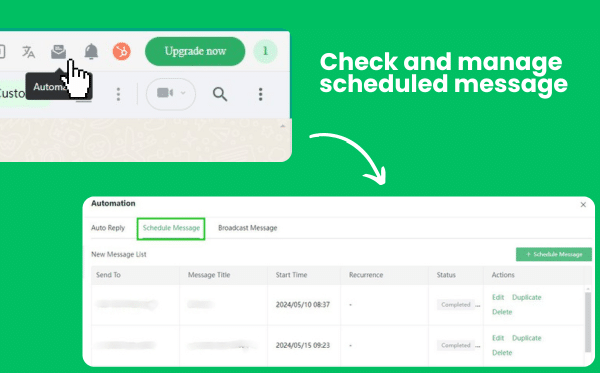
Additionally, WAPlus offers an entry to the scheduled message list, where you can check the sending status(pending, completed, failed) and manage all of them. Just click the Automation icon in the chat and select Schedule Message. From there, you can see what’s queued up, make changes, or cancel if you need to.
Why Choose WAPlus As Top One WhatsApp Scheduler
Here is a comparison among three popular WhatsApp Web Chrome extensions with Schedule WhatsApp Message feature👇
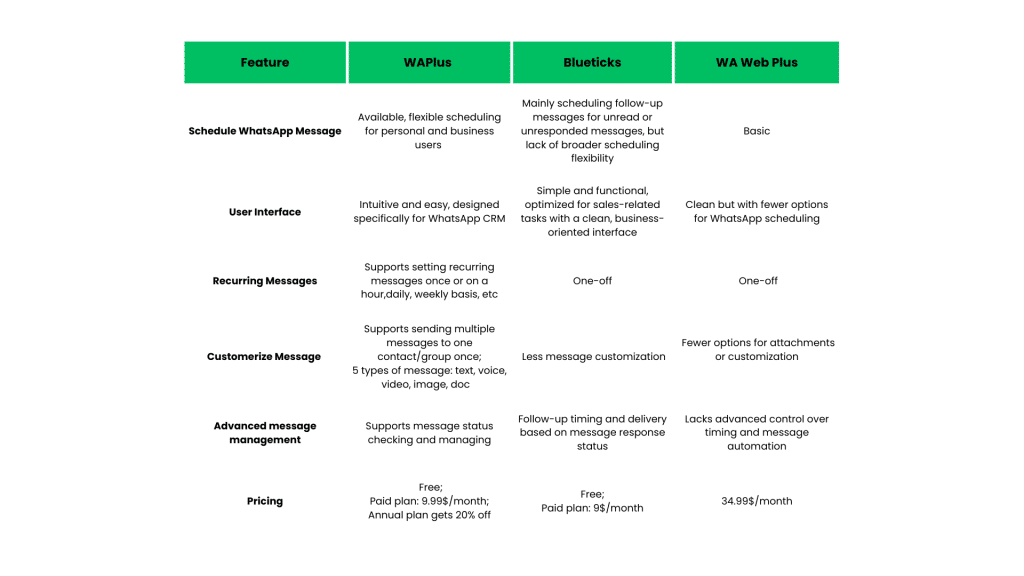
From the sheet, WAPlus remains the most comprehensive solution for flexible WhatsApp Schedule Message, while Blueticks is more specialized, focusing on follow-up messages for unread or unresponded conversations. WA Web Plus offers basic and minimal timed message support. All in all, WAPlus is the best choice.
Proven Tips to Level Up Schedule WhatsApp Message
Plan Ahead: Start from the simple details in your life – schedule WhatsApp messages for birthdays of your family and friends. You’ll be the one who never forgets!
Time Zone: As an foreign trade specialist, when messaging international contacts, set the scheduler to their time zone. They’ll think you’re incredibly thoughtful.
Test Run: Before relying on Schedule WhatsApp Message for something important, send yourself a test message as a precautionary measure.
Keep It Like A Man: Add some personal touches, memes to your timed messages on WhatsApp. Nobody likes talking to a robot.
Conclusion
Schedule WhatsApp Message feature is like having a personal assistant for your social life. It helps you stay on top of your communication.
So why not give it a shot? Schedule your first message tonight. Maybe it’s a sweet good morning text to your partner, a reminder to your forgetful friend, or even a motivational message to yourself for tomorrow morning.
Now, use your new Schedule WhatsApp Message superpowers wisely, and watch your WhatsApp game soar to new heights!











