iLoungeiLounge
  • News
    • Apple
      • AirPods Pro
      • AirPlay
      • Apps
        • Apple Music
      • iCloud
      • iTunes
      • HealthKit
      • HomeKit
      • HomePod
      • iOS 13
      • Apple Pay
      • Apple TV
      • Siri
    • Rumors
    • Humor
    • Technology
      • CES
    • Daily Deals
    • Articles
    • Web Stories
  • iPhone
    • iPhone Accessories
  • iPad
  • iPod
    • iPod Accessories
  • Apple Watch
    • Apple Watch Accessories
  • Mac
    • MacBook Air
    • MacBook Pro
  • Reviews
    • App Reviews
  • How-to
    • Ask iLounge
Font ResizerAa
iLoungeiLounge
Font ResizerAa
Search
  • News
    • Apple
    • Rumors
    • Humor
    • Technology
    • Daily Deals
    • Articles
    • Web Stories
  • iPhone
    • iPhone Accessories
  • iPad
  • iPod
    • iPod Accessories
  • Apple Watch
    • Apple Watch Accessories
  • Mac
    • MacBook Air
    • MacBook Pro
  • Reviews
    • App Reviews
  • How-to
    • Ask iLounge
Follow US

Articles

Articles

SpyMyFone – The Best Monitoring App To Spy With Good Intentions

Last updated: May 24, 2019 12:04 pm UTC
By Lucy Bennett
SpyMyFone - The Best Monitoring App To Spy With Good Intentions

Considering using a spy app to track down details and information on a target device? SpyMyFone is an advanced tracking tool that can be used in a variety of situations. As a phone spy app, it is used to conveniently spy your kids’ or families whereabouts and smartphone activities.


How To Use SpyMyFone
SpyMyFone Install

SpyMyFone - The Best Monitoring App To Spy With Good Intentions

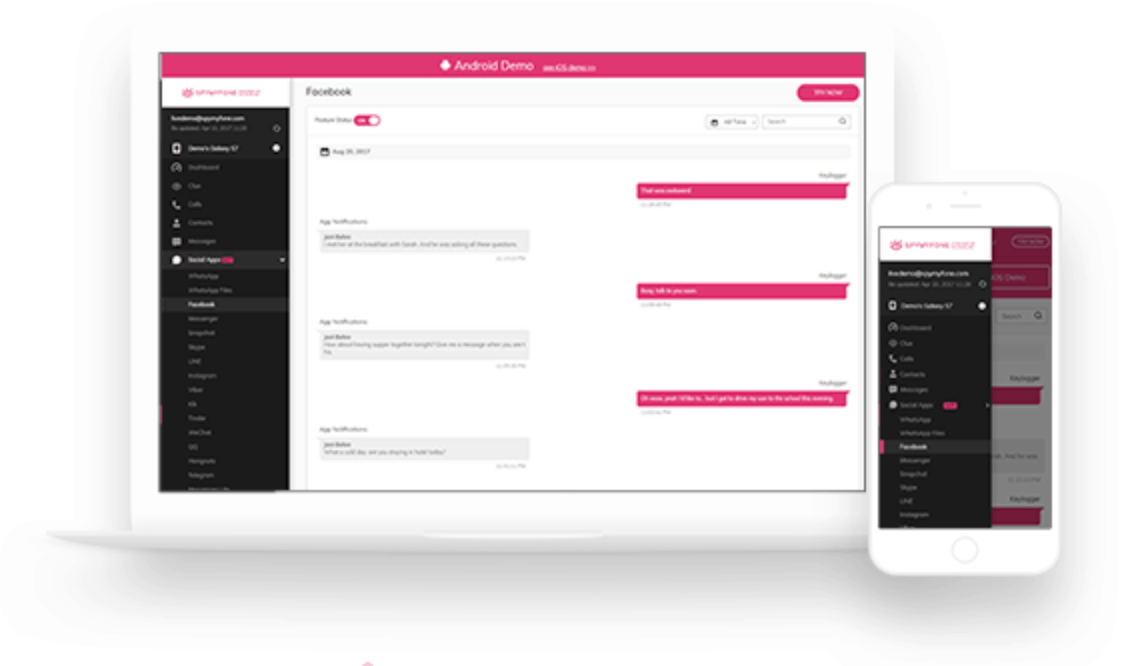
Installing SpyMyFone is as easy as finding it on the Play Store and installing it on the target’s Android device. For iOS smartphones, you will need to activate the iCloud platform by logging in or creating an account. Then, head to the SpyMyFone website and create an account to begin tracking.

Users won’t have to do anything technical except for the usual sign-ups and downloading apps on a smartphone. Setting up the tracker settings can be done in just a few minutes.


When the target device connects to the web, collected information will be automatically uploaded and available to view on the SpyMyFone dashboard or the app’s Control Panel section. You can view extracted information such as the contacts list and call logs, including the name, date and time the conversation took place. Messages can be viewed across messaging apps and social media platforms like Snapchat, Facebook, WhatsApp, Instagram and more. SpyMyFone can extract all photos and videos and even voice files. You’ll see frequently visited sites and the entire browsing history, whether it’s on an iOS or Android phone or tablet.


Here are some instances when the SpyMyFone device monitoring and tracking software can be useful:

Parental Control

Parental Control

SpyMyFone can be installed in a kid’s smartphone device so parents know how they use their smartphone and intervene if necessary. Features such as spying on calls, messages on social media and browsing habits can be useful in protecting them from bullies and unsuitable online content. Moreover, the tracking app can locate the smartphone owner’s whereabouts anytime, anywhere. You get location information in real time and also have the ability to set geofences.


Employee Monitoring

Employee Monitoring

Companies can protect their assets by constantly monitoring how their employees use the company smartphone or how they behave at work. The 24/7 surveillance data is stored on a dashboard in case of legal or moral breaches.

Relationships

Spymyfone Relationships

One of the quickest ways to know whether a partner is cheating or not is by installing a spy tracker app and monitoring the messages, call details and location. Plus, social media activity can be tracked for incoming and outgoing chats and direct texts.



Latest News
The 14-inch MacBook Pro with M5 Chip 16GB RAM/512GB is $250 Off
1 Min Read
Noise and Static on AirPods Pro 3 Still Unfixed
1 Min Read
New iMac with 24-inch OLED Display May be Brighter With 600 Nits
1 Min Read
The 15-inch M4 MacBook Air 256GB Is $250 Off
1 Min Read
Internal Kernel Debug Kit from Apple Reveals Tests for a MacBook with A15 Chip
1 Min Read
Apple Currently In Talks With Suppliers for Chip Assembly & Packaging of iPhones in India
1 Min Read
Apple Allows Easier Battery Replacement For M5 MacBook Pro with 14-inch Display
1 Min Read
The Apple Watch SE 3 44mm GPS is $50 Off
1 Min Read
20th Anniversary iPhone May Launch in Two Years
1 Min Read
Better Image Generation Capabilities and Apple Music Integration Coming to ChatGPT
1 Min Read
A20 Pro Chip Coming to Next Gen iPad Mini OLED
1 Min Read
Amazon has the AirTag 4 Pack Marked $29 off
1 Min Read

iLounge logo

iLounge is an independent resource for all things iPod, iPhone, iPad, and beyond. iPod, iPhone, iPad, iTunes, Apple TV, and the Apple logo are trademarks of Apple Inc.

This website is not affiliated with Apple Inc.
iLounge © 2001 - 2025. All Rights Reserved.
  • Contact Us
  • Submit News
  • About Us
  • Forums
  • Privacy Policy
  • Terms Of Use
Welcome Back!

Sign in to your account

Lost your password?