

Everyone wants to pull the best prank on this April Fool’s Day. However, they lack the ideas to make everyone laugh their wits out. In this case, you need access to a good resource with something great to try for this April Fool’s Day. Have you recently thought of showing yourselves in a different and unexpected location? In this article, learn how to spoof your location and make it seem realistic with the best possible methods.
Part 1. Wondershare Dr.Fone – Virtual Location: Your Solution to Location Spoofing
In terms of efficient location spoofing, Wondershare Dr.Fone – Virtual Location provides a one-click solution to its users. This practical tool does not restrict itself to a specific audience, as it includes support for the latest Android and iOS users. There are different scenarios where Wondershare Dr.Fone – Virtual Location provides a consistent location spoofing solution.

From changing location to a single-point location to a multi-stop route, this aids users in making their location spoofing feel real. This April Fool’s Day, this unique utility tool can be the best accessory to a good prank on your friends or family.
Prominent Features of Wondershare Dr.Fone – Virtual Location
- Hiding Location on Phone: If you have a different plan in mind, you can hide your location on your phone using this location spoofing solution. This protects your location from getting breached, which can then be used to confuse your friends.
- Crossing All Geo-Restrictions: Realizing your ethical boundaries, you can use this service to bypass geo-restrictions imposed in your country or location. This helps you use the restricted service or game like a regular user.
- Joystick Movement: Wondershare Dr.Fone – Virtual Location can be used to move your GPS location in real time. This is possible with the joystick feature offered, which helps you simulate GPS movement with flexibility.
- Multi-Stop Route: Using this location spoofing solution, you can select multiple spots on the location and define your simulation using different parameters. Define the speed, overall distance, and other parameters to make your movement feel real.
Part 2. Different Scenarios For Using Wondershare Dr.Fone – Virtual Location At Its Best
There are multiple scenarios where you can use Wondershare Dr.Fone – Virtual Location to pull a prank on this April Fool’s Day. Provided next are some scenario-based overviews where this utility can be used at its finest:
Scenario 1: Pulling April Fools Prank on Friends
Hailey, a 24-year-old, thought of pranking her friend by calling him at a restaurant for a date. However, she never reached the location and asked him to hurry up. Tina uses Wondershare Dr.Fone – Virtual Location to spoof her location to that restaurant to make him panic; however, she is still at home on her bed.
Scenario 2: Looking For A Date?
Wondershare Dr.Fone – Virtual Location supports different dating apps for location spoofing. Laura, who intends to find a new friend for pranking on a dating app, plans to relocate to another country. The person she connects with can be from another country, with whom she decides on a complete date plan, even though she is not there.
Scenario 3: Social Media Location Spoofing
Everyone uses social media to let their followers know about recent updates that have happened in their lives. As an influencer, Janice pranks her followers by showing that she has moved to a new location. Wondershare Dr.Fone – Virtual Location turns out helpful in this case, as it spoofs your location to a new location. Every other story you post will be shown as if it is posted from that country.
Scenario 4: Playing Games With Spoofed Location
Micheal, a Pokemon Go enthusiast, decides to shift to a new location and confuse his counterparts. However, he never shifts there but uses Dr.Fone’s virtual location spoofing ability to change his device’s location. Now, he will be able to capture some special Pokemon that is not even available in his actual location.
Part 3. How To Spoof Your Location With Wondershare Dr.Fone – Virtual Location?
In this part, learn how to change your location with Wondershare Dr.Fone – Virtual Location. Provided below are the steps to execute this method seamlessly and confuse your friends this April Fool’s Day:
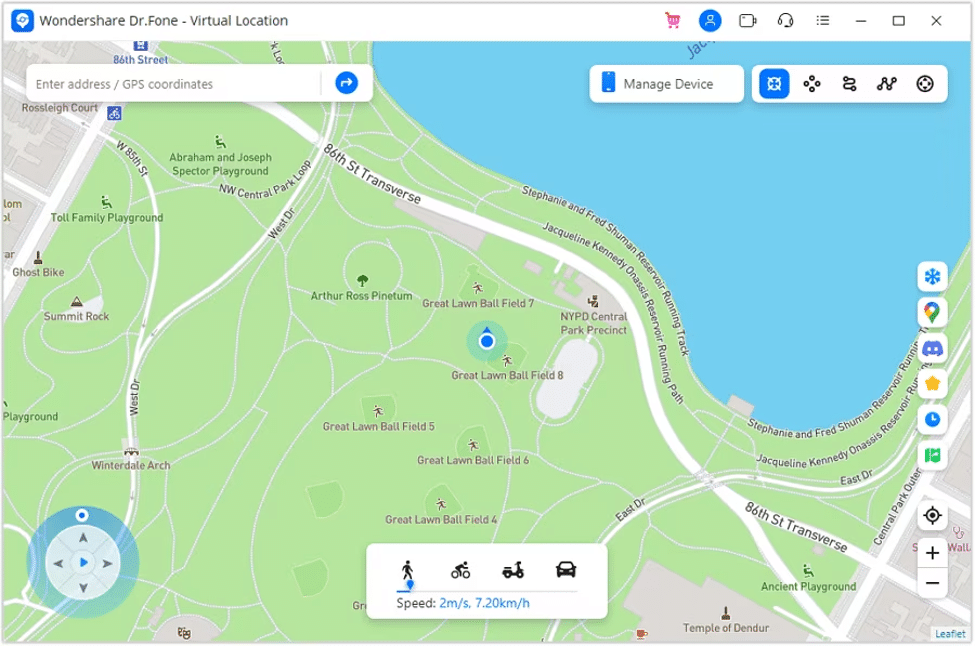
Step 1: Activate Teleport Mode on Dr.Fone – Virtual Location
As you connect your smartphone successfully, enable the “Teleport Mode” button on the top-right side of the Wondershare Dr.Fone – Virtual Location’s window.
Step 2: Teleport To a New Location Successfully
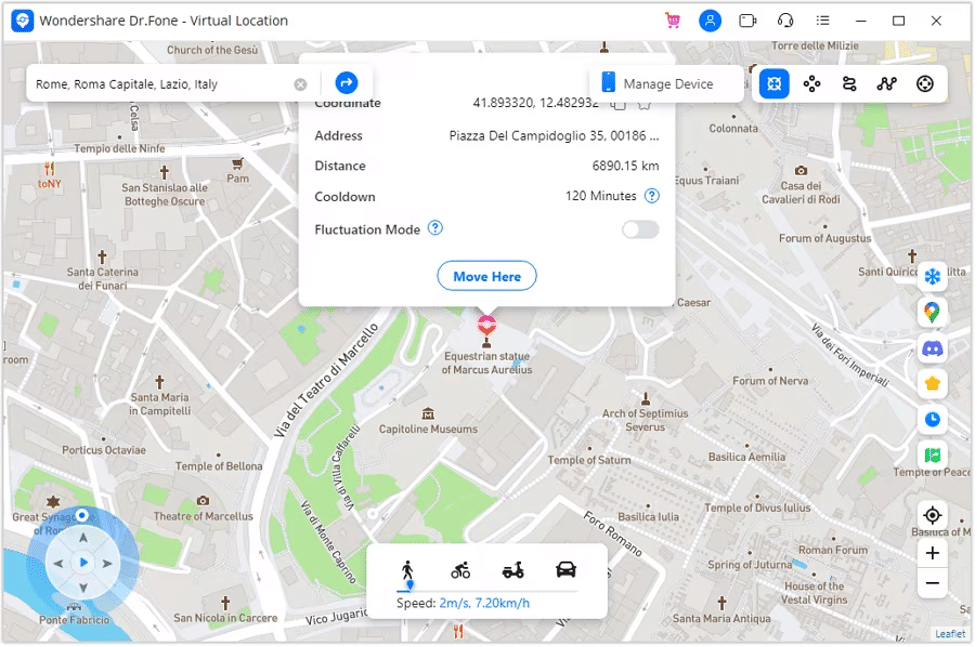
When activating this, select any appropriate location by searching it from the “Search” bar on the top. Continue to select “Move Here” to shift your location by teleporting using this solution.
Conclusion
This article has shown you multiple scenarios that can be used to spoof your location this April Fool’s Day. While this is possible with Wondershare Dr.Fone – Virtual Location, you would’ve learned some great options to try for pranking your friends and family. If you have other great ideas, share them with us on Instagram to show your creative side.











