
With more than a decade of experience in video streaming, Hulu is a popular on-demand service. More than 40 million people subscribe to its streaming service, which is one of the best and largest in the U.S.
The fact that Hulu uses ads sets it apart from most of its competitors. In the cheapest $6.99/month plan, you’ll see ads, just like on network television. Even though many users might find it frustrating to pay for a service and still see ads, this does keep the costs down.

The price of accessing content without ads and downloading movies and TV shows for offline viewing is almost twice, as much at $12.99/month.
But, why would you blow that much money, when you have Pazu’s Hulu Video Downloader?

Pazu is one of the world’s most popular video downloading services. Pazu Hulu Video Downloader was released on 9th June 2022. Hulu Downloader for macOS and Windows is specially designed for downloading movies and shows from Hulu to MP4/MKV in 1080p. The downloads can also be transferred and played from anywhere in the world.
The most popular firm specializing in video downloaders and music converters is Pazusoft. Currently, Pazusoft offers downloaders for Amazon videos, Netflix videos, and Hulu videos. This is the best app to download, share, save, and preserve video content from giant OTT platforms.
In this review article, we will review Pazu’s video downloader for Hulu.
Hulu Video Downloader Features
Pazu Hulu video downloader allows users to download ad-free Hulu videos to MP4/MKV on Mac/Windows even with the ad-supported $6.99/month Hulu plan. You should also see movies and TV shows to be downloaded from hulu.com, hulu.jp, and hulu.jp/store. Download Hulu movies and TV show to MP4/MKV and watch them offline on any device. Video downloads from Hulu can be done in 1080p with subtitles and audio kept intact. Downloads will never expire even after they leaving Hulu or your subscription ends.
Here are some other features of Pazu’s Hulu Video Downloader:
A Multilingual Soundtrack And Subtitles
Learning another language is one of the most useful features. The subtitles and audio of multilingual movies and TV shows provide you with an opportunity to learn a foreign language. Pazu Hulu Video Downloader allows you to download any video from Hulu and retain the audio as well as subtitles. Besides, you can take your pick of which language you want to download the video in.
It is possible to download subtitles and audio in any language you wish. The interface also offers preset subtitles and audio languages. It is quick and easy to employ an audio description and surround sound.
The software saves subtitles by either embedding them or hard-coding them. The software offers surround sound in both 5.1 and 2.0 formats.
The Easiest Way To Download
The software is compatible with both Windows and Mac. Both Windows and macOS can save video content. The user gains flexibility here. Downloading and transferring it to others via PD, hard disk, or hard drive are all possible. It is also seamless to download the videos, and if there are any issues for clients then Pazu can assist them.
Multi-Device Support
The quality of the video is a primary consideration for users who wish to download movies or shows for offline viewing. You can fully enjoy the media with the Pazu Hulu video downloader because it gives you access to full high-quality content. Your favorite shows or movies can be downloaded up to 1080p. It implies smooth and clear video quality since 1080p is HD.
Hulu videos are available for download in H.264 and H.265 video formats. As many devices as possible can be used to watch Hulu movies and TV shows offline. You can download Hulu’s movies and TV shows without any limitations.
Steps to download Hulu movies and TV shows to MP4:
Step 1: Firstly, download and install the Hulu Video Downloader on your Mac/Windows, then launch the application.
Step 2: Log in or sign up your Hulu Account.
Step 3: Select the profile and enter the pin.

Step 4: Click the icon(key icon) and enter your registration code to unlock the version. Otherwise, run the free version.
Step 5: Add the video or show you want to download, or you can copy/paste the URL of the show/movie from the website of HULU.
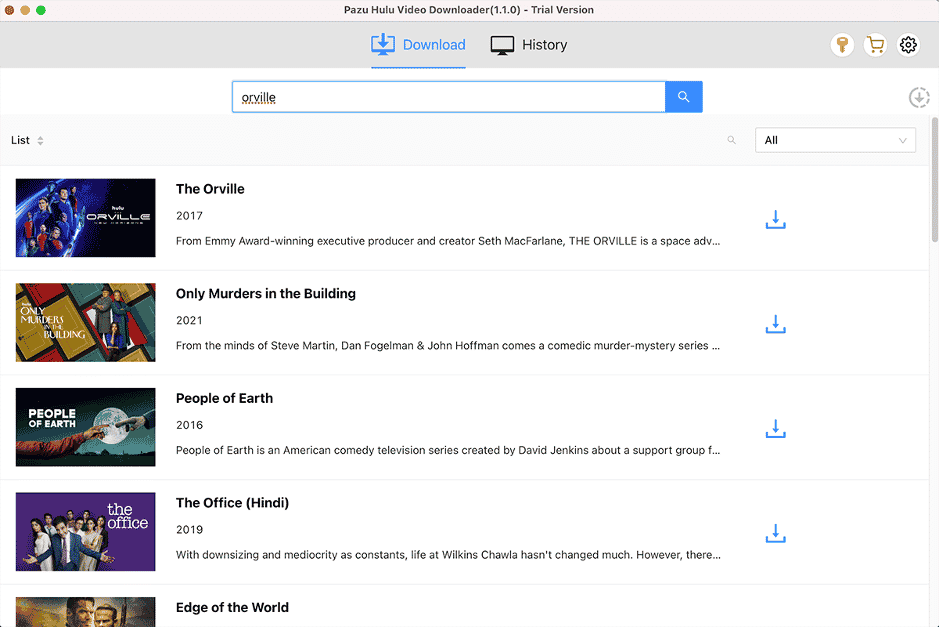
Step 6: Select the quality and format of the video you wish to download.
Step 7: Click the download arrow.
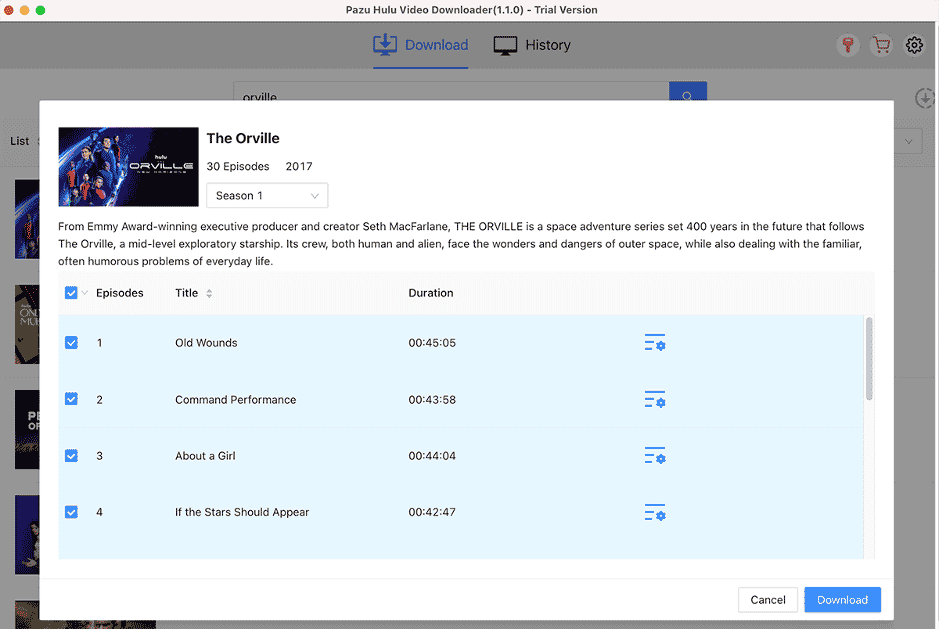
Step 8: When the download is done, click on history to view all downloads.
The Verdict
Pazu is the place where you can download every Hulu, Netflix, or Amazon series in HD quality within minutes. Take advantage of Pazu Hulu Video Downloader’s new release to download videos!











