
Have you accidentally formatted the wrong hard drive partition or pressed the Delete button by mistake?
A few years ago, there were hardly any reliable solutions to fix issues like these and get back our lost or accidentally deleted data. Thankfully, with the advancement in technology, data recovery solutions have also seen a lot of changes. Now, we can take the assistance of data recovery tools to retrieve the lost, deleted, or inaccessible data under different scenarios. Let’s get to know about one of these reliable solutions.


Is it Possible to Recover Deleted data from a Hard Drive?
Yes, it is possible to recover deleted data from a hard drive or any other storage unit. This is because when a file is deleted, it isn’t wiped off from the source right away. The space allocated to it becomes free and ready to be overwritten by something else. That’s why it is recommended to use a data recovery tool to extract this inaccessible content that we can’t readily read/write.
Why Use Recoverit?
Recoverit can recover different kinds of files – from videos to music and photos to valuable documents. This also includes emails, compressed files, and everything in between. What’s more is that you’ll be able to retrieve your data that was lost from different scenarios like BSOD (blue screen of death), a hard drive failure, OS booting issue, and others. Recoverit can scan all sorts of lost and corrupted files as well as formatted or deleted data on both Mac and Windows systems. Apart from it, you can also perform data recovery on cameras, music players, USB flash drives, SD cards, external hard drives, camcorders, and other sources.
One of the best things about Recoverit is that no prior technical knowledge is needed to operate it. Simply launch the tool and follow an intuitive process to recover your data. To make the data recovery process a hassle-free experience for all, Wondershare is offering a free version of the tool. Using it, you can get back at least 100 MB of data without spending anything. To enjoy its unlimited service or create a bootable media, you can upgrade to its pro or ultimate version.
How To Use Recoverit Data Recovery?
If you have lost your data under any circumstances, then Recoverit would be your go-to tool. You can use it to recover data from every leading device or file system for free. Since it runs on both Windows and Mac, you won’t face any hassle using it. All you need to do is follow these simple steps:
Step 1: Download and Install Recoverit
Go to the official website of Recoverit and download its free data recovery tool on your computer.
Step 2: Launch the Recovery Tool
Complete the installation and launch Recoverit whenever you face any unexpected loss of your data. You will be welcomed with a straightforward and intuitive interface.

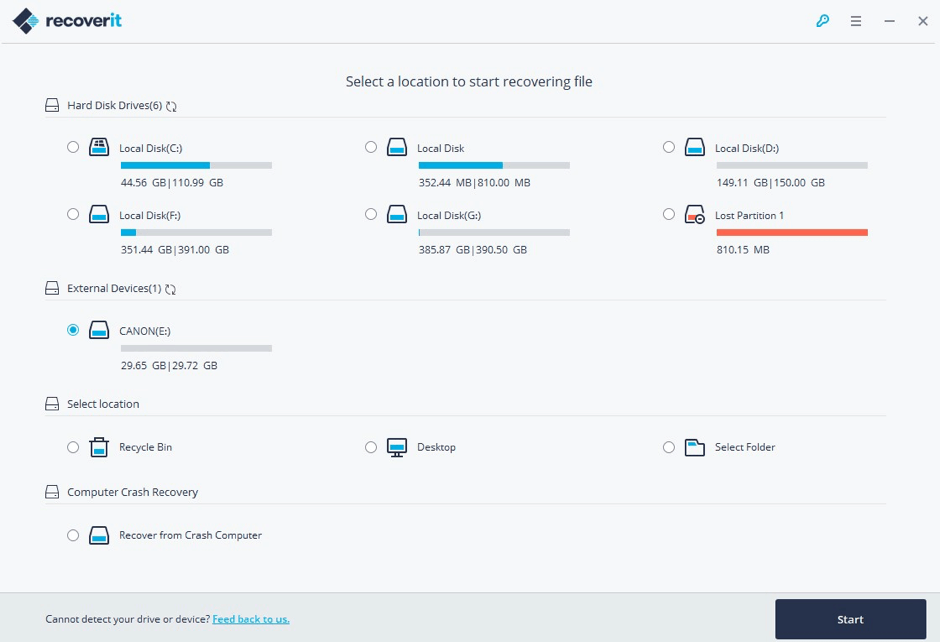
Step 3: Select a Target Location
On its welcome screen, you can see the possible locations to scan (like a hard drive, partition, important folders, or external devices). Simply mark the location of your choice and click on the Start button.
Step 4: Scan and Preview
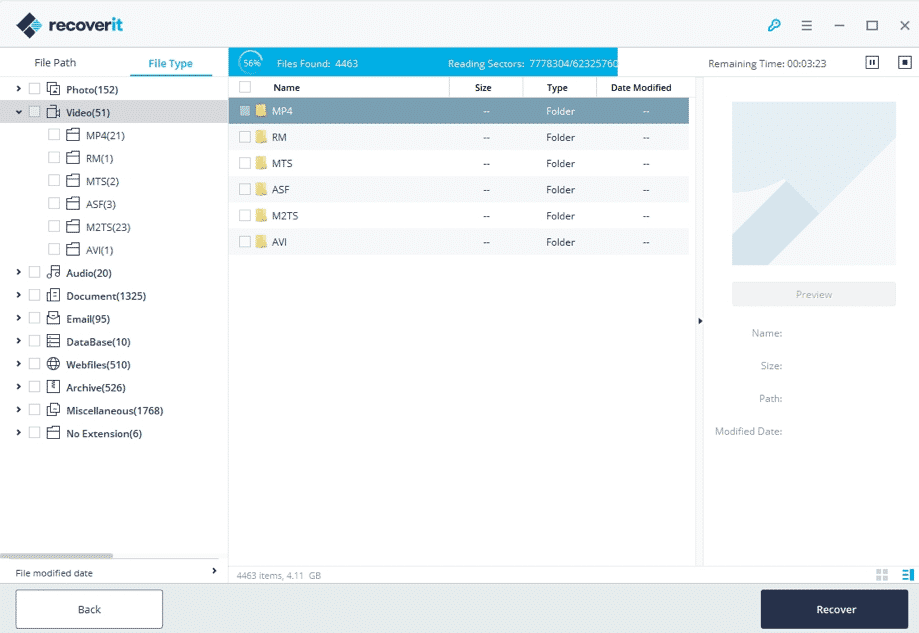
After Recoverit completes the scan, all the lost and available files will be displayed on its interface. Although you can pause the scan in between, it is recommended to let the application complete the process to get better results.
Step 5: Recover Your Lost Data
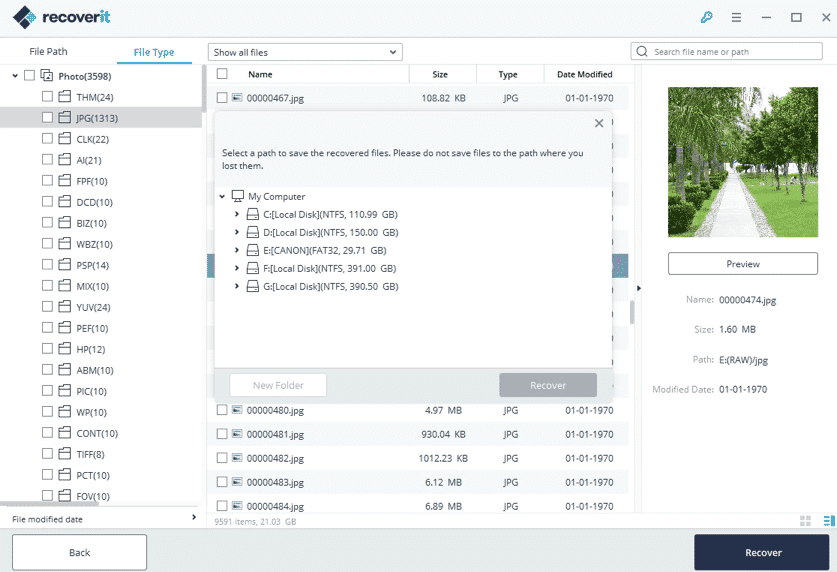
After obtaining the results, preview them, and select the data you want to get back. Make multiple selections if you want to, and click on the “Recover” button when you are done. In the end, just select a location where you wish to save your files securely.
Now when you know how data recovery works, you can easily get back your lost or deleted files from any source and under every possible scenario. Keep a reliable data recovery tool like Recoverit installed on your Windows/Mac system. Use it whenever an unwanted data loss scenario happens and never let go of your important files again!











