
Digital data is a necessary component of everyday life. We can’t afford to lose any files on our computers, including our theses, study materials, personal information, images, and business documents. Sometimes, though, we unintentionally remove a necessary file from our computer. Mostly, we delete our important photo unintentionally and don’t find any photo recovery app to recover data. Data recovery can be done in a number of ways. However, not everyone knows the resources available and how to recover deleted PC files. This article demonstrates how to quickly recover deleted files using the best data recovery or photo recovery app Wondershare Recoverit.
Typical Causes of Data Loss
Here are the top five reasons for data loss.
Individual flaws
Employees may mistakenly erase essential data or replace crucial firm data. Other potential data loss sources include incorrectly renaming files or removing text blocks, which forces businesses to look for preventative measures.
Damage to Storage
Any system’s storage is prone to failure, and hardware issues are the most frequent reasons for this. Suppose your data or backups are kept locally. In that case, mechanical problems, human error or misuse, such as improper shutting down data storage systems, can also result in severe damage and considerable data loss.
Malware and Viruses Assault
One of the critical causes is that emails sent to businesses often contain viruses and malware threats. Necessary data can be deleted, corrupted, or stolen by viruses, which would impede business operations. These frequently happen when unwary employees click on specific emails that contain phishing or data-stealing links.
Power Failures
Business operations might be affected by sudden power outages since they require systems to abruptly shut down. This corrupts existing files and directories and causes a significant loss of unsaved data.
Wondershare Recoverit: What Is It?
The Wondershare Recoverit data recovery program accesses the paths to deleted files on your system. Recoverit was first made available by Wondershare in 2003. It has consistently improved and released new versions to rank among the top data recovery solutions. This user-friendly software can restore emails, documents, images, videos, and other media types on Windows and macOS. In actuality, Recoverit is capable of recovering over 1000 files.
How to Use Recoverit to Retrieve Lost Data
In-depth knowledge or a highly developed skill set are not prerequisites for recovering deleted images from Windows. For accurate data recovery, little effort and attention are needed. Additionally, Wondershare Recoverit would tremendously aid in making the procedures easier to manage. Windows users can get it free (limited) and use it to recover files for media restoration. There are only three steps to using Wondershare Recoverit to restore your data after installation:
Step 1: Choose a starting location in
Find the location of the data that was lost or permanently erased. Additionally, missing partitions are shown here.

Step 2: Scanning your file
To find your missing files, search the chosen location. You can take a brief break from your recuperation process and continue while scanning. To quickly locate files, use the filter.
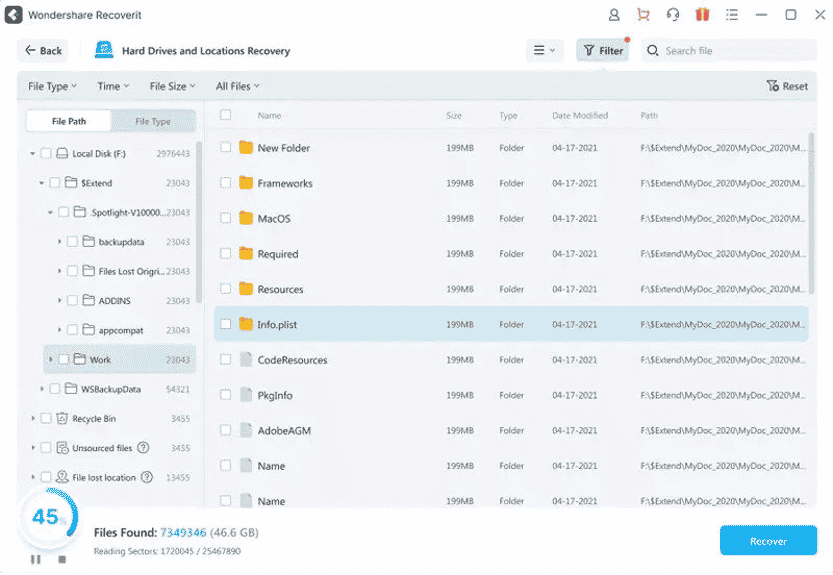
Step 3: Preview and Retrieve Lost Data
For the ensuing menu, preview the files you want to recover. To get everything restored, select “Recover. After recovering, save the file to your desired location.

Reasons to Select Recoverit for Data Recovery
• Success Recovery Rate of 95%
One of the top data recovery programs, Recoverit, has the highest success rate in recovering data from all types of loss.
• Over 35 Patents on Technology
35+ Patents have been granted for Wondershare Recoverit’s inventive data recovery method, apparatus, and video fragment file recovery.
• Superior Performance
No need to be concerned about the system failing halfway through the scanning or recovery procedure. Recoverit now boasts industry-leading levels of stability.
• A 66 percent decrease in memory usage
The memory use of the most recent version has significantly decreased thanks to the new data management approach, improving system speed.
• Previews may be any size.
A comfortable experience for you during the healing process.
• Select a Particular File Type
Give you the option of choosing the quickest method for sorting the desired files from thousands to millions of results.
Other Techniques for Recovering Lost Data
Restore From Recycle Bin
Deleted files from the recycle bin can be recovered
- Right-click the desktop’s recycle bin.
- From the context menu, choose Open.
- Verify and choose which files to recover.
- Use the right-click to recover the files you desire.
- To restore your selected files, pick Restore from the context menu. The files can also be dragged directly from the Recycle Bin.
Restore From Previous Versions
Can’t find the desired files in the recycle bin? There is yet a chance for you to get them back, so don’t worry. If System Restore is enabled beforehand, use these procedures to restore a file or folder that was deleted or renamed:
- Double-click the This PC icon on the desktop to open File Explorer or press Windows + E.
- Track down the folder that houses the misplaced file or folder.
- Restore prior versions by performing a right-click on it.
Conclusion
Wondershare An excellent data recovery application is Recoverit. That will function on nearly every gadget. Recoverit can assist even if you want to retrieve video from a vintage camcorder. If you work from home or need to ensure that your sensitive files are safe, you can quickly test the free download to see if it’s the correct tool.











