
Blurry, low-quality photos can be frustrating, especially when they hold special memories. Fortunately, AI-powered image enhancers can restore clarity and improve resolution with just a few clicks. But with so many options available on the Internet, choosing the right one can be difficult. Today, I tested and reviewed five popular AI image enhancers—let’s find out which one is truly the best!
Top 5 AI Image Upscalers
I compared free AI image upscalers available on the internet based on key factors like processing speed, enhancement quality, user experience, free usage limitations, and platform compatibility, to help you easily choose the best one for your needs.
Here’s a snapshot of my top 5 AI Image Upscalers.
| Features | PhotoGrid | Pixelcut | YouCam Enhancer | Cutout.Pro | Fotor |
| Processing Speed | Super fast(5s) | Medium(15s) | Medium(18s) | Fast(10s) | Slow(20s) |
| Enhancement Quality | 4K | 4K(Not True 4K ) | 4K(Blurred/Soft Details) | Ordinary | 4K(Not True 4K) |
| User Experience | Intuitive, automatic enhancement | complicated | Simple, limited free enhancements | Limited free trial | complicated |
| Free Usage Limits | Unlimited, watermark-free | Unlimited (2x upscale only) | Limited (4 free uses) | Only 1 free use | Unlimited (2x), high-res paid |
| Price | Completely Free | 59.9$/Year | 6.67$ (200 credits/mo) | 16.90$ (200 credits/mo) | 31.99$/Year |
| Platform Availability | Web, Android, iOS | Web, Android, iOS | Web, Android, iOS | Web only | Web, Android, iOS |
| Overall Rating | ★★★★★ | ★★★★☆ | ★★★☆☆ | ★★★☆☆ | ★★☆☆ |
1. PhotoGrid
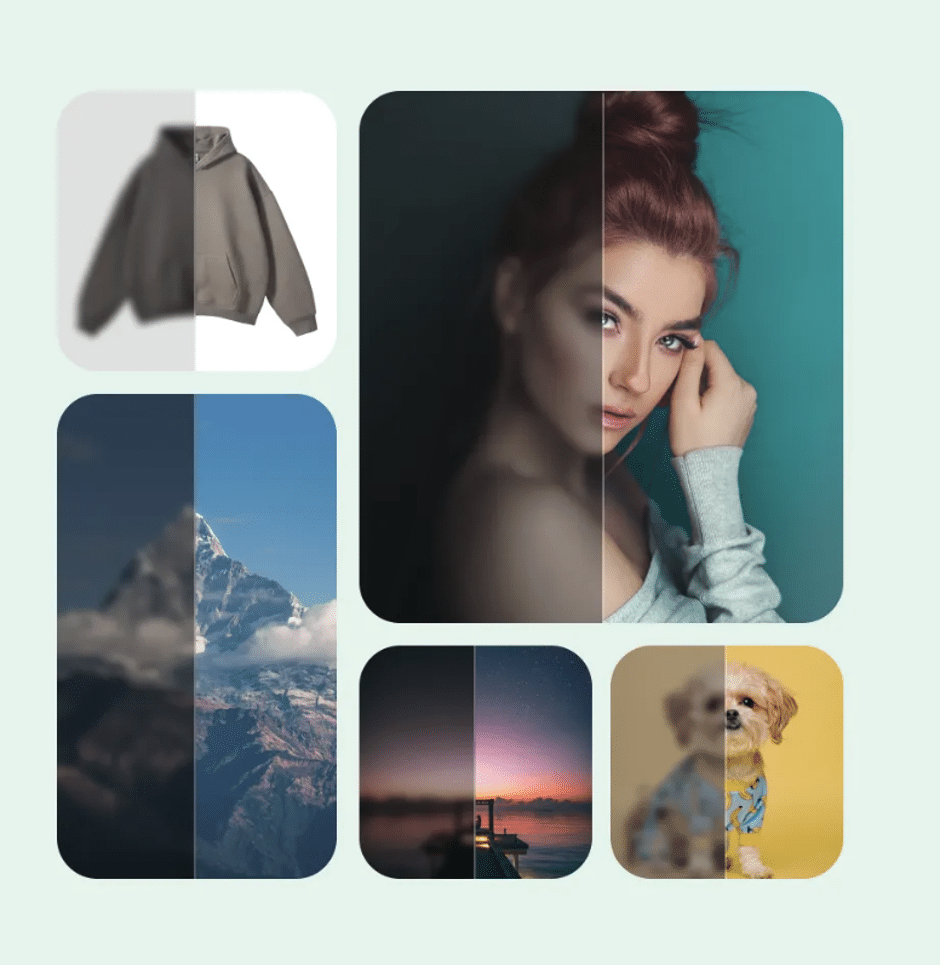
Originally popular as a simple collage-making app, PhotoGrid has evolved into a powerful AI-driven photo editing platform. It now offers an impressive suite of features, including AI Image Upscaler, Background Remover, Object Remover, Watermark Remover, and Batch Image Processing—all completely free.
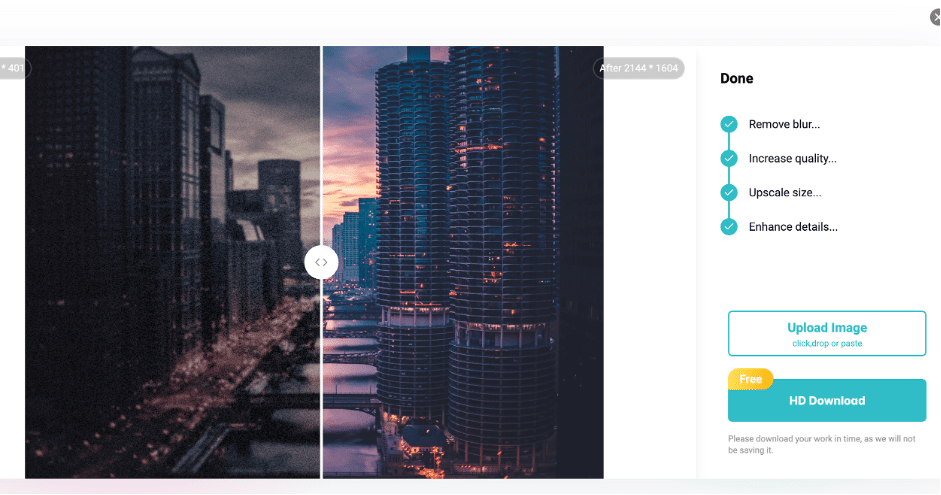
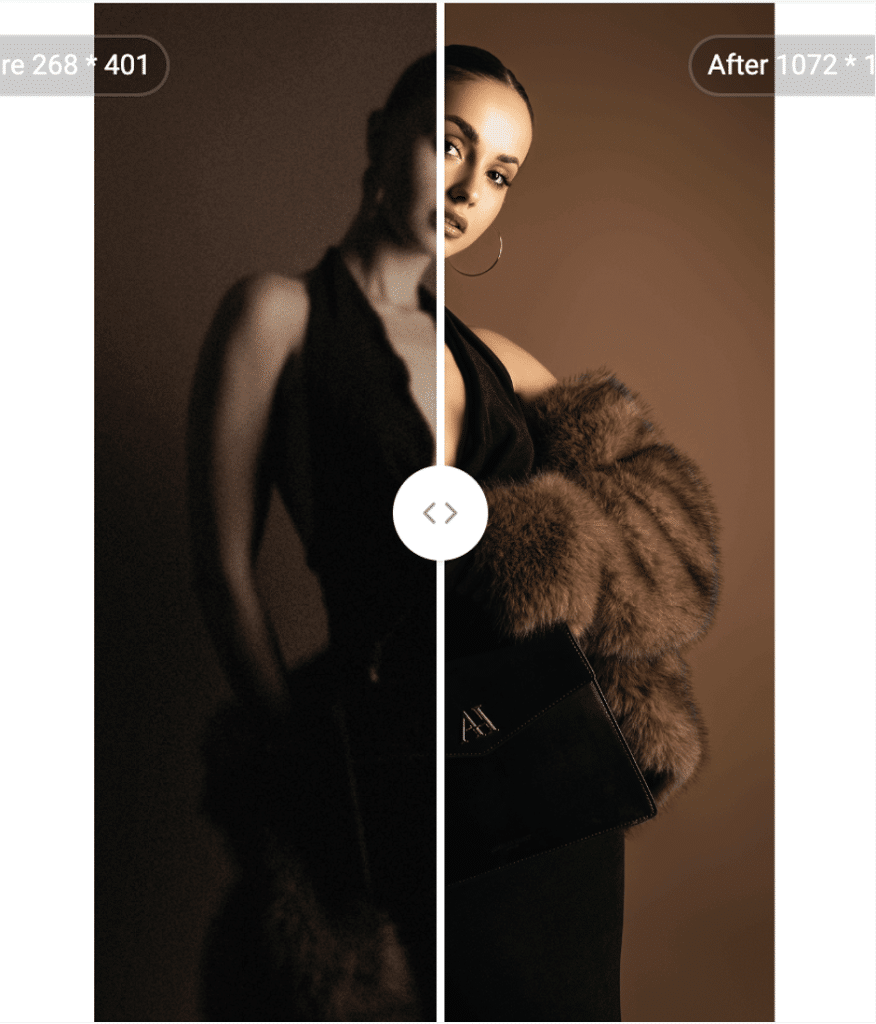
I tested PhotoGrid on various types of photos, including night shots, portraits, and batch images. Surprisingly, PhotoGrid handled them all exceptionally well, delivering sharp, vibrant, and high-quality results every time.
It’s now my go-to AI image enhancer!
1. Night Photography:
2. Portrait:
3. Batch Photos:
✅ Pros:
- Totally free: no hidden fees, subscriptions or watermarks.
- High Quality Enhancements: Excellent detail retention, color accuracy and noise reduction for all types of images.
- Easy to use: the interface is simple, straightforward and very intuitive.
- Fast Processing: Enhance images in seconds (~5 seconds).
- Available across Web, Android, and iOS.
⚠️ Cons:
- Limited Manual Controls: Designed primarily for automated enhancements, less flexibility for detailed manual editing.
- Batch Processing Limitation: Though available, batch processing may slow down slightly with large numbers of high-resolution images.
Overall, PhotoGrid is the easiest but most powerful editor to use, making it an exceptional free choice for AI-based photo editing.
2. Pixelcut
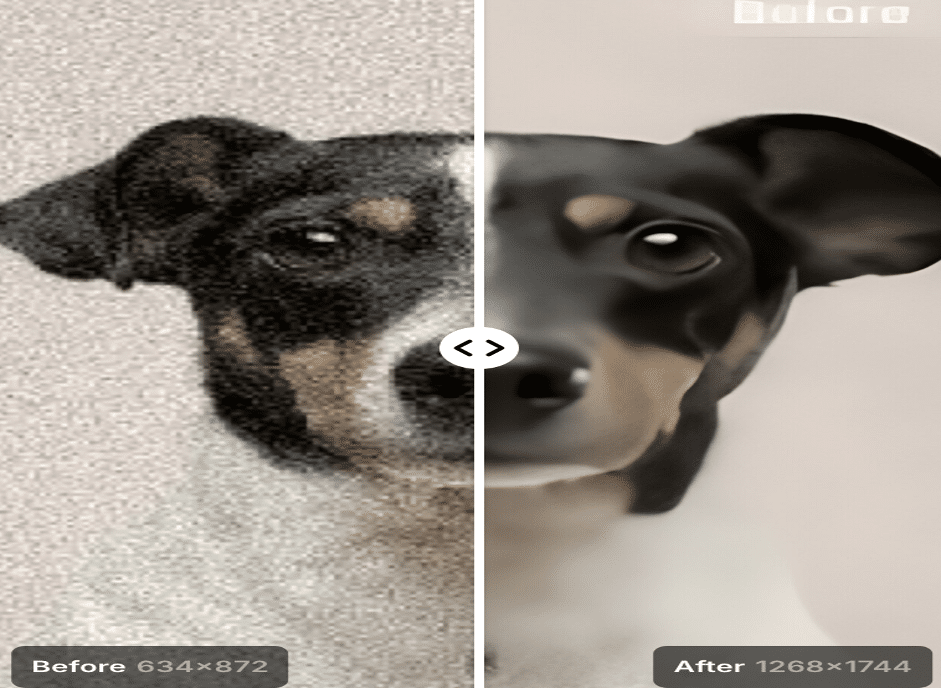
Pixelcut’s image enhancement is flexible, with two different enhancement levels (2x and 4x). And I found that it does a good job of reducing noise while still maintaining the natural look of the image. Unfortunately, it lacks in retaining fine details, resulting in a loss of sharpness.
✅ Pros:
- Flexible Upscaling Options: Provides choices of 2x (free) and 4x (paid) upscale levels.
- Good Denoise Capability: Effectively reduces noise in low-quality or grainy images.
- Available across Web, Android, and iOS.
⚠️ Cons:
- Edge Clarity Issues: Occasionally produces slightly unclear or blurry edges, especially noticeable in complex images.
- Paid 4x Upscale: The higher-quality 4x upscale option requires payment, limiting full accessibility for users who prefer a completely free tool.
- Moderate Processing Speed: Takes around 13 seconds per image, slightly longer than the fastest options on the market.
Overall, Pixelcut is a relatively basic AI image enhancer for users with basic needs.
3. YouCam Enhancer
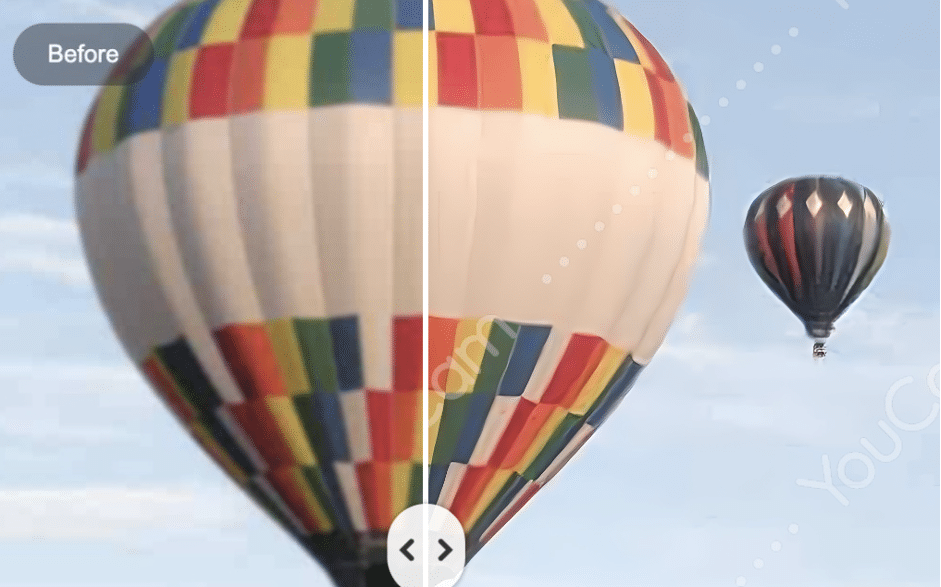
YouCam Enhancer focuses on AI features and it has an easy-to-use interface for beginners. However, while the platform claims to enhance images up to 4K resolution, the testing showed that the actual improvements don’t even come close to true HD quality.
✅ Pros:
- User-Friendly Interface: Intuitive and easy to use.
- Available on Web, Android, and iOS.
⚠️ Cons:
- Limited Free Usage: Only offers 4 free image enhancements, after which you must pay.
- Mediocre enhancement quality: Enhanced images are not very sharp.
- Moderate Processing Speed: Slightly slower performance (around 10-15 seconds per image) compared to other tools.
- Watermarked Downloads: Free downloadable images are watermarked, limiting professional or commercial use.
Overall, YouCam Enhancer is a good choice for occasional quick edits!
4. Cutout.Pro
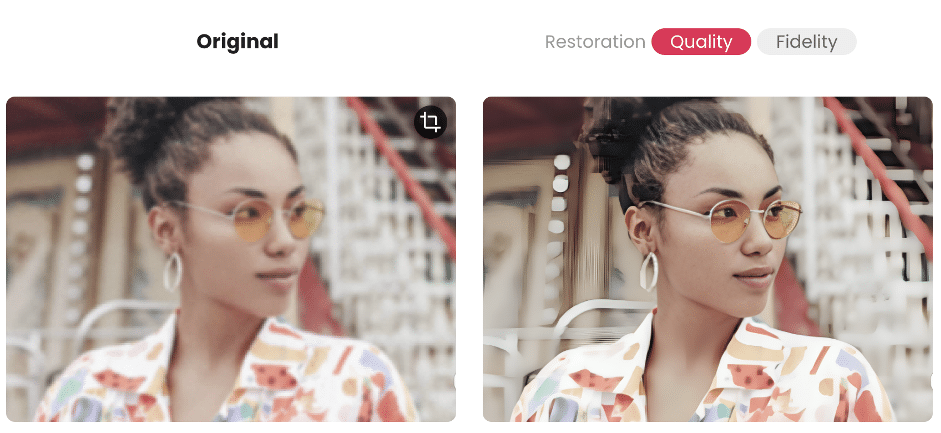
Cutout.Pro claims that their ai enhancement technology is advanced and comprehensive.However, in my testing, the results didn’t fully meet these claims. While some improvements were noticeable, image detailing remained insufficient, with many lines appearing blurred or lacking sharpness. Although the overall enhancement effect is clear, I ranked it fourth because it only offers one free use—far too limited for practical, everyday use.
✅ Pros:
- Variety of AI Tools: Cutout.Pro offers multiple AI-based editing features.
- Good Quality Enhancement:Adequate for basic needs.
- Effective Portrait Enhancement: Performs well in improving facial clarity and sharpness.
⚠️ Cons:
- Limited Image Enhancement: Often does not significantly improve clarity or detail.
- Limited Free Trial: Can only be downloaded for free once.
- Limited Platform Availability: Currently available only on the web, limiting accessibility across different devices.
Overall, Cutout.Pro Image Enhancement performs well but with only one free download it won’t fulfill most people’s basic needs!
5. Fotor
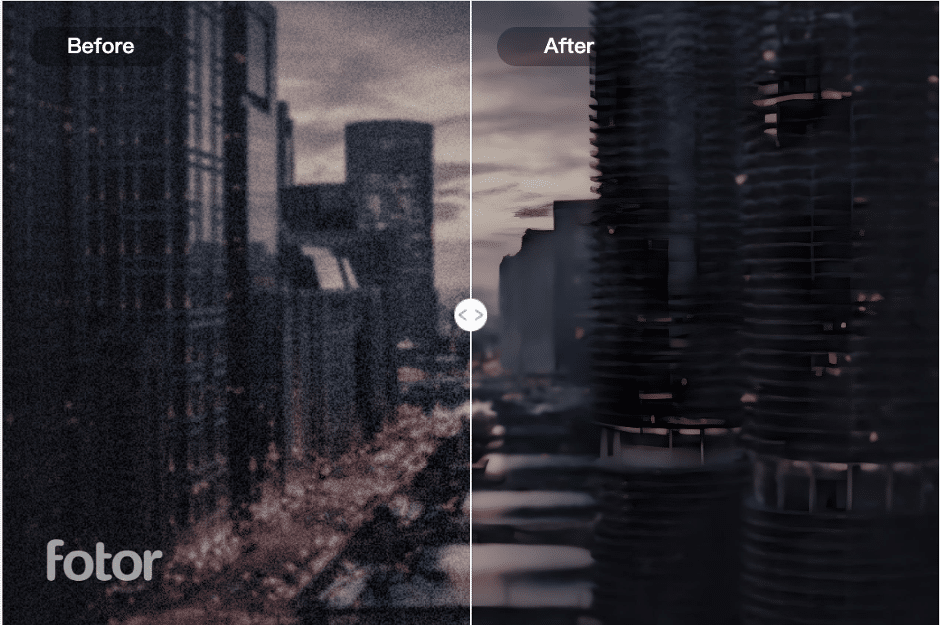
Fotor is a versatile all-in-one image editing platform with a broad range of editing and design tools. However, when it comes to its AI Enhancer feature, it falls short of expectations. Image resolution and sharpness show minimal improvement, and color reproduction is weak, often leaving images looking dull or washed out instead of vibrant and refined.
✅ Pros:
- Comprehensive Tools: Provides a wide range of editing and design features, not just AI enhancements.
- Flexible Upscaling: Users can select a 2x upscale option, suitable for standard image enhancement.
- Available on Web, Android, and iOS.
⚠️ Cons:
- Slowest Processing Speed: You need to wait a long time to get your photo done.
- Paid High-Resolution Downloads: High-quality image downloads require payment.
- Limited Color Accuracy: Enhancement often results in faded or grayish tones, diminishing overall visual appeal.
- Watermarked Downloads: Images downloaded under the free plan contain a watermark, limited for professional or business purposes.
Overall, Fotor provides a valuable suite of image editing tools but falls short when it comes to AI image enhancement specifically, particularly in processing speed and color accuracy.
What Makes PhotoGrid Stand Out?
What makes PhotoGrid stand out is that it’s free and powerful. It meets the basic needs of most people, and there are no watermarks or free count limits.
How to Use PhotoGrid’s AI Image Upscaler – Step-by-Step Guide
Upscaling images with PhotoGrid’s AI Image Enhancer is incredibly simple, even if you have no prior editing experience.
Follow these quick steps to enhance your images effortlessly:
step1: Upload your image.
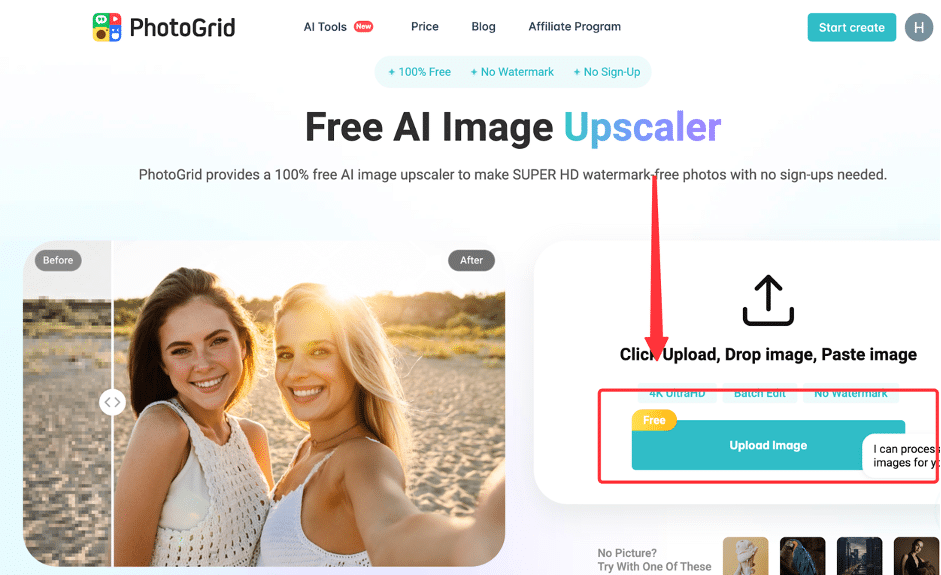
step2: Let the AI Work Its Magic
step3: Preview the Before & After
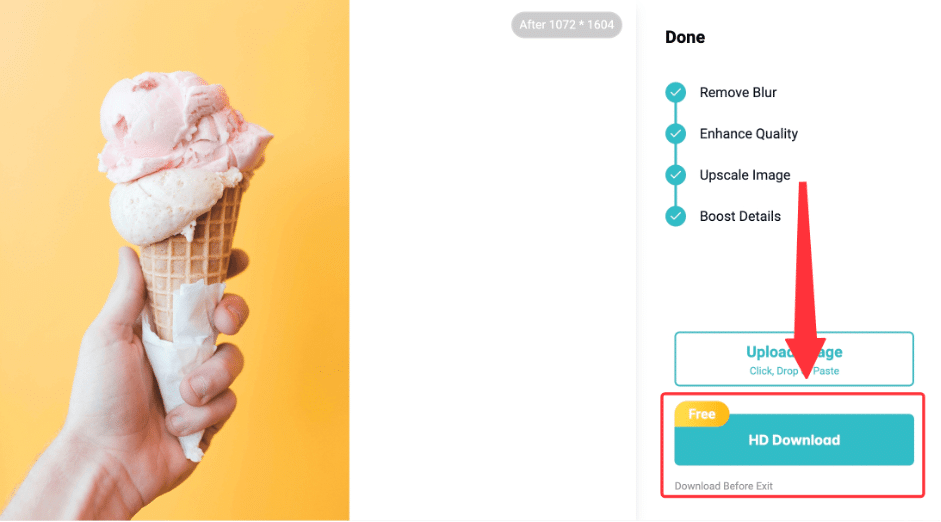
step4: Download Your Enhanced Image
Bonus Tips for Best Results:
✔ If you need to enhance multiple images at the same time, you can use the batch processing feature.
✔Try using other AI tools such as the Background Remover or Object Remover for even more refined edits.
Final Verdict
After testing these five AI tools, I think PhotoGrid is the best choice. It’s fast, easy to use, and delivers high-quality enhancements. And there are none of the usual nuisances – no watermarks, no hidden fees, no download restrictions.
FAQ
Q: Which is the best free AI image upscaler?
A: PhotoGrid. You can imorove the quality of your images very quickly with PhotoGrid.
Q: Does PhotoGrid add watermarks?
A: Nope! Your enhanced images are completely watermark-free.
Q: Besides PhotoGrid, which AI image upscaler is the best alternative?
A: Pixelcut maybe is the alternative, offering good detail preservation, natural color enhancement.











