
Are you looking for an Apple Music Converter that can help you convert your songs and albums to other formats? Pazu’s services are best for you! Pazu Apple Music Converter is developed to convert Apple Music songs and playlists to various formats compatible with your media player. After conversion, you can send it to any available devices or stream them offline.
Top Features of Pazu Apple Music Converter
Apple Music has all kinds of songs released on the global stage. You can enjoy your favorite songs anywhere, but its subscription plan is too costly. That’s where Pazu Apple Music Converter comes in. This tool supports converting Apple Music to MP3, M4A, AAC, FLAC, WAV and AIFF, so you can easily convert music into any one of these formats.
Here are some of the awesome features of the Pazu Apple Music Converter:
1. High-Speed Conversion
Pazu Apple Music Converter is the most efficient and user-friendly music converter available in the market. It supports downloading Apple Music songs at 10x speed, which makes it a great choice for users who want to convert their music files quickly and easily.
2. Best Audio Quality
The Pazu Apple Music Converter can help users convert their Apple Music library to any form of audio format, including lossless FLAC, WAV, and AIFF files. The program is able to preserve the original audio quality of the music so that the users can enjoy their music in the best possible way.
3. Easy to use Interface
- Pazu Apple Music Converter has the best and most easy-to-use interface. It also has a Music Web Player to help you find and stream your favorite songs.
- This program supports multi-language user interfaces where you can easily switch between the English, German, Spanish, and French versions.
- Pazu Apple Music Converter is a handy tool that allows you to organize converted songs by Title, Album, or Artist.
4. Original Quality
There is a popular saying that goes, “quality is never lost in translation”. This is true when it comes to this tool. Regardless of whether it’s a classic song from the 1930s or a new release from this year, the quality of the music will always be intact whenever you convert it.
After successfully converting your files, you can send them to your smartwatch, tablet, or any available device and preserve them as long as you want.
5. No Complexity
If you’ve ever downloaded an album from Apple Music, you know that it can be a time-consuming process. Also, you will need a subscription to download your favorite music.
Pazu Apple Music Converter is designed to make this long-lasting method easier. Simply load the music into Pazu and it will automatically save all of the ID3 tags for you.
Now all you have to do is select the songs you want to download and Pazu will take care of the rest. Plus, Pazu works with both Mac and Windows platforms, so it’s easy to use no matter where you are.
How To Install Pazu Apple Music Converter
You can easily install Pazu Apple Music Converter on your Windows and Mac. Just follow these steps carefully:
Step 1
(For Windows) – Go to https://www.pazusoft.com/apple-music-converter-for-windows/
(For Mac) – Go to https://www.pazusoft.com/apple-music-converter-for-mac/
Step 2
Click on the Free Download option to begin your download. Install the app after downloading is complete.
That’s it! You have successfully installed Pazu Apple Music Converter. Convert your favorite music seamlessly.
Convert Apple Music to MP3 Using Pazu Music Converter
If you’re searching for simple and efficient ways to convert your apple music files to MP3, look no further than Pazu’s Apple Music Converter. This program is easy to use and the conversion results are accurate. So you can be sure your music will have the same quality once it’s converted.
Here’s how to convert Apple Music to MP3 using Pazu Music Converter –
- After downloading Pazu Music Converter, you can either subscribe to the premium version or move forward with the trial version.
- Log in to the Music Web Player using your Apple ID.

- Select the settings icon to change the format. There are various formats available like – MP3, FLAC, AAC, etc.
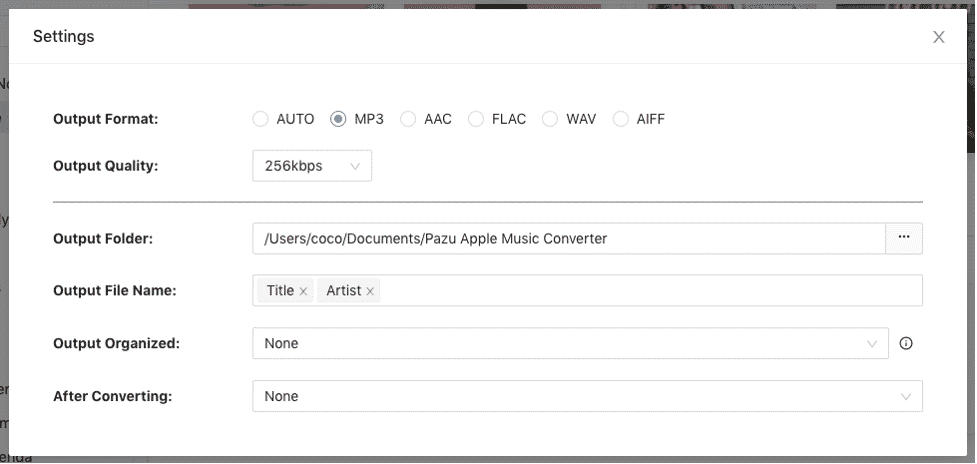
- Under the Output folder option, you can see where your songs will be saved.
- Now go back to the Web Player. Here you can search the song you desire to convert.
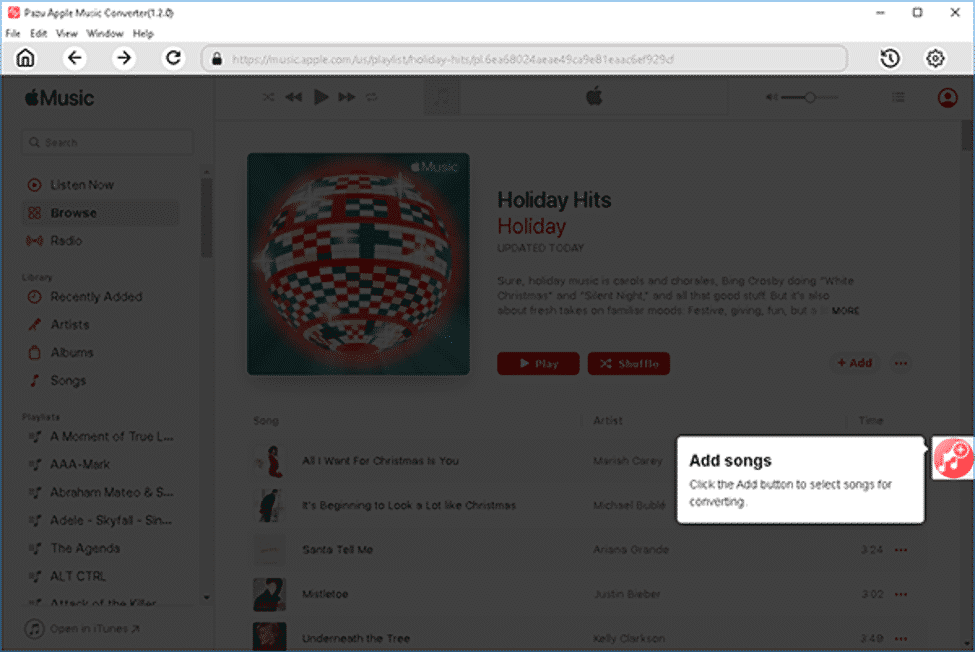
- Browse or search the song, album or playlist in the built-in web player. After finding the album or playlist, click on the “Add” option on the right-hand side to add songs or playlists for converting.
- Now click on the “Convert” option to start converting your selected files into the desired format.
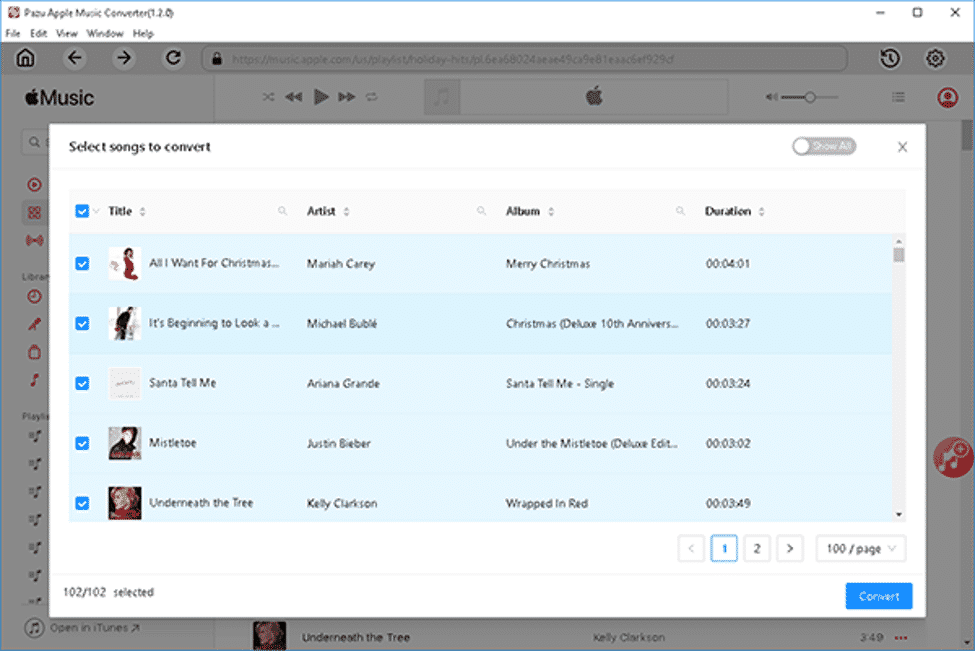
Now within minutes, all your selected music will be converted into MP3 format. The files will be saved in the output folder on your device.
Final Words
Pazu is a popular music converter that can help you convert your audio files to MP3, AAC, and WAV formats. Some of the benefits of using Pazu include its ease of use, conversion speed, and compatibility with a wide range of devices. With Pazu, you can listen to your favorite songs even after your Apple Music subscription expires.
However, Pazu’s services also come with a few cons. First and foremost, Pazu is not free to use. You will need to buy their subscription to continue converting music. Additionally, it can take time to convert multiple files.
In conclusion, the Pazus Apple Music Converter is an easy-to-use tool that allows you to convert Apple Music songs and playlists to M4A, FLAC, MP3, WAV, AAC, and AIFF formats.
This is a great way to keep your music library organized and accessible no matter where you are. If you need to convert and download Apple Music files, the Pazu Apple Music Converter is a great option.











