
For the most part, making the right betting decision is a factor of how much information you have at your disposal. This puts in perspective why most successful are the ones akin to doing research of the possibilities of a game before placing their bets.
This is where prediction apps like the Overlyzer iOS app comes in handy, because they help ease the efforts you would put into getting proper statistical data to place informed bets. In this article, we will be going into some of the perks of using the Overlyzer iOS app and most importantly, a look into how to download the app and take advantage of its services.

In-depth Game Analysis
Imagine that you don’t have to do all that brainwork that is involved in reading a game because all the information about the game is offered on a platter. It becomes clearer what to predict, right? This is one of the key things you stand to gain by using the Overlyzer app.
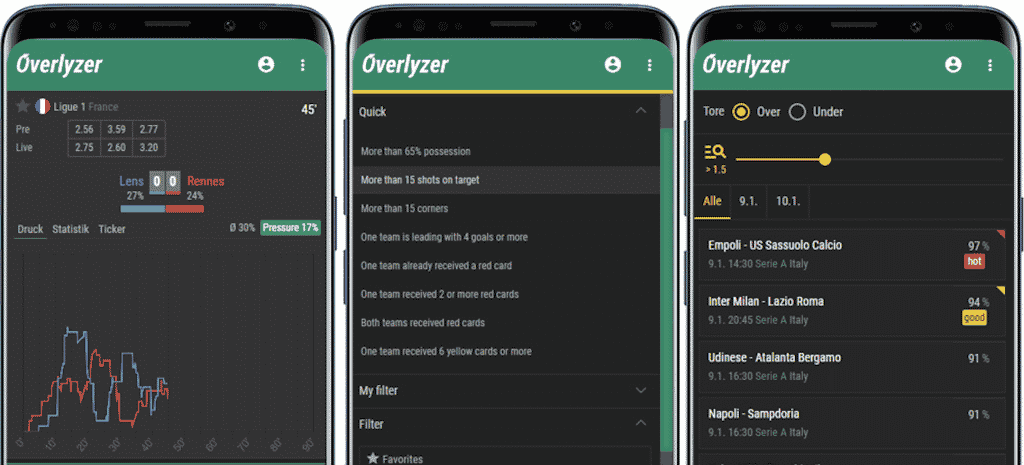
With the graph that is presented on a particular game, you can get insight into what team is pressing at what time and understand who is likely to score or win the game. As it is consistent with the app, when the blue line is visible on the graph, it shows the home team is pressing, while in a case the red line is showing, it hints that the Away team is pressing.
To get an even comprehensive idea about how the game is progressing, the Stats and Ticker side of the graph gives you detailed statistics like the possession, shots on target, attacks, yellow cards, corner kicks and so much more as the game progresses. The most thrilling thing about this app is that it is not just limited to offering statistics on the popular games. It offers statistical information on thousands of games across the globe.
Regardless of how unpopular that league you may have interest in might be, Overlyzer is stocked enough to provide you detailed analysis on that game.
Custom Settings
It can be confusing when you have too much information at your disposal but don’t have a sense of direction. If you are an experienced pundit, you must have been familiar with the information to look out for before when placing your bets. With the help of the Overlyzer app, you can define what information you would like to be presented with.
For example, with the progress option, you can select the different types of pressures that you consider essential for your game analysis. The option makes provision for variables like Home Pressor, Away Pressor, Team Pressor, Diff Pressure and a couple more. Nothing beats the fact that you can set the parameters based on your needs, and as such making your analysis much easier. With the app, you can also categorize games by match results, score and goalscorers. The most exciting thing is the fact that you can also create your league table on the app, this way, you get to keep track of the best-performing teams. Amazing, right?
Over and Under
If you are not new into betting, you should know how popular over and under betting has become among bettors. This is easily one of the most harnessed betting types and Overlyzer, understanding that, sets aside a unique section that’s dedicated to giving you over/under betting tips on a wide range of football events. Essentially, with this option, sorting out bets has never become this easy.
Scores
With the Overlyzer iOs app, you don’t necessarily have to explore another app to get information about scores of live games. While Overlyzer is mainly known as a prediction app, it stretches the limits to the services offered by allowing you to get updated scores of live football games of all leagues and countries.
How to Download the Overlyzer iOS App
Now that you have a sense of what to expect when you download the app, let’s look into how to download the app especially if you are an iPhone user. Follow the steps below to download the Overlyzer app for your iOS device:
- Go to the apple store on your mobile device
- Navigate to the search button on the store and find the Overlyzer app
- Click on the app and start the download
- Once the app is downloaded and installed, you can now access and explore the app on your iOS device whenever you choose to.
Are you an iPhone user who is on the lookout for a functional prediction app that’s equipped with enough statistical information to make informed bets? Look no further as the Overlyzer app is everything you need and more. Simply head to the iOS Store now to download the best app for bettors and get started.











