

With cyber threats lurking everywhere online, a VPN creates a private tunnel for your data, keeping it safe even on public Wi-Fi.
Setting one up on your smartphone is pretty straightforward – download the VPN app, give it permissions, select a server, and you’re good to go.

Not using a VPN makes you vulnerable to data theft. Exploring more on this subject will equip you better in this digital age.
What is a Mobile VPN?
A Mobile VPN, or Virtual Private Network, is your key to securing data when you’re on the go. It’s like your personal digital bodyguard, protecting your information from threats.
Imagine you’re connecting to a public Wi-Fi network at a coffee shop. Without a Mobile VPN, your data is like an open book – anyone with the right skills can read it.
But with a VPN, your data gets encrypted. It’s like it’s written in a secret code that only you can understand. This keeps your personal information, like emails, passwords, and credit card details, away from prying eyes.
Why Use a VPN on Mobile?
With the rise in mobile data breaches, using a VPN on your mobile device has become more critical than ever for protecting your privacy and securing your data. VPNs, or Virtual Private Networks, act like a shield, encrypting your data and making it unreadable to hackers.
You might think you’re safe, but remember, public Wi-Fi networks are a prime target for cybercriminals. Using a VPN ensures you’re not an easy prey.
More so, a VPN disguises your online identity. It masks your IP address, making it harder for advertisers and ISPs to track your online activities. Plus, it helps you bypass internet censorship and access geo-blocked content, letting you surf the web freely and securely.
How Mobile VPNs Work
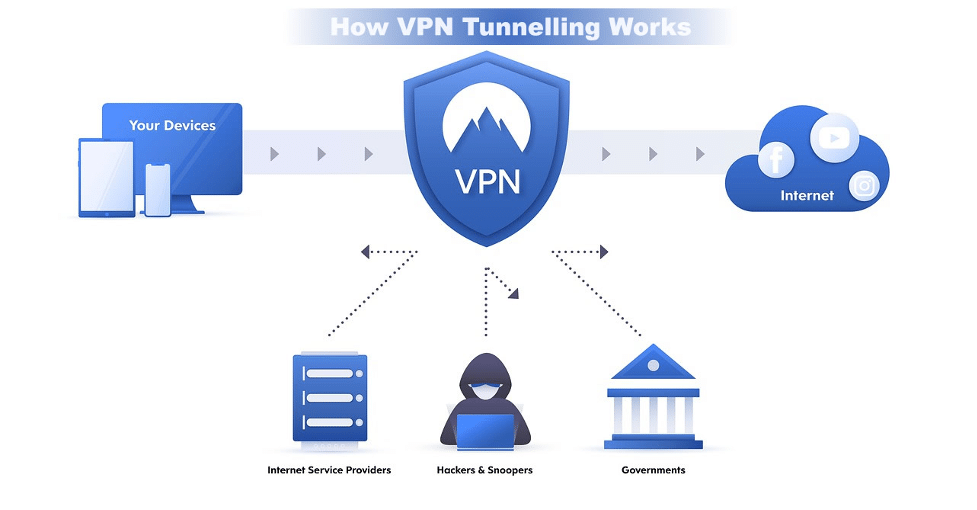
When you connect to a VPN, it’s like you’re creating a secure tunnel for your data to travel through. This tunnel is encrypted, meaning it’s coded in such a way that only your device and the VPN server can understand.
Here’s a simple analogy. Imagine you’re sending a letter via snail mail. Without a VPN, it’s like sending a postcard: anyone can read it. With a VPN, it’s like putting that postcard in a locked box. Only you and the recipient have the key.
Setting Up Your Mobile VPN
Setting up your mobile VPN is easier than you might think, and it’s a critical step to secure your online data.
- Download a VPN app from your smartphone’s app store. Once installed, open the app and sign up or log in.
- You’ll be asked to give the VPN app permission to change your device’s settings. This allows the VPN to create a secure connection.
- Choose a server to connect to. It’s often best to select one that’s close to your physical location for optimal speed. You can choose a service that has servers in diverse locations, For example, a VPN India server allows you to safely access India-specific content.
- Lastly, hit the ‘connect’ button.
After you successfully set up your mobile VPN, your internet connection is encrypted and your online activities are anonymized.
Risks of Not Using a VPN
If you’re surfing the web without a VPN, you’re exposing yourself to numerous risks, including data theft and privacy invasion.
Cybercriminals can easily intercept your data, read your emails, view your photos, and even steal your personal information. Public Wi-Fi networks, such as those in coffee shops or airports, are particularly dangerous.
Without a VPN, your internet service provider can also see and track your online activities. They could sell this information to advertisers or even hand it over to government agencies. Your browsing history isn’t as private as you might think.
Moreover, geo-restrictions can limit your web access. Without a VPN, you’re stuck viewing a restricted version of the internet.
Don’t let your online safety and freedom be compromised. Utilize a VPN to secure your mobile browsing.
VPN Impact on Mobile Data
When you use a VPN on your mobile device, all your internet traffic is routed through an encrypted tunnel to a VPN server. This process consumes your mobile data.
It’s important to understand that your Internet Service Provider (ISP), or mobile carrier, can still monitor your mobile data usage even when you’re using a VPN. Simply put, a VPN doesn’t provide unlimited mobile data or bypass your data caps.
However, it does offer enhanced security and privacy by encrypting your data and hiding your real IP address, which makes your online activities anonymous.
Managing VPN Data Consumption
Managing your VPN’s data consumption effectively can enhance your mobile browsing experience while ensuring you don’t exceed your data limits.
You might be already aware that using a VPN can increase your data usage. Here’s why: VPNs encrypt your data, adding extra bits to it, which results in more data being used.
Now, don’t let that deter you from using a VPN. There are ways to manage this increased data consumption.
- Be aware of when you’re using your VPN. It’s not necessary to keep it on all the time – only when you need that extra layer of security, such as when you’re using public Wi-Fi.
- Consider the protocol your VPN uses — some protocols use less data than others.
Optimizing VPN for Lower Data Use
To optimize your VPN for lower data use, you’ll need to tweak a few settings and make smart choices about when and how you use it.
- Start by selecting the right protocol. VPNs can operate on different protocols, with some being more data-efficient than others. Opt for lighter protocols like IKEv2 or L2TP/IPSec over heavier ones like OpenVPN.
- Consider the server location. Connecting to a server closer to you can help reduce data usage.
Wrapping Up
With the digital age comes the increasing risk of data breaches and online privacy invasions. So, setting up a mobile VPN has become less of an option and more of a necessity. It provides an essential layer of protection for your data, particularly while using public Wi-Fi, by encrypting it and making it unreadable to potential threats.
Moreover, it adds a layer of anonymity to your internet activities by masking your IP address. While the use of a VPN may slightly increase data consumption, proper management, such as selecting efficient protocols and strategic usage, can control this.
Secure and safe mobile browsing is achievable through the effective use of a VPN.











