
A lot of people face trouble when they forget their Mi Account password and can’t access their Xiaomi or Redmi devices. This can be very disturbing, especially if you bought a used phone or lost your recovery info. In such cases, you need a way to do a Mi account remove without password to regain control of your device.
While official recovery methods exist, they are complicated or sometimes fail completely. So, understanding why the account is essential and the scenarios that cause this issue helps find the right solution. Thus, this article will help you explore multiple solutions to remove the Mi Account without hassle.
Part 1. What is a Mi Account and Its Security Purpose?
A Mi Account is a special user account created by Xiaomi to give access to many services and products. It lets you use features like the MIUI system, Mi Store, and Xiaomi Cloud. When you log in with your Mi Account, your device connects to the account for better support. Users rely on it to sync data, restore content, and maintain device continuity.
The security of a Mi Account is critical to protect your personal information and the device itself. It protects sensitive information using encrypted storage and secure transfer through trusted protocols. Also, 2FA authentication adds another protection layer to reduce risks from account access. Besides, the OAuth 2.0 support permits safe access for external apps without exposing sensitive core credentials.
Part 2. Common Scenarios Requiring Mi Account Removal Without Password
Many users face situations where they cannot open their Xiaomi phones. To understand these moments better, here are the most common reasons behind removal needs:
- Bought Used Device: You may buy a used Xiaomi phone with the original Mi Account active. Without the owner’s password, the device stays locked and hard to use.
- Forgotten Password: Many users forget passwords and cannot access their accounts. This situation creates stress and prevents them from using important phone features.
- Broken Screen: A damaged display blocks login attempts and stops password entry on Mi devices. Users cannot verify identity because the touchscreen fails during crucial steps today.
- Device Reset: A factory reset may trigger protection features that require the old password for unlocking. You then face trouble because account verification becomes mandatory after system restoration.
- Locked Device: Devices sometimes show Mi Account locked messages and stop normal phone functions. As a result, owners cannot bypass the required login screens without verification.
Part 3. 2 Methods for Mi Account Remove Without Password on Xiaomi Devices
Many users try simple ways for Mi account removal before choosing professional tools. The following standard methods can work, but each option also carries risks:
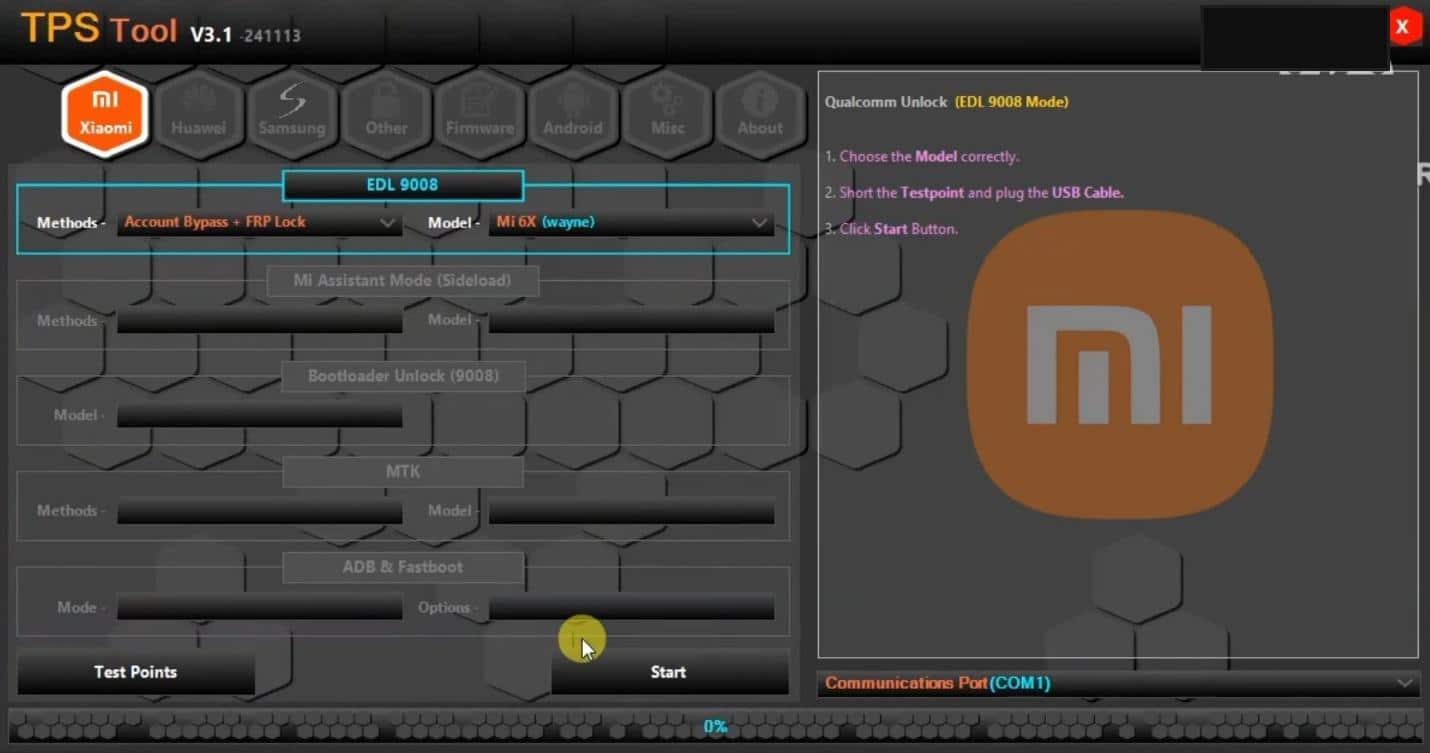
1. Use the TPS Xiaomi Tool
It is a powerful PC software that offers functions for bypassing Mi Account limits. TPS Xiaomi even supports Fastboot and Qualcomm 9008 COM PORT modes for efficient unlocking. This tool also helps technicians unlock Redmi models during repair or reset tasks. Moreover, it includes features for removing FRP locks and restoring standard phone controls.
Limitations
- It erases all your device data during the Mi Account removal process.
- Some actions can void official warranties and affect future service support options.
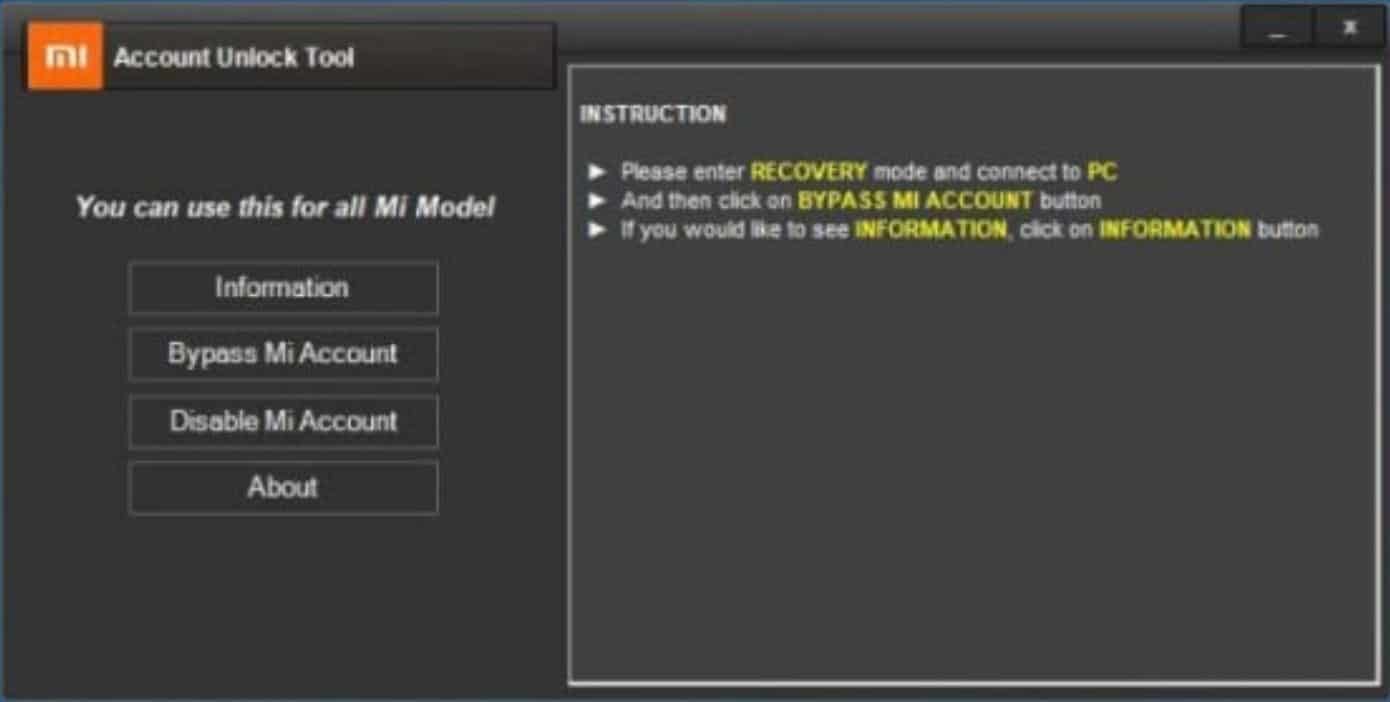
2. Try the Mi Account Unlock Tool
The Mi Account Unlock Tool also helps users bypass account locks on many Xiaomi phones. It supports Fastboot and EDL modes that assist in different device situations. Also, users can fix verification errors and restore basic phone functions using its interface. This tool works with various Xiaomi, Redmi, and POCO models across multiple systems.
Limitations
- May fail on devices running newer security patches or updated firmware.
- A Windows computer and correct USB drivers are required for proper operation.
Part 4. Dr.Fone Unlock (Android) | One-Click Solution for Mi Account Removal
When your Xiaomi phone is locked by Mi Account, Dr.Fone Online Unlock is the best solution. It offers a remote unlock service to unlock Xiaomi devices without a password. The tool supports all Xiaomi, Redmi, and POCO models worldwide, regardless of software version. Apart from that, it handles HyperOS and MIUI systems from early releases to current stable builds.
The platform works across all regions and sub-brands to ensure effortless Mi Account lock removal. Plus, its cloud-based service needs no complicated installations, providing fast remote unlocking. While unlocking, the tool allows users to track unlock progress through an easy online status page. It includes 24/7 professional guidance that helps users avoid mistakes during unlocking.
Ultimate Guide: How to Use Dr.Fone Online Unlock for Mi Account Removal
Take guidance from the following steps for Mi account removal without a password via Dr.Fone Online:
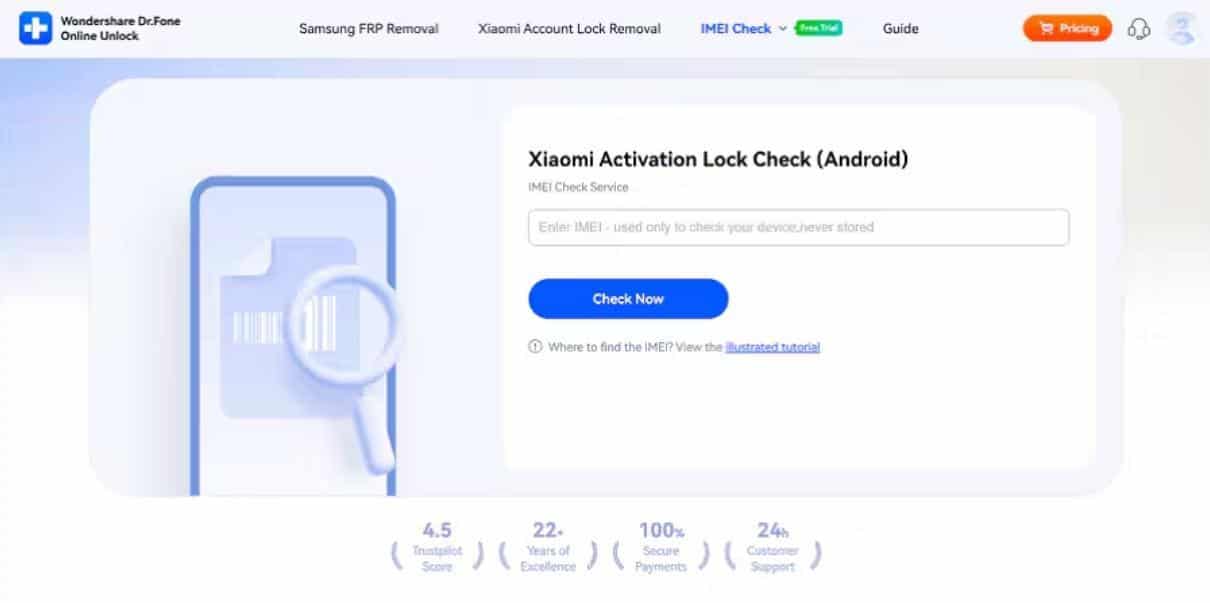
Step 1. Access the Tool for Mi Account Removal
When you access the “Xiaomi Account Lock Removal” tool from the Dr.Fone Online toolbox, enter your device’s IMEI code and hit “Check Now.”
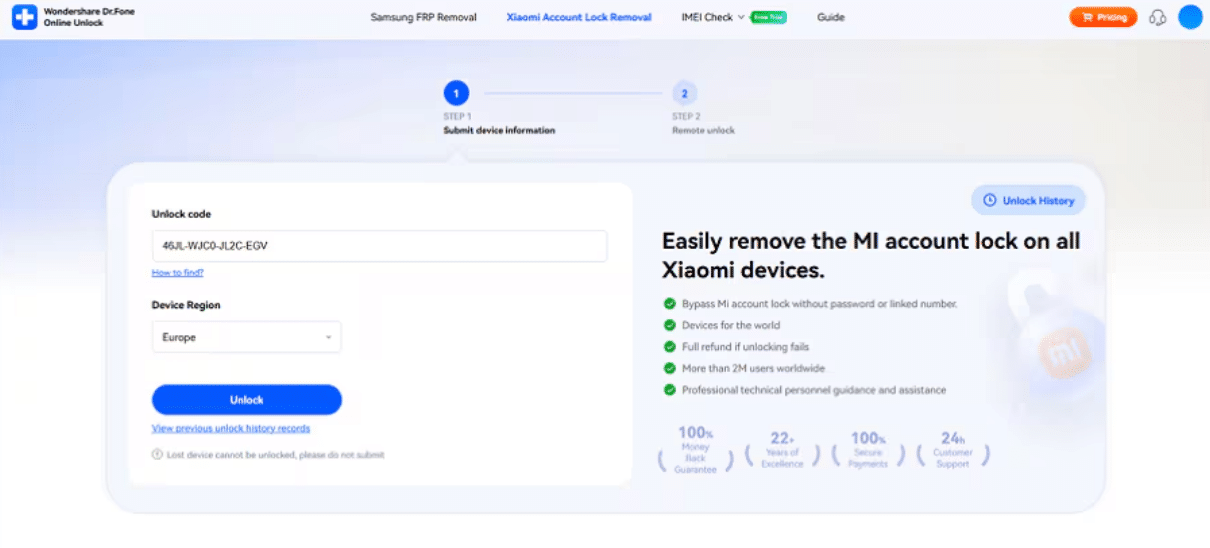
Step 2. Enter Device Info to Unlock
Upon doing this, enter the “Unlock Code” and your device region before pressing the “Unlock” button. For the Unlock Code, you can follow the straightforward guide provided by Dr.Fone Online.
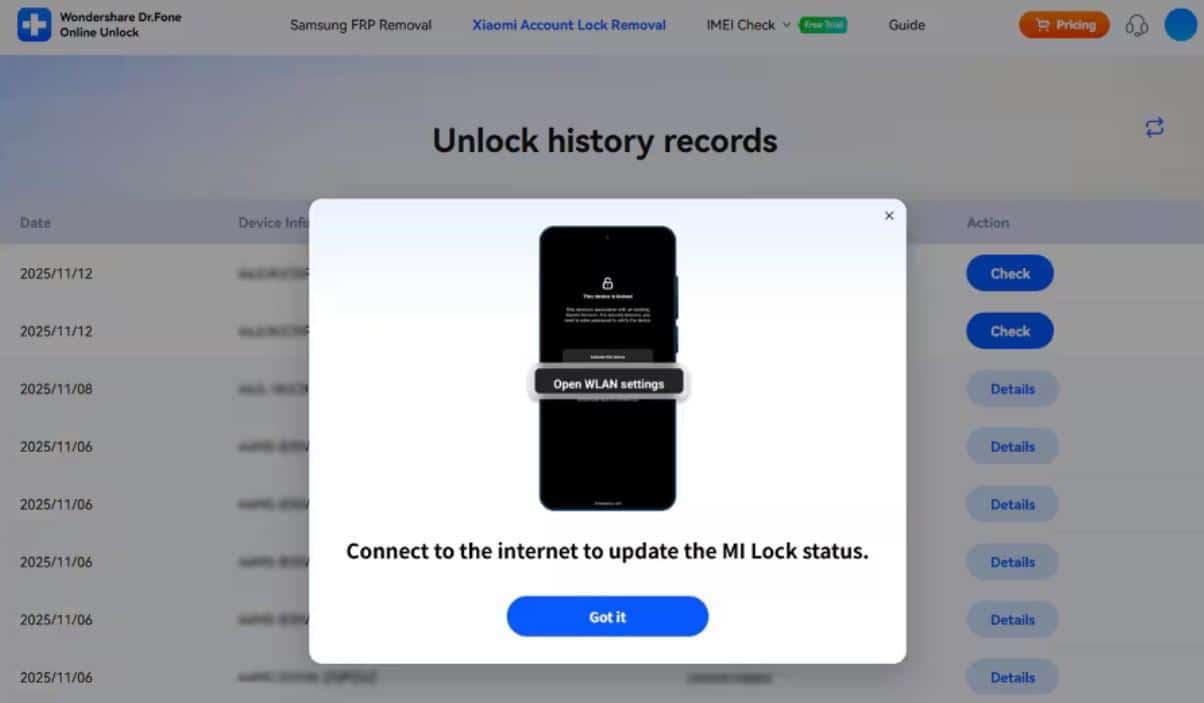
Step 3. Effortlessly Remove Mi Account Limits
You will then need to wait for a few hours and check either your email or the tool’s “Unlock History Record” section. Once you access the removal message, press “Check” and adhere to the displayed guide to update the Mi Lock status.
Why Dr.Fone Unlock (Android) is the Top-Recommended Tool
Dr.Fone Unlock stands out because it delivers safe unlocking with trusted worldwide support. Below, you will explore a few key benefits of this dedicated tool for Mi Account removal:
- High Success: Its strong technology offers effortless results without repeated failures. Users trust the stable performance because it works across many Xiaomi phones.
- Remote Process: It performs unlocking online without requiring software installation on computers. This helps users complete removal tasks using simple guidance from the platform.
- Fast Results: Most devices unlock, giving users more rapid access to essential phone features. This saves time and reduces stress during moments requiring urgent account removal.
- Safe Operation: Its verified process ensures protection and avoids damaging essential phone data. Besides, users feel confident because every step follows secure handling practices.
- Global Coverage: Dr.Fone Online works effortlessly across different countries without region-based unlocking restrictions. Thus, users from worldwide locations benefit from stable support whenever needed.
Conclusion
To sum up, forgetting your Mi Account password can block access to devices completely. Many manual methods exist, but they usually fail or risk data loss during attempts. Tools like TPS Xiaomi or Mi Account Unlock may help, yet limitations remain significant. For a safe and fast solution, users should choose Dr.Fone Online Unlock. It provides an easy way to remove the Mi account without a password and technical stress.











