

Loss/accidental deletion of crucial iMessage is often on iPhones, and classic ways to recover from iCloud or iTunes backups turn out to be time-consuming and may overwrite already existing data. Thus, a more convenient and safe solution is using professional iMessage recovery programs. FonePaw iPhone Data Recovery is one of the favorite tools among many users because of its great performance in recovering deleted iMessages. This article explores FonePaw iPhone Data Recovery along with its features, pros and cons, and steps.
Why Choose an iMessage Recovery Program
Without backup in advance, you can get back deleted iMessages with half the effort using third-party iMessage recovery software. The advantages of these tools over recovering backups are obvious:

- Convenient and fast: No backup or reset of the device is needed in advance. Just scan and recover, saving you a lot of time and energy.
- Preview: You can use the preview features of professional iMessage recovery programs to view the content, sender, date, etc., to locate the desired iMessages.
- Selective recovery: You can choose to recover specific iMessages as needed to avoid unnecessary data recovery, which is more efficient than using backup files.
- Data security: Reliable iMessage recovery programs will not overwrite your existing data.
Best iMessage Recovery Software: FonePaw iPhone Data Recovery
One of the best iMessage recovery software programs (that we have tested) is FonePaw iPhone Data Recovery. It is a very powerful tool and is used on Windows and macOS. Handling various data scenarios like accidental deletion, OS crashes, device formatting, and more, you can recover over 30+ file types from your iOS devices, including messages, photos, videos, etc. Even your permanently deleted files can be detected. Below are some key features of FoneP Paw iPhone Data Recovery, which make it the one you cannot miss when recovering your lost messages.
Highlight Features
- Recover iMessages Without Backup: FonePaw iPhone Data Recovery has great algorithms to scan and detect deleted iMessages, along with their attachments and photos, directly from your iOS device without needing a backup.
- Preview iMessages: It supports a free preview feature that allows you to check the message’s sender, date, specific content, etc., to locate the desired one.
- Export iMessages and Attachments: It can export iMessages to computers in CSV or HTML format. Additionally, you can save the attachments as photos and other formats.
- Supports the Newest iOS Version: It is fully compatible with the newest iOS versions, including iOS 18, 17, 16, and below, ensuring it works seamlessly with your updated devices.
- Additional Features: More features like it supports to recover messages and attachments from Apps like WhatsApp, Kik, Line,
Pros & Cons
Although countless impressive features make FonePaw iPhone Data Recovery reliable and efficient in recovering deleted iMessages, it has its limitations, just like any other software. Here’s a closer look at the pros and cons of using Fonepaw for your iMessage recovery needs.
Pros:
- Require no backup files. Just connect your phone to scan deleted messages and recover them. Simple and easy.
- FonePaw iPhone Data Recovery can recover deleted and lost iMessages very effectively with a high success rate.
- The software has a friendly interface that all users can use without problems.
- Apart from the basic quick scan, it also provides a deep scan to meet more advanced recovery needs.
- The software gives a 100% guarantee of your data privacy and security.
- You can recover not only your iMessage but many other files as well.
- Besides the iPhone, it works with all types of iPad Pro, iPad Air, iPad mini, iPad, and iPod touch.
- It offers a free trial that you can try before buying it.
Cons:
- It is a paid software. You can scan and preview for free with the free trial. But you have to purchase the software to get all the features and recover the messages.
Guide to Recover iMessage with FonePaw iPhone Data Recovery
Now that we have some idea about FonePaw iPhone Data Recovery, how to recover iMessages using it? Follow these easy steps to get back your deleted messages.
Step 1. Download and Install FonePaw iPhone Data Recovery
Download the proper version from the official website of FonePaw iPhone Data Recovery and install it on your computer. After that, use a USB cable to connect the iPhone to the computer.
Step 2. Scan Your Device
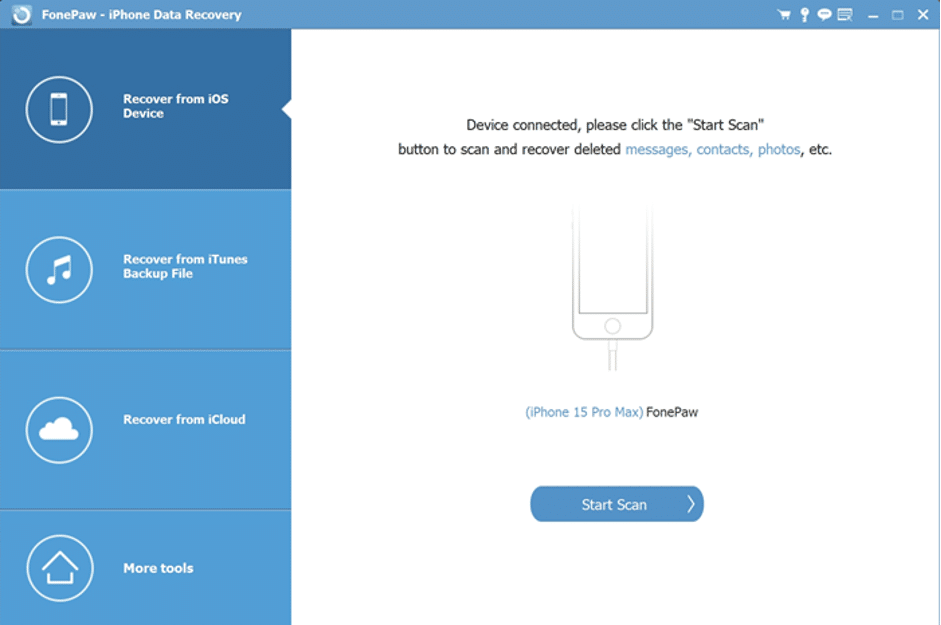
Run the program and choose “Recover from iOS Device” mode, then click the “Start Scan” button to let it scan your iPhone for lost iMessages.
Step 3. Preview Deleted iMessages
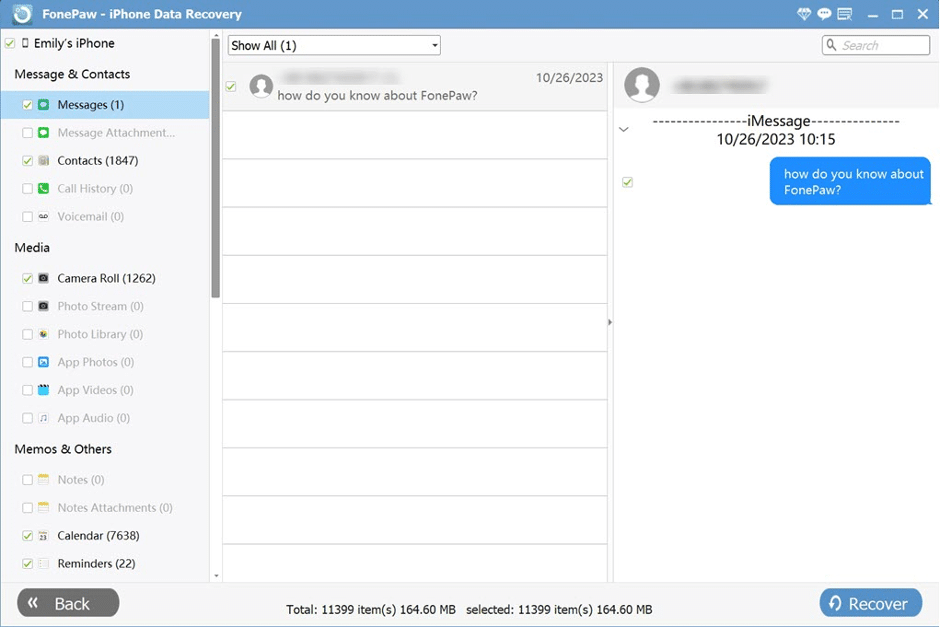
Preview all the scanned iMessages to decide what you want to recover. You can use the filter at the top bar.
Step 4. Recover Deleted iMessages
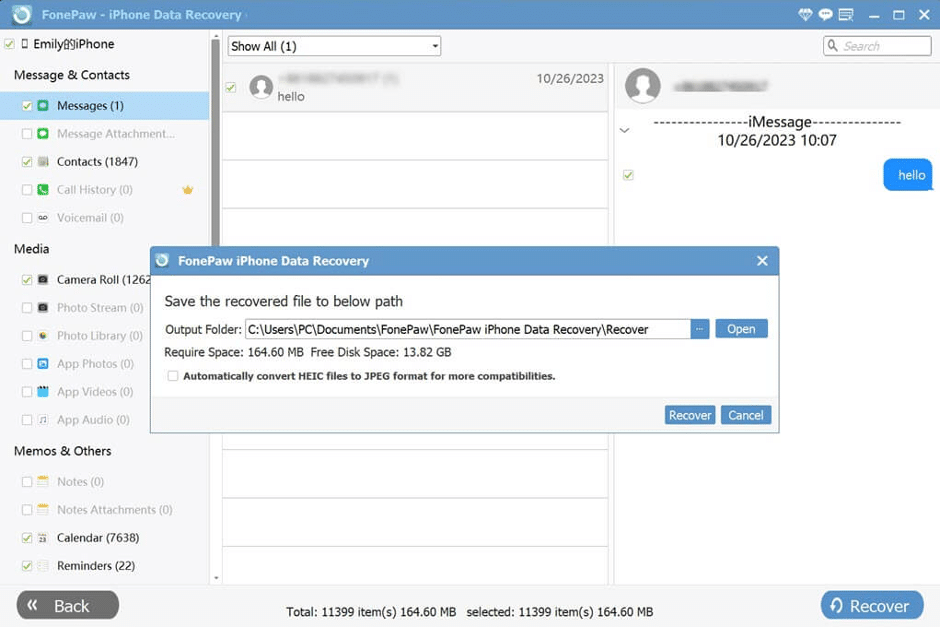
Select messages you want to recover. Click “Recover” to save them back to your computer.
The Bottom Line
Obviously, the software really does what it says. If you have deleted iMessages and do not have a backup, then FonePaw is actually a practical solution and very efficient for this task. The ability to recover data directly from your device eliminates the need for cumbersome backup restores. Even if you’re not particularly tech-savvy, that is OK.
Overall, FonePaw iPhone Data Recovery can be rated as one of the best tools, and truly reliable recovery software to recover deleted iMessages. If you want to find an easy way to recover important conversations, it is worth consideration.











