
By Jeremy Last, Content Manager, Craft.io
SaaS products are becoming so popular these days that you can find an online platform for almost any job out there!

If you’re a product manager then Craft.io has been considered among the best for product planning and decision-making.
The inclusion of a fully interactive feature table in the latest release of Craft.io has taken the platform to the next level, providing the speed and flexibility that product managers need when making planning and prioritization decisions.
At the end of the day, the main aim of a product manager is to choose which features should be added to the product and then decide what order they should be developed in. For example, if you are the product manager for an online email service you may decide to make a setting that automatically sends messages from specific people to a folder.
It’s an essential part of the software development process, although one that can sometimes be overlooked.
When you are able to use a single dedicated platform to plan and organize all your product management it streamlines the entire procedure, and Craft.io is one of the few platforms that provides that service.
A Dynamic Spreadsheet
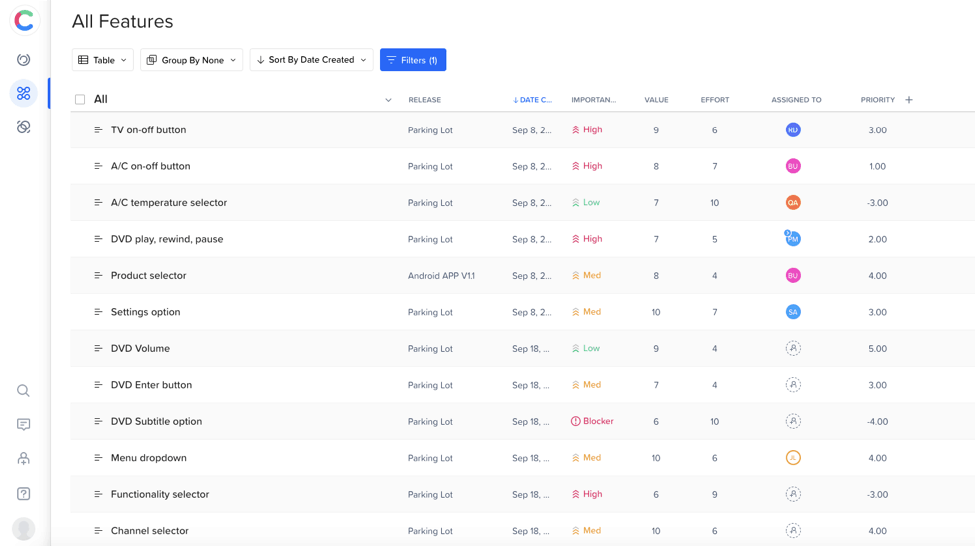
The features table is the central hub in Craft.io – it is where you create and manage your list of potential, scheduled and in progress features so it needs to be easy to use and connect to every other part of Craft as well as your dev team’s task management tool like Jira.
When you make changes in the table they are automatically updated throughout Craft – including in the Strategic Roadmap and also in any integrated tools.
With the most recent Craft.io release the table was transformed into an excel-style spreadsheet that is fully interactive and editable.
Until now product managers needed to open up the details of the feature in order to set and edit the meta-data such as Effort Level, Assignee and Time Spent.
Now everything can be accessed and changed directly from the table which makes for a superb user experience.
How Does this Work, Practically?
So what can you actually do with the Craft.io features table?
- Write and edit feature titles
Previously you had to open the feature editor to change the name of a feature. Now you can click on the title in the table and change it right there.
- Change the details in any field
Instead of opening the feature editor you can click on any field in the table to change the details of a feature. This includes selecting which release a feature is in, who is responsible for the feature, which team they are in, the goals the feature is connected to and more.
- Column Sorting
You can decide to sort the table by any column data directly from the column header. And you can also choose to move columns left or right.
- Add Custom Fields from Column Headers
Adding a new custom field is easier than ever now you can go into the column header and select new custom field. So if you don’t find the type of column you are looking for in the default list you can just add a new one, such as a Priority Score column.
- See Formulas by Hovering Over
When you use a formula in a custom field you can just hover the mouse over the field and see the formula. So if the Priority Score is set by subtracting effort from value you can see how it is worked out when you hover over.
This interactive table is just the latest enhancement to Craft’s product management platform. Check out their blog if you wanna see all the upcoming updates.











