
With the recent rollout of Apple Intelligence, ChatGPT is no longer just a standalone app—it has become a deeply integrated part of the iOS and iPadOS ecosystem. As long as you have a compatible iPhone, iPad, or Mac, you can access the AI chatbot directly through your system settings.
However, many users are still confused about the best way to use ChatGPT free on iPhone. This guide walks you through three simple, free methods to use ChatGPT on your Apple devices. Let’s start exploring.
Can You Use ChatGPT on iPhone
Yes, you can use ChatGPT on an iPhone, and you don’t need special hardware or advanced technical knowledge to do so. As long as your device has an internet connection, ChatGPT can be accessed through the official app, web browsers, or the built-in AI feature introduced in newer versions of iOS.
ChatGPT works on an iPhone in the 3 ways:
- Through Apple’s Intelligence features integrated into the OS.
- Via web browsers using specialized tools like EaseMate AI.
- By using the official mobile app from the App Store.
Is ChatGPT Free for iPhone
ChatGPT offers a free version for iPhone users. While there are paid plans that unlock advanced models and additional features, basic ChatGPT functionality is available at no cost. With the free version, iPhone users can typically:
- Ask questions and receive AI-generated answers.
- Get help with writing, brainstorming, and explanations.
- Use ChatGPT for everyday productivity tasks.
However, free access may come with some limitations, such as reduced access to advanced AI models, slower responses during peak usage, or fewer customization options. Even so, for most everyday needs, the free version is more than sufficient.
How to Use ChatGPT on iPhone for Free
Method 1: Use ChatGPT with Apple Intelligence
Apple Intelligence is Apple’s AI system designed to enhance productivity, writing, and everyday tasks across iOS devices. If you own a newer Apple device (such as the iPhone 15 Pro, iPhone 16 series, or any M-series iPad), you can use ChatGPT for free without even opening a browser.
Here’s how to set up ChatGPT with Apple Intelligence on iPhone:
- Enable Apple Intelligence: Go to Settings > Apple Intelligence & Siri and ensure the feature is turned on.
- Activate ChatGPT Extension: Under the “Extensions” section, tap on “ChatGPT” and toggle it to “Enabled“. Then tap on “Use ChatGPT with an Account”, and follow the on-screen instructions to complete the setup.
- Use ChatGPT: You can say, “Siri, ask ChatGPT to write a travel itinerary for London,” and Siri will present the answer directly.
One of the best parts of this method is that you don’t even need to sign in to an OpenAI account. Apple obscures your IP address, so your requests stay anonymous.
Method 2: Use a Free Web-Based ChatGPT Tool
If you are using older devices that don’t support Apple Intelligence or don’t want to install any app, you can use a free web-based ChatGPT tool – EaseMate AI. It allows you to use ChatGPT on your iPhone or iPad for free through Safari or Chrome browser.
Here’s how to use it on iPhone for free:
- Opening your browser on iPhone and visit the official website of EaseMate’s ChatGPT free.
- Choose your preferred GPT model from the drop-down menu.
- Entering a question or prompt into the box and press “Enter”.
- Once generated, you can copy the answer for free directly or start a new chat to get more information.
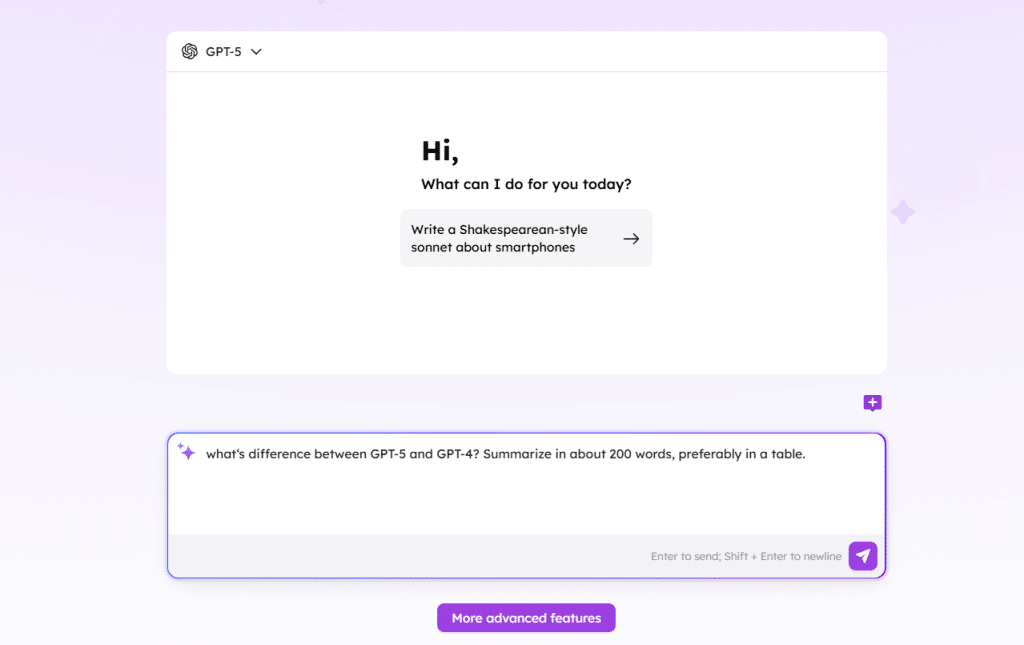
This method is especially useful for occasional users or anyone who wants to try ChatGPT without committing to downloads or registrations. It also works across different iPhone models and iOS versions, making it widely accessible.
Method 3: Use the Official ChatGPT App
Another common way to use ChatGPT on iPhone or iPad is through the official ChatGPT app available on the App Store. This method provides a dedicated interface optimized for mobile use. It offers a polished user experience and supports voice input, conversation history, and basic customization options.
To get started:
- Open the App Store on your iPhone or iPad.
- Search for “ChatGPT”.
- Download and install the official app.
- Sign in or create an account using your email.
- Start using ChatGPT with the free versio.
To Sum Up
Using ChatGPT on iPhone or iPad for free is easier than many users expect. Whether through Apple Intelligence, a free web-based ChatGPT tool, or the official app, you can choose the method that best fits your needs and start using ChatGPT to boost productivity, creativity, and everyday efficiency on your iPhone devices.











