

Businesses and content creators shouldn’t and don’t have to limit themselves to viewers from a certain region. Nowadays, it has become quite necessary for them to reach a global audience in the current digital age. But, it isn’t as straightforward as one thinks. For content creators and organizations aiming to reach a wider viewership, the challenge of language barriers can feel like a formidable obstacle. Previously, they would have to allot a specific budget to hire translators or advertisers for marketing in a different language. However, thanks to AI, this has increasingly become a walk in the park. How? To learn more about that, continue reading this guide as we will explore ways AI can translate videos at scales, assisting in tapping into new markets.
1. How AI Can Translate and Subtitle Videos
The advent of AI in video translation is not just a leap forward; it’s a paradigm shift in how we approach content globalization. With seamless algorithms and AI’s machine learning capabilities, video translation and subtitling content have automatically become more accurate and more accessible than ever. Now, crossing linguistic barriers isn’t a dream; it is just a matter of taking the initiative.
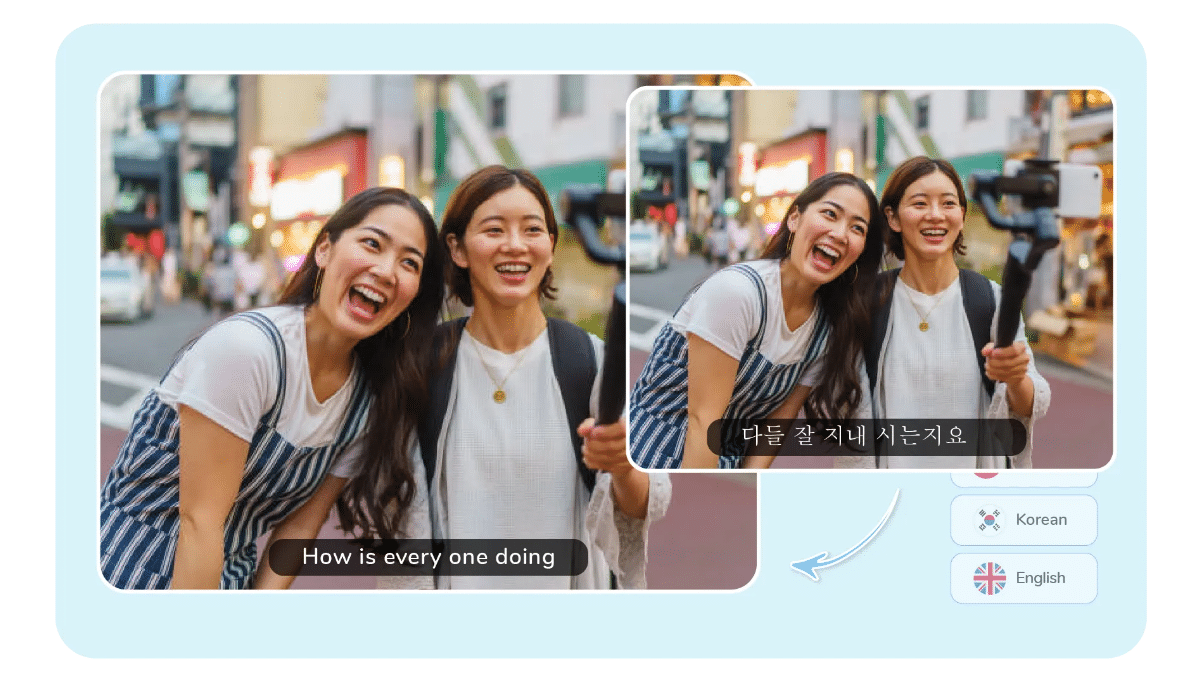
Follow this section to explore the depth of this technology and its impact on video content.
AI-Powered Translation and Voice Cloning
AI video translation tools, such as Virbo, are equipped with sophisticated language models capable of interpreting and converting spoken language from one tongue to another. What sets these tools apart is their ability to translate text and clone voices with remarkable accuracy. This means that the original speaker’s voice can be replicated in a different language, maintaining the tone, pace, and emotional nuances of the original content. These features and attention to detail ensure that the translated video preserves the essence of the original message, enhancing the viewer’s connection with the content.
Subtitling with Precision
Beyond mere translation, AI tools like Virbo extend their capabilities to subtitling, where timing, accuracy, and readability are crucial. These tools analyze the audio waveform of the video to perfectly sync subtitles with spoken words, adjusting them for readability and ensuring they appear on screen at the right moment.
Seamless Lip-Syncing for Authenticity
While translating video content, the main concern is that awkward disconnect is often found where the audio and visual elements don’t quite match up. These AI translators take the technology further by eliminating the concerns and incorporating lip-syncing features, ensuring the translated audio matches the speaker’s lip movements in the video. With it, a natural viewing experience feels authentic and engaging.
Comprehensive Video Translation
A standout feature of AI in video translation is its ability to learn and improve over time. Machine learning algorithms adjust based on feedback and corrections, refining their accuracy. The more content they process, the better they understand and translate linguistic subtleties, leading to higher-quality translations with each project.
2. Benefits of Translating Videos
The benefits of translating videos are vast and varied, impacting everything from viewer engagement to market reach.
Let’s explore how translating your videos can significantly amplify the impact of your content.
Wider Audience Reach and Content Engagement
The most immediate benefit of video translation is the dramatically expanded audience reach. By offering content in multiple languages, you’re not just limited to native speakers of your original video’s language. This inclusivity invites a global audience, opening up markets and communities previously beyond your content’s reach.
It is proven that videos translated and subtitled in a viewer’s native language tend to have higher engagement rates. Audiences are likelier to watch a video to completion, interact with it, and share it within their networks when it speaks their language. This increased engagement not only boosts your video’s performance metrics but also fosters a stronger connection between your brand and its international viewers.
Discoverability
The whole concept of creating content is to share it with the world and hope that it will be seen. When you translate your videos, it can also significantly improve discoverability online. Search engines and video platforms rank content higher if it caters to a broader audience. Subtitled videos cater to search queries in multiple languages, increasing the likelihood that users worldwide will find your content. We all know how saturated the digital landscape can be. If you can share your content in a different part of the world in their native language, you can be set apart from any competitor. Not only that, but you can also demonstrate inclusivity with it. Moreover, it is portrayed as being forward-thinking and accessible to a diverse audience.
Cultural Sensitivity and Localization
Beyond mere language translation, the process allows for cultural localization, ensuring that your content is not only understood but also culturally relevant to your audience. This sensitivity can enhance brand perception and loyalty, as viewers appreciate content that respects and acknowledges their cultural context.
3. The Quickest Way to Efficiently Translate Videos with AI
Want to translate your video content into multiple languages? Want to save time and resources as well? Simply use Wondershare Virbo’s Online Video Translator. Just drag/drop your video to the web interface and follow the onscreen prompts to convert the content quickly into an entirely different language.
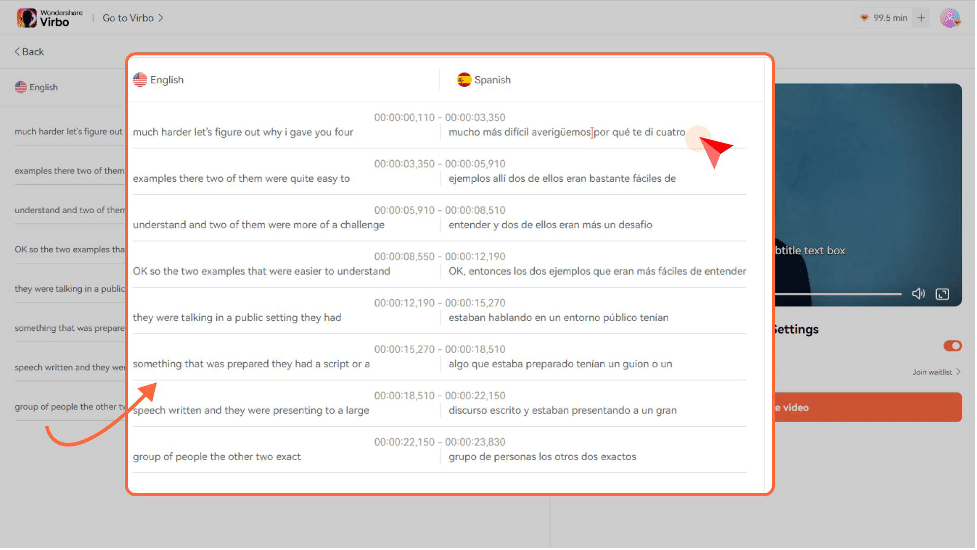
Don’t worry about the translation being out of place, as Virbo offers the Lip-Sync feature to align the video with the script. In addition, the natural voice clone feature will create a digital replica of a person’s voice in the video without losing the personal touch or brand identity, making it presentable to the viewer. This online tool also offers a Subtitle feature for viewers who have difficulty hearing or require visual aids to understand. Worried about the script accuracy? Don’t be! The Proofread Video Script feature can throw away all the inconsistencies. With it, you can edit the translated content(script) to make sure everything is right on the money. Currently, this tool supports more than 30 languages, including English, Chinese, Spanish, Japanese, French, Hindi, etc.
The steps are as follows.
Step 1: Upload the Video
Visit the website, and tap “Click to Upload the Video” to insert your content.
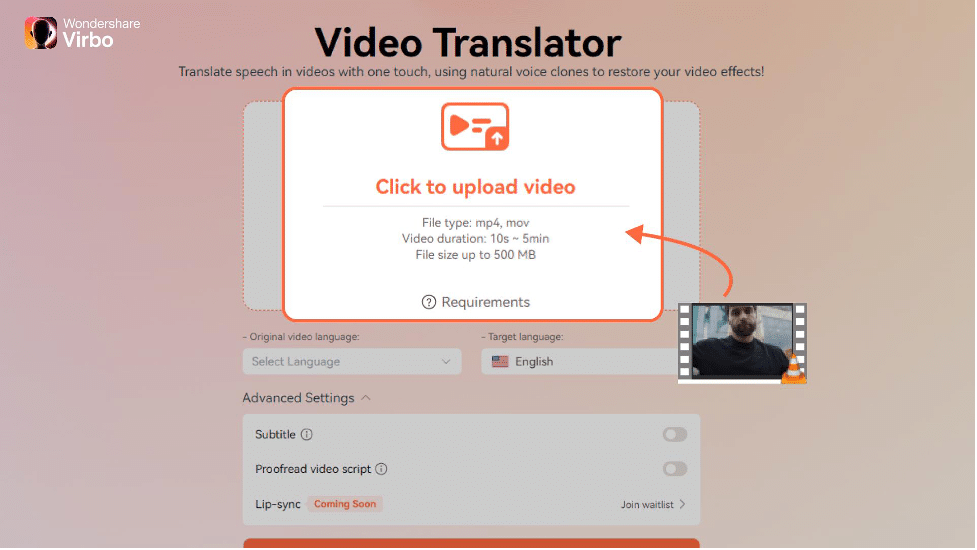
Step 2: Set Parameters
Set the “Original Video Language” and “Target Language”. Also, under the Advanced Settings section, enable the “Subtitle” and the “Proofread Video Script” feature.
Tip: With the Proofread Video Script feature, you can polish the translated content, clearing it from any grammatical mistakes.
Step 3: Translate
Finally, tap “Translate this Video” to initiate processing. Download the changed content to your device.
4. Conclusion
AI tools like Wondershare Virbo have made every effort to make things easier for content creators and businesses to market their videos and products to a broader audience who speak different languages. With sublime accuracy and fast conversion speed, AI is the way forward. Stay ahead of the curve, and try this amazing new tool today!











