
Spoofing, the act of tricking the GPS location in Pokémon Go, has become increasingly popular among players looking to access distant regions without physically traveling. While the process can lead to temporary or permanent bans if caught, many still pursue this method for various reasons. Use a PC to spoof can avoid potential ban from pokemon go. This article sheds light on different techniques to spoof Pokémon Go for iOS users with/without pc free.
Part 1. Spoofing Pokémon Go GPS Location Free on PC(Windows/Mac) by iGPSGo:
iToolPaw iGPSGo Pokemon Go Spoofer for iOS is a professional location changer that allows users to simulate movement between two points. iGPSGo is a user-friendly software solution that allows iOS users to spoof their location on Pokemon Go using a PC. This method provides precise control over your virtual location and allows you to teleport to any desired coordinates. It is a reliable and easy-to-use option for those who prefer a PC-based approach to spoofing.
- To spoof Pokémon Go GPS Location on PC(Windows/Mac) using iGPSGo :
- Download and install the iGPSGo software on your PC.

- Connect your iPhone to the computer using a USB cable.
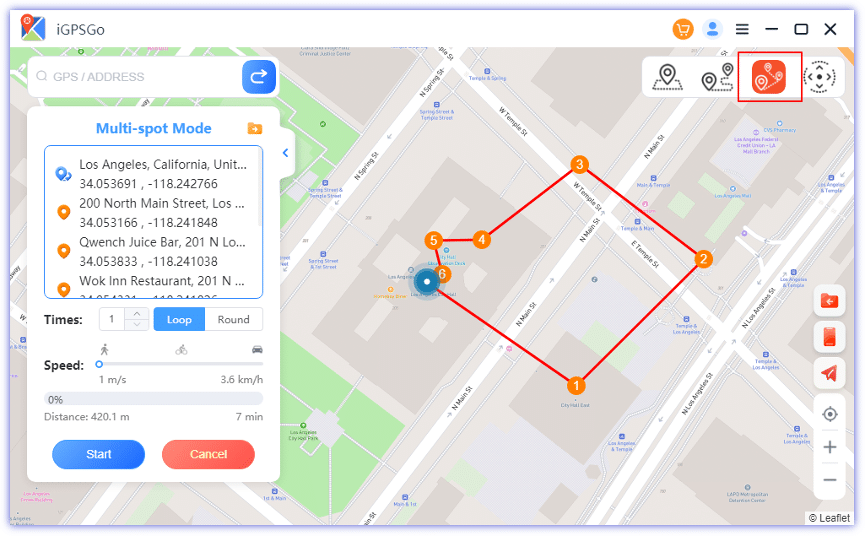
- Open the software, select ‘Teleport Mode’, and input the desired GPS coordinates.

Launch Pokémon Go on your iOS device. You’ll find your character in the new location. You can also use the GPS joystick feature to walk in pokemon go.
Part 2. Spoofing Pokémon Go GPS Location Free with PC by BlueStacks:
BlueStacks is an Android emulator that can be used on a PC to play Pokemon Go and spoof your location simultaneously. While not as precise as some other methods, it provides a convenient way to enjoy the game on a larger screen and try out different locations.
Steps for spoof pokemon go on PC with BlueStacks :
- Install BlueStacks on your PC.
- Download Pokémon Go APK within BlueStacks and launch it.
- Navigate to Settings > Location and choose a simulated location.
- Return to Pokémon Go APK and experience the new location.
Note: As this is an emulator, the experience might differ from actual gameplay on mobile devices.
Part 3. Spoofing Pokémon Go GPS Location without PC by iPogo Signulous:
iPoGo Signulous is a method for iOS users to spoof their location without the need for a PC. It utilizes the Signulous service to install the spoofing app directly on your device. This method is relatively easy to set up and is a suitable choice for those who prefer a PC-free experience.
Steps for spoof pokemon go free no PC with iPoGo:
- Visit the Signulous website on your iOS device and purchase a subscription for 20usd.
- Search and install the iPogo for Pokémon Go application.
- Once installed, launch iPogo, select your desired location, and initiate the game.
Part 4. Spoofing Pokémon Go without PC by Jailbreak Cydia Fake Location:
Jailbreaking your iOS device allows for more extensive customization, including location spoofing. By using Cydia tweaks, you can simulate a fake location in Pokemon Go without computer. However, this method comes with significant risks, including potential security issues and voiding your device’s warranty.
Steps for spoof pokemon go free no PC with Cydia tweaks:
- Jailbreak your iOS device using a trusted method.
- Open Cydia and search for ‘Location Faker’ or a similar GPS spoofing tweak.
- Install the tweak and configure your desired location.
- Play Pokémon Go as you move virtually across the globe.
Part 5. Spoofing Pokémon Go with PC and without PC: Which Method is More Safe?
Safety is a primary concern when spoofing. Using a PC often involves third-party applications or emulators, which might get detected by Niantic, leading to potential bans. Spoofing without a PC, particularly with jailbreak, provides more in-depth customization, making it harder to detect but not foolproof. Regardless of the method, players should always be cautious, avoid sudden location jumps, and consider the potential risks.
Conclusion:
Spoofing Pokemon Go can be an exciting way to explore the game world, but it’s essential to choose a method that aligns with your preferences and priorities. PC-based methods like iGPSGo and BlueStacks offer greater control and security, while PC-free methods like iPoGo Signulous and Jailbreak Cydia Fake Location are more accessible but come with higher risks. Ultimately, the decision on how to spoof Pokemon Go should be based on your comfort level with the chosen method’s complexity and potential consequences. Regardless of your choice, always remember to play responsibly and respect the rules of the game.











