
Effective cooling is crucial for electronic devices, power systems, and LED lighting – and aluminum heatsinks have become the go-to solution for managing heat in these applications. Aluminum extrusions, in particular, enable the mass production of heatsink profiles with fins that dissipate heat efficiently. In this article, we explore why aluminum heatsinks are so widely used and how to get the best thermal performance from them through smart design and finishes.
Why Aluminum for Heat Sinks?
Aluminum is prized in thermal management because it offers an excellent balance of thermal conductivity, weight, and cost. Pure copper has higher thermal conductivity (around 400 W/m·K) than aluminum (~230 W/m·K), but aluminum is far lighter (about one-third the density of copper) and significantly cheaper. This means an aluminum heatsink can be made much larger (with more heat-dissipating surface area) for the same weight and cost as a smaller copper one. Additionally, aluminum is easier to extrude into complex finned shapes, whereas copper is too hard to extrude in most cases. The result is that extruded aluminum heat sinks dominate industries from consumer electronics to industrial equipment, providing efficient cooling at a practical cost.
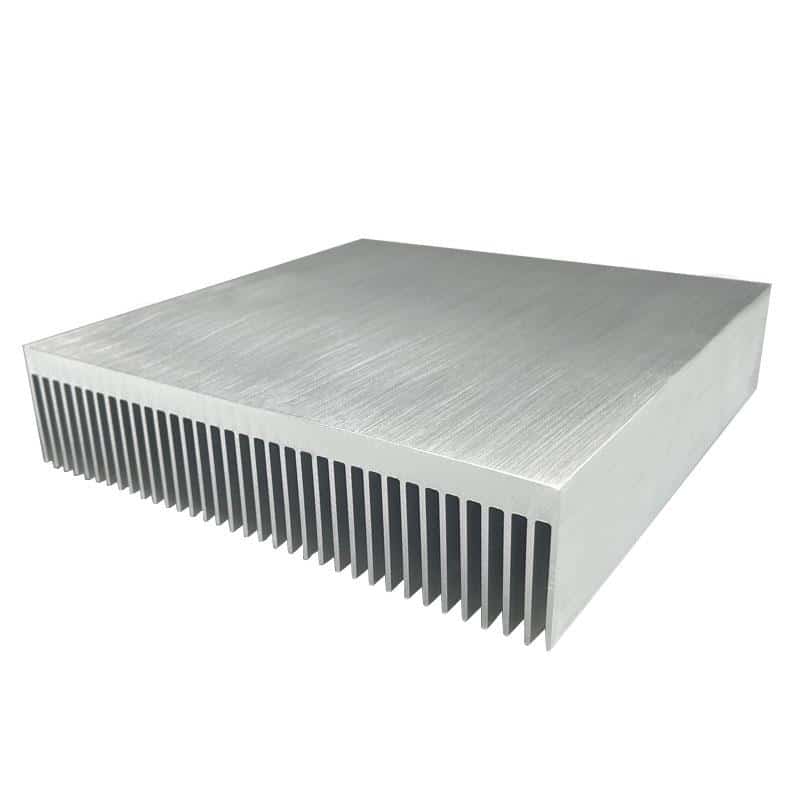
Aluminum’s thermal conductivity, while lower than copper’s, is still high compared to most materials and more than adequate for many cooling needs. For example, an aluminum alloy like 6063 has thermal conductivity around 200 W/m·K, which allows heat to spread quickly from the device base into the fins. Furthermore, aluminum’s heat capacity is relatively high (it can absorb a lot of heat energy before its temperature rises), helping to buffer transient temperature spikes. In short, aluminum heatsinks hit a sweet spot of performance and practicality, which is why they are found in everything from LED lamp housings and computer CPUs to motor controllers.
Designing an Efficient Extruded Heatsink
To maximize cooling, a heatsink’s design must promote effective heat transfer to the air. This primarily means maximizing surface area (more fin area for air to contact) and ensuring airflow can move through the fins. Extrusion makes it straightforward to create many thin, tall fins on a base plate. However, there are practical limits – extremely thin fins or very tightly packed fins can be difficult to extrude and may not improve cooling if air can’t circulate between them. A good design finds the optimal fin thickness and spacing for the intended airflow (natural convection vs. forced-air). For instance, in natural convection (no fan), slightly wider spacing between fins often performs better, whereas in forced convection (with a fan), closer-packed fins can be effective since the air is actively pushed through.
Material thickness also matters. The base of the heatsink should be thick enough to spread heat across all the fins, especially if the heat source (like a power transistor or LED module) is small relative to the heatsink size. Sometimes designers will incorporate a copper heat spreader or base plate onto an aluminum heatsink for very high power applications – the copper spreads heat quickly at the source, and the aluminum fins dissipate it to air. This hybrid approach leverages copper’s conductivity and aluminum’s weight and cost advantages.
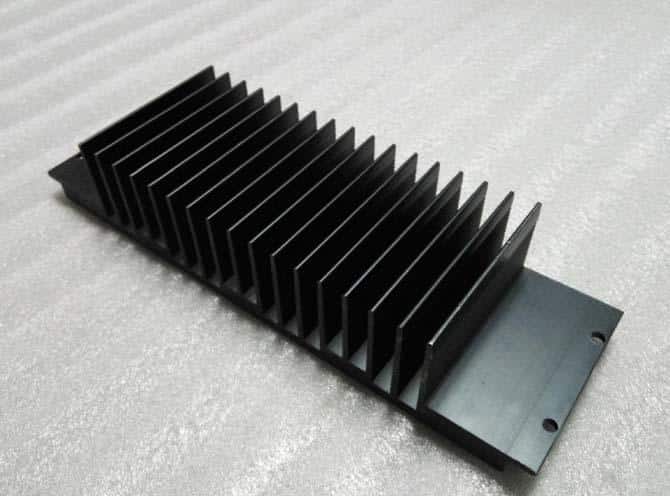
Another consideration is surface finish. Aluminum heatsinks often come in a bare (mill finish) silver color, which is fine for many cases. But applying an anodized finish can protect against corrosion and slightly enhance radiation of heat. In particular, black anodized heat sinks are popular because black surfaces emit thermal radiation more effectively. Test data shows that in low airflow conditions (passive cooling), a black anodized heatsink can dissipate roughly 8–10% more heat than a bare silver-colored one. Under strong forced airflow, the difference is negligible, but in natural convection every bit of extra cooling helps. Anodizing also provides electrical insulation on the surface (useful if the heatsink might contact other components) and a professional appearance. It’s worth noting that overly thick coatings or paints should be avoided on heatsinks – a thin anodic layer is ideal, whereas a heavy powder coat could act as an insulator and reduce performance.
Getting the Most Out of Your Heatsink
To ensure your aluminum heatsink performs optimally, keep a few guidelines in mind. First, orient the fins appropriately for the device’s typical usage – for example, vertical fins are best for natural convection (as hot air rises between them). If the device has a fan, make sure the fin orientation aligns with the airflow. Second, don’t overlook mounting: use a quality thermal interface material (thermal paste or pad) between the component and the heatsink base to minimize contact resistance. Even the best heatsink won’t help if there’s an air gap or poor thermal transfer from the device to the metal.
Consider the operating environment as well. If the equipment will run in dusty or dirty conditions, wider fin spacing might be needed to avoid clogging over time. In high-vibration environments, robust mounting of the heatsink is important to keep it secure. Luckily, extruded aluminum profiles can be easily machined or tapped to add mounting holes, clips, or other hardware as needed. Many manufacturers (including aluminum heatsink supplier) offer custom fabrication services to cut, drill, or attach hardware to heatsinks so they’re ready to integrate into your product.
Finally, match the heatsink to your specific thermal requirements with some safety margin. Thermal design often involves calculating the required heatsink thermal resistance (in °C/W) for your heat load and airflow. Extruded aluminum heatsinks come in various sizes and profiles; if a standard profile doesn’t meet your needs, suppliers can modify an existing design or even create a fully custom extrusion profile for your project. The flexibility of aluminum extrusion means that whether you need a compact board-level heat sink or a massive industrial heat exchanger, there’s likely a cost-effective solution available.
Aluminum heatsinks remain a cornerstone of electronics cooling due to their blend of high thermal performance, low weight, and manufacturability. By selecting a well-designed extruded profile, using appropriate finishes like anodizing, and accounting for your device’s cooling conditions, you can maximize thermal performance and reliability. In partnership with an experienced heatsink manufacturer, you’ll keep your components running cool and extend the life of your equipment.











