
Whether it is to save file size or transfer multiple data from one device to another, Zip files are one of the convenient ways to compress the files. However, due to various factors such as Hardware faults or software bugs, Zip files can become corrupted or damaged. Thus, resulting in loss of data or files, which you cannot access or unzip to recover.
Fortunately, there are many tools available that can help fix a corrupted Zip file and recover the compressed data. Among these tools, Wondershare Repariit is the best option that you can choose for corrupt Zip file repair without affecting the data inside it. The app is available for both desktop and online platforms. However, the online tool supports all other forms of files or documents except the Zip files.
Part 1: Why is Zip File Corrupted or Damaged?
If you want to share multiple files and folders from one device to another over the internet, Zip files are the preferred choice. But corrupted Zip files are among the common issues faced by many users, resulting in an inability to access the data it contains. Although there are many ways to fix a corrupted Zip file, choosing the right one can be a little tricky. However, you can apply the correct solution and prevent the corruption of Zip files by understanding the reasons behind it.
Here are some of the most common reasons that can cause a Zip file to get corrupted or damaged:
- Disrupted Downloads: When a zip file download is interrupted due to network troubles, power outages, or other circumstances, the file could get corrupted or unfinished.
- Hardware Error: Faulty or failing hardware components, such as hard drives or memory modules, can cause data corruption in zip files.
- Software Bugs: Software applications or operating systems may occasionally encounter faults or glitches that cause files to be corrupted during compression or decompression.
- Incorrect Transfer: Bad file transfer methods or improper transfer techniques can cause data corruption and compromise the integrity of zip files.
- Disk Issues: Defects on storage media, such as hard drives or portable devices, can result in data corruption, including zip file corruption.
Part 2: Why Use Wondershare Repairit to Fix a Corrupted Zip File
Now that you understand the reasons causing the Zip file to go corrupt, one thing is certain. To fix a corrupt Zip file if you use typical tools, you might need to pick the right one depending on the reasons behind the Zip file corruption. That might take forever to resolve the issue and you might need to install multiple tools on your device.
Thankfully, to address this dilemma, you can choose Wondershare Repairit File Repair, a comprehensive file repair tool for corrupt Zip file repair caused by any reason. The app is extremely user-friendly and can be applied by any skill-level user for damaged Zip file repair.
Following are the key features of the Wondershare Repairit File Repair tool to help fix a corrupted Zip file:
- It can repair damaged Zip files with any amount of corruption, such as Zip files that do not open, Zip folders that are invalid, CRC errors, and so on.
- You can fix damaged or corrupted Zip files for any cause, including system crashes, file format changes, virus attacks, and so on.
- The program can successfully restore corrupted Zip files without affecting the original file.
- It automatically decompresses, extracts, and restores fixed files to their original conditions.
- The utility supports batch repair for ZIP files and files larger than 1GB.
- It can also fix damaged or corrupted PDF, Word, Excel, Zip, and PowerPoint files and is compatible with all file formats and versions.
- It is available for Windows 11/10/8/7/Vista, Windows Server 2003/2008/2012/2016/2019/2022, and macOS 10.12-14.
Part 3: How to Fix a Corrupted Zip File Using Repairit File Repair Software
For corrupt Zip file repair, all you need is an efficient file repair tool such as Repairit. As mentioned earlier, using the app, you will get all the advanced repair technology along with an easy-to-use interface. All you need to do for a damaged Zip file repair via Repairit is add the corrupted files, click on the repair option, wait for the process, and save the repaired file.
Here are the following steps to fix a corrupted Zip file using the Repairit File Repair tool:
Step 1: Add Corrupt Zip Files
Launch the software and select the “More Types Repair” option from the left side panel on the main screen. Next, click on the “+ Add” button to browse files on the system to add your corrupted Zip files.

Step 2: Start Repair Process
Click on the “Repair” button at the bottom to start the damaged zip file repair process.

Step 3: Preview And Save
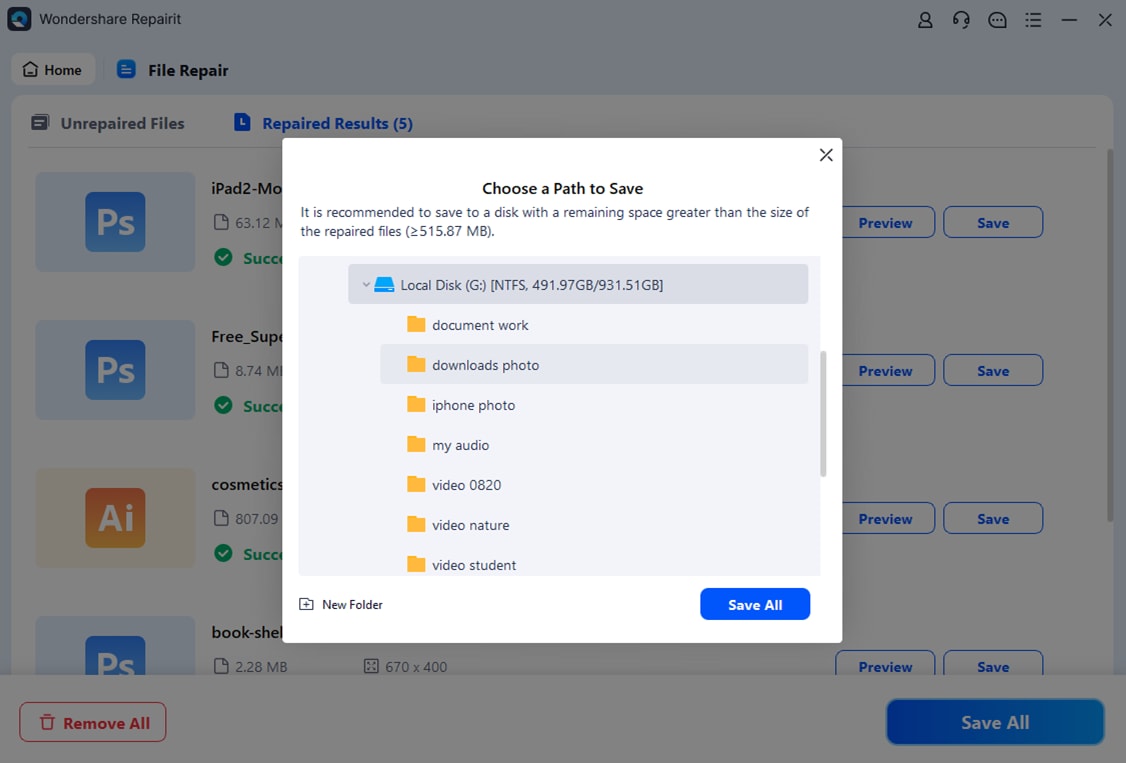
You can preview the repaired PowerPoint files by clicking on the “Preview” option next to the result. Choose the location path of your preference to save the Zip files and click on the “Save All” option.
Conclusion
As useful as the Zip files can be to compress files and bundle them together to transfer over the internet, it can also tend to become corrupt. Instead of going with the usual tools that might help fix one or two errors in the Zip files, you must consider using the Repairit File Repair tool as a stop solution. Not only can you damaged Zip file repair effectively, but you can also preserve the original data inside it. The app is available for both Windows and Mac systems, so you can choose depending on your requirements.











