
Do you copy business details from Google Maps into Excel one by one? This slow process wastes your valuable time. Maybe you used a script to get data faster. But Google detected the request and banned your IP address. This situation feels hopeless. You need quality leads, yet the technical barriers stop you.
Relax. You found the right guide. This guide explains how to scrape Google Maps without technical headaches. It covers four proven methods. You will master everything from Python code to simple software. Get ready to export data safely.

What You Need Before Scraping Google Maps
Google Maps protects its data strictly. You request multiple pages. The system detects this high traffic. It blocks your access immediately. You see CAPTCHA or error messages. Your local IP address gets blacklisted. You must hide your real digital identity to avoid this. A professional proxy service solves this problem.
This brings us to the IPcook web scraping proxy. It provides premium proxy services for data extraction. This company helps businesses access public data safely. The network mimics real user behavior to bypass restrictions.
Here are the benefits of IPcook proxies:
- Elite Anonymity. Google proxy removes all proxy headers and presents each request as a regular user.
- Fast IP Rotation. The system rotates the IP every minute or assigns a new IP address for each request.
- Massive IP Pool. The network provides access to over 55 million IPs across more than 185 locations.
Your network connection is secure with the IPcook Google proxy. Now, you need to prepare your digital workspace before scraping Google Maps. Download the latest version of Python from the official website if you plan to write code. Install a text editor like VS Code as well. Or you might prefer ready-made scraper software. You can also update your Google Chrome browser to support the latest extensions. These basic tools ensure you can follow the tutorials below.
How to Scrape Google Maps: 4 Proven Methods
This guide selects the most effective ways to extract map data. You can choose the method that fits your technical skills, because some approaches require programming knowledge. Now, let’s read through these four proven approaches carefully.
Method 1: Using Python (For Developers)
For developers who need full control, using Python to scrape Google Maps is the most powerful method. It is flexible, can handle large projects, and you can customize every step. Libraries like Selenium or Playwright let you automate a real browser. This is perfect for dealing with Google Maps dynamic content.
Here is a simplified guide on how to scrape data from Google Maps using Python and Playwright. We will collect the names and ratings of pizza shops in Chicago.
Step-by-Step Process:
- Set Up Your Environment. First, make sure you have Python installed. Then, open your terminal and install the necessary libraries. You will need Playwright to control the browser and a library to save data.
- Configure Proxies. To avoid being blocked, you must use a residential proxy service. Replace the placeholder server and credentials in the code with your own proxy details. This step is important for smooth scraping.
- Write the Scraping Script. The script will open a browser, go to Google Maps, perform a search, and extract data. The key is to find the correct HTML elements that hold the information you want.
- Run and Extract Data. Execute your script. It will automatically scroll the page to load more results, collect the data, and save it into a structured format like a CSV file.
Below is a basic version of a Google Maps data scraper script. It searches for “pizza in Chicago” and gets the first few results.
from playwright.sync_api import sync_playwright
import csv

def scrape_google_maps():
    # Launch the browser with a proxy (REPLACE with your proxy details)
    with sync_playwright() as p:
        browser = p.chromium.launch(
            headless=False,  # Set to True to run in the background
            proxy={
                "server": "http://your-proxy-server:port",
                "username": "your-username",
                "password": "your-password"
            }
        )
        page = browser.new_page()
        page.goto("https://www.google.com/maps")

        # Accept cookies if the button appears
        try:
            page.click('button:has-text("Accept all")', timeout=5000)
        except:
            print("No cookie button found or already accepted.")

        # Type the search query
        search_box = page.locator('input#searchboxinput')
        search_box.fill("pizza in Chicago")
        search_box.press("Enter")
        page.wait_for_timeout(5000)  # Wait for results to load

        # Scroll to load more places
        for _ in range(3):
            page.mouse.wheel(0, 10000)
            page.wait_for_timeout(2000)

        # Extract data from the loaded listings
        results = []
        listings = page.locator('div[role="article"]').all()[:5]  # Get first 5 listings

        for item in listings:
            try:
                name = item.locator('div.fontHeadlineSmall >> nth=0').inner_text()
                rating = item.locator('span.fontBodyMedium >> span >> nth=0').inner_text()
                results.append({"Business Name": name, "Rating": rating})
            except:
                continue

        # Save data to a CSV file
        with open('chicago_pizza_shops.csv', 'w', newline='', encoding='utf-8') as file:
            writer = csv.DictWriter(file, fieldnames=["Business Name", "Rating"])
            writer.writeheader()
            writer.writerows(results)

        print("Scraping finished. Data saved to 'chicago_pizza_shops.csv'.")
        browser.close()

if __name__ == "__main__":
    scrape_google_maps()
This simple scraper for Google Maps launches a browser, goes to Google Maps, and looks for Chicago pizzerias. To load additional results, it scrolls down. The business name and rating for the first five results are then extracted from the listings on the page. This clean data is then stored on your computer in a CSV file.
This is a simplified example, so please keep that in mind. A full project needs better error handling and might extract more data, like reviews or addresses. Using a reliable proxy service is also important to keep your scrape Google Maps project running without getting your IP address blocked.
Method 2: Using No-Code Tools (For Non-Tech Users)
What if you need data but do not know how to code? No-code tools are the perfect solution. They turn scraped data from Google Maps into a point-and-click task. These tools provide a visual interface to select the data you want. They handle the technical complexity in the background. This makes them ideal for marketers, researchers, or business owners.
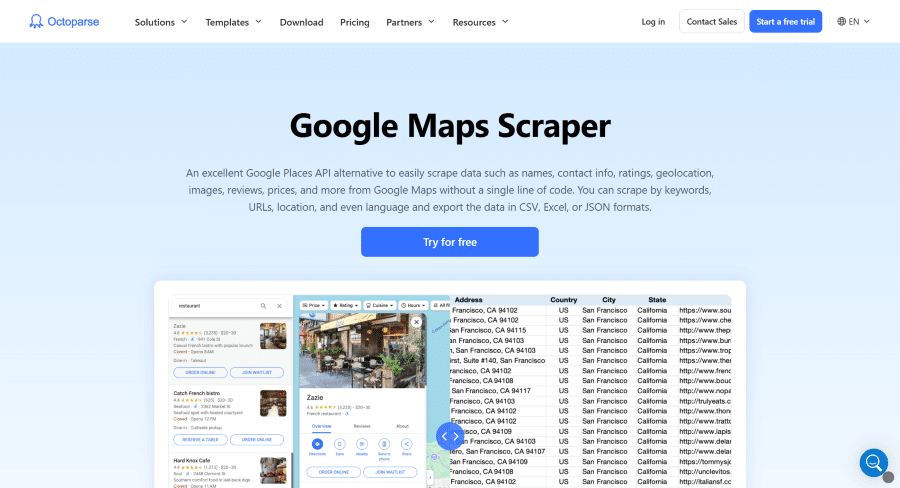
Options like Octoparse, ParseHub, and Apify are available when looking for the best Google Maps scraper in this area. It offers pre-made templates and cloud-based services. Let’s utilize Octoparse as an example to provide a straightforward tutorial on how to scrape Google Maps without using any code.
- Install and Create a Task. Download and install the Octoparse desktop client. Open it and create a new Advanced Mode task. Paste the URL of your Google Maps search results page into the main box.
- Set Up the Scraping Workflow. The page will load. Click on the first business listing on the map. Octoparse will highlight similar elements. Select the Select All to capture all listings. Then, choose the specific data points you want to extract, like name, rating, and address, by clicking on them.
- Run the Task and Export Data. Click Run to start the extraction. You can run the task on your computer or in the cloud. Once finished, the data will be available within Octoparse. You can easily export it to an Excel or CSV file with one click.
Method 3: Using Browser Extensions
The simplest approach to quickly and easily scrape data from Google Maps is to use browser add-ons. These small tools, which operate immediately on your browser page, include Instant Data Scraper, Web Scraper, and Scraper Mini. They are available in the Chrome Web Store.
Using a basic Google Maps scraper extension typically involves three simple steps:
- Install the Extension. Go to the Chrome Web Store, search for a data scraper extension, and click ‘Add to Chrome’.
- Click to Select Data. Navigate to your target Google Maps page, open the extension from your toolbar, and use your mouse to click on the data fields you want (e.g., business name, phone number).
- Export the Results. Once the data is highlighted, use the extension’s export button to download it as a CSV or Excel file.
However, this convenience comes with a major trade-off. These extensions are designed for very small-scale, one-time tasks. They may not be the best Google Maps scrapers for serious projects because they usually cannot automatically paginate or scroll to collect large datasets. If you need to scrape Google Maps beyond a single page of results, its limitations become immediately apparent.
Method 4: Using Official Google Places API
For a fully compliant method, Google offers its official Places API. This API fully complies with Google’s terms of service and is suitable for long-term, commercial, and user-facing projects. This service is ideal for developers who need to display business information on a website or app. It also delivers stable responses with clear official documentation. However, it is not a cost-effective solution for large-scale data collection using Google Maps.
The limitations are significant. First, the cost scales poorly. After a $200 monthly free credit, you pay for every 1,000 requests. Extracting detailed data for thousands of locations quickly becomes expensive. Second, the data fields are restricted. The API often returns less information compared to what you can scrape from Google Maps directly, such as full review text or specific business attributes. For projects requiring extensive data, the official API is often not the best solution due to these high costs and data limits.
Best Practices for Google Maps Scraping
To run a successful and sustainable project to scrape Google Maps data, follow these key practices. They reduce technological and legal concerns while assisting you in obtaining high-quality data.
- Observe rate limits. Don’t submit requests too quickly. Include a pause of two to five seconds between each request. The best technique to prevent Google’s anti-bot technologies from blocking your IP address is to simulate human browsing speed.
- Clean Your Data. Scraped data is frequently untidy. You need to sanitize the data you’ve scraped from Google Maps. Eliminate empty fields, correct conflicting formatting, and eliminate duplicate entries. Clean data is trustworthy information that can be analyzed.
- Follow Legal Rules. Always check the legal context. Only gather information that is accessible to the public. If you manage user data from Europeans, be mindful of laws like GDPR. When in doubt, consult with a legal expert to ensure your Google Maps data scraper project operates within the law.
FAQs
Q1: Is it legal to scrape Google Maps?
Although it is usually regarded as legal, scraping publicly accessible material carries some danger. It is essential to review local laws or obtain expert legal advice in advance because the specific legality greatly depends on your local laws and regulations (such as GDPR or CCPA) and how the data will be used.
Q2: Why is my scraper getting blocked?
Google has sophisticated mechanisms in place to identify bots. You will be reported if you send queries from a single IP address or too soon. Using high-quality proxies that rotate IP addresses is the most popular approach. Also, to replicate human behavior, always include realistic delays between requests.
Conclusion
Learning how to scrape Google Maps effectively opens up a world of data for your business. Whether you choose the power of Python, the simplicity of no-code tools, quick browser extensions, or the official API, the right method depends on your skills and needs.
A good scrape project relies on stability. To avoid blocks and ensure smooth data collection, using a reliable proxy service is essential. For this, this guide recommends trying IPcook. Its proxies are designed to help you scrape data from Google Maps efficiently and without interruption. Let’s start your project the right way today.











