
iLoungeiLounge
  • News
    • Apple
      • AirPods Pro
      • AirPlay
      • Apps
        • Apple Music
      • iCloud
      • iTunes
      • HealthKit
      • HomeKit
      • HomePod
      • iOS 13
      • Apple Pay
      • Apple TV
      • Siri
    • Rumors
    • Humor
    • Technology
      • CES
    • Daily Deals
    • Articles
    • Web Stories
  • iPhone
    • iPhone Accessories
  • iPad
  • iPod
    • iPod Accessories
  • Apple Watch
    • Apple Watch Accessories
  • Mac
    • MacBook Air
    • MacBook Pro
  • Reviews
    • App Reviews
  • How-to
    • Ask iLounge
Font ResizerAa
iLoungeiLounge
Font ResizerAa
Search
  • News
    • Apple
    • Rumors
    • Humor
    • Technology
    • Daily Deals
    • Articles
    • Web Stories
  • iPhone
    • iPhone Accessories
  • iPad
  • iPod
    • iPod Accessories
  • Apple Watch
    • Apple Watch Accessories
  • Mac
    • MacBook Air
    • MacBook Pro
  • Reviews
    • App Reviews
  • How-to
    • Ask iLounge
Follow US

Articles

Articles

How to Convert Spotify to MP3 from Spotify Web Player

Last updated: Oct 19, 2022 7:27 am UTC
By Lucy Bennett
2022-10-13 Spotify Music Converter

Spotify official has launched the download feature for premium subscribers to enjoy Spotify songs offline, using Spotify app on mobile devices or in the desktop software. On Spotify web player, it seems that users are only allowed to stream songs with network connected, but actually, you can make it possible to convert Spotify to MP3 without encryption for playback offline. How to make it possible even without Spotify premium subscription? Actually, TuneFab Spotify Music Converter is the only software you will need.


Embedded Spotify Web Player in TuneFab Spotify Music Converter

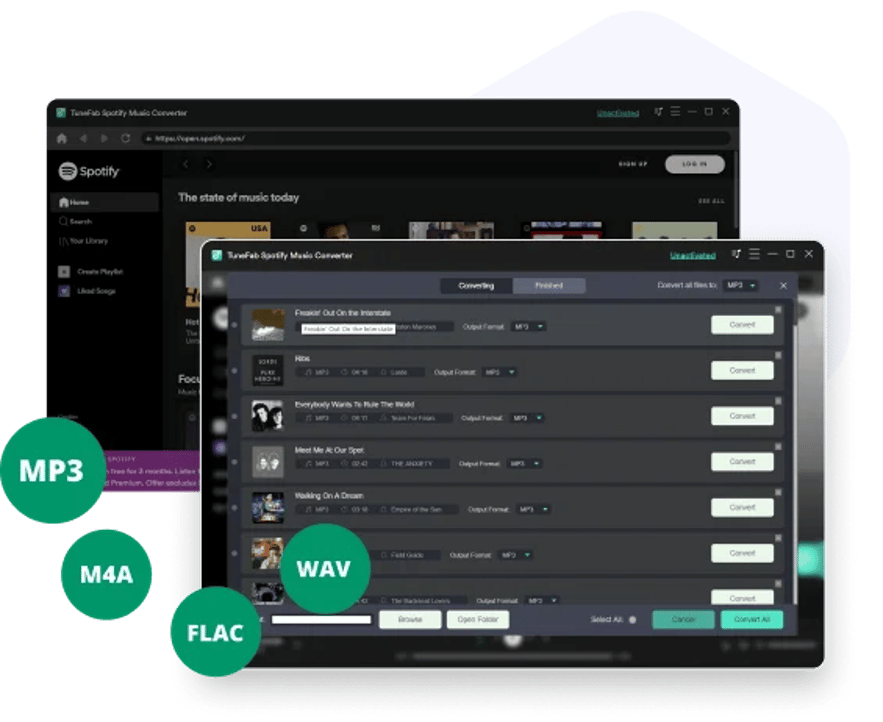
Spotify web player has been embedded inside TuneFab Spotify Music Converter, a powerful software providing professional help to strip DRM encryption from official Spotify songs, playlists, and podcasts. Users are able to access the official Spotify web player within TuneFab Spotify Music Converter simply by logging in via your free Spotify accounts, then you are available to select any Spotify content to convert as you desire.
2022-10-13 Spotify Music Converter
Embedded Web Player

Strip DRM from Spotify Songs, Playlists, Podcasts

When Spotify has limited its download feature by employing the DRM encryption tech, only allows users to stream the downloaded Spotify songs and podcast episodes within desktop software or its mobile apps, TuneFab Spotify Music Converter is workable to strip the encryption and convert Spotify to MP3, M4A, WAV, or FLAC in completely DRM-free status. Hence, users are allowed to transfer the audio files to all devices for streaming without limitations!


Quality Equalizer Provided

TuneFab Spotify Music Converter is equipped with the quality equalizer within the software, enabling users to customize the best audio quality to convert Spotify songs, podcasts, and playlists to MP3 or other formats without hassle. It offers the highest 320kbps bitrate and 48 kHZ sample rate for selection. To smaller the file sizes, you are still possible to select lower quality in requirements.

High-efficient Conversion Speed

As Spotify only takes one tap to download Spotify playlists, TuneFab Spotify Music Converter also offers great convenience to process Spotify playlist download in one-shot – you only requires to drag the Spotify playlists to a convert button and they will be processed right away! In addition, with 5X faster speed and batch download feature, TuneFab Spotify Music Converter is able to complete the whole playlist conversion process within a short time for you.


Convert Spotify to MP3 in 3 Steps

Now, grasp how to complete the Spotify to MP3 conversion within only 3 steps via TuneFab Spotify Music Converter:

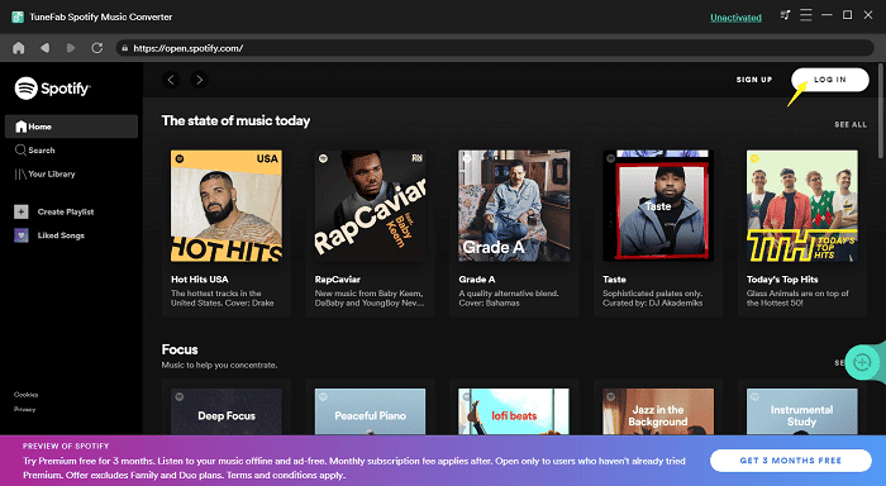
STEP 1. Launch the well-installed TuneFab Spotify Music Converter on desktop, then enter the built-in Spotify web player to log in via your Spotify account (the free one is supported).
Log in TuneFab Spotify Music Converter Web Player

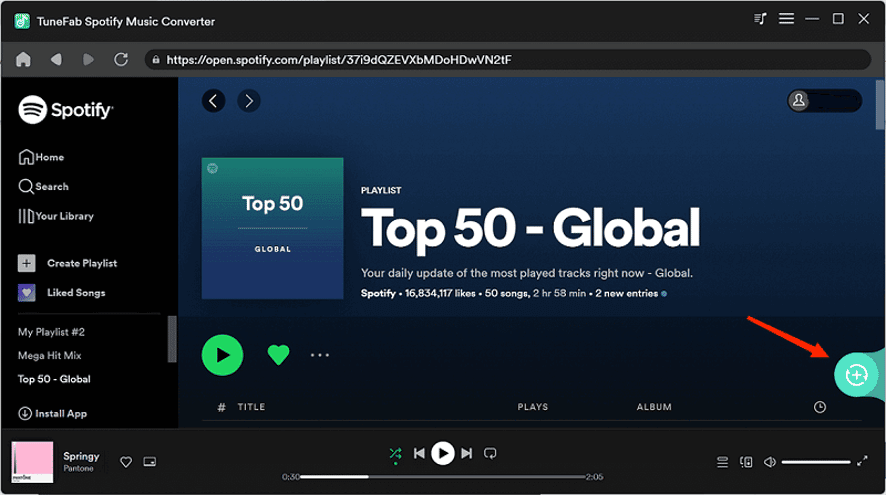
STEP 2. Now, simply browse and select any Spotify single, playlist, or podcast episodes you desire to convert to MP3, then drag them to the floating “+” icon for adding to the conversion queue.

Select Spotify Playlist to Convert

STEP 3. Then, directly select MP3 format from the upper-right “Convert all files to” menu. Once complete, tap the “Convert All” icon and the Spotify playlist will be converted to MP3 right away.

NOTE: To further adjust sample rate or bitrate before the conversion, navigate to “Menu” > “Preferences” > “Advanced” to select your preferred options.
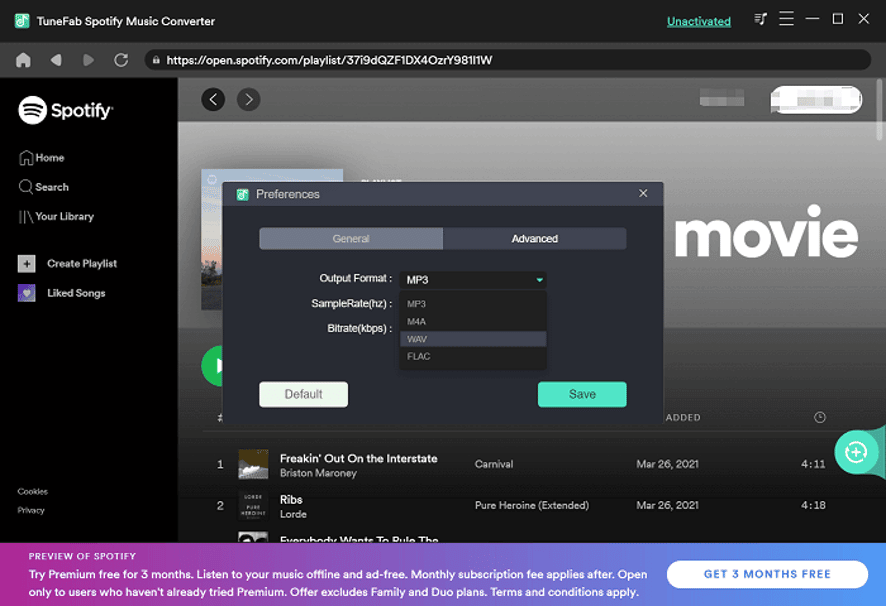
Customize Output Parameters to Download Spotify Songs

When TuneFab Spotify Music Converter has embedded the Spotify web player inside, it makes it possible to convert Spotify to MP3 without installing Spotify app or desktop software at all. Via customized quality, mainstream formats, and speedy performance, you will find it even much easier to enjoy Spotify songs and podcasts now! Simply install TuneFab Spotify Music Converter and get started with its free version from today!



Latest News
The Apple Watch Series 11 42mm GPS is $100 Off
1 Min Read
Apple Launching A New Education Hub In India Teaching Robotics and Swift Programming
1 Min Read
Women’s and Men’s Golf Added to Apple Sports
1 Min Read
Apple Adding Civilization VII and Other Games To Apple Arcade
1 Min Read
AirPods 4 ANC Is $59 Off
1 Min Read
Apple Using 2NM Process For Their M6 and A20 Chip
1 Min Read
iPhone 18 Models Will Not Have a Big Redesign
1 Min Read
Launch of MacBook Pro M5 Pro and M5 Max Models is Approaching
1 Min Read
Get the iPad Mini 7 256GB Wi-Fi at $99 Off
1 Min Read
Mozilla Now Allows Turning AI Features Off
1 Min Read
Barcelona Passeig de Gràcia Apple Store Temporarily Closing
1 Min Read
Apple’s Plans to Enter the Smart Glasses Market is Changing the Industry
1 Min Read

iLounge logo

iLounge is an independent resource for all things iPod, iPhone, iPad, and beyond. iPod, iPhone, iPad, iTunes, Apple TV, and the Apple logo are trademarks of Apple Inc.

This website is not affiliated with Apple Inc.
iLounge © 2001 - 2025. All Rights Reserved.
  • Contact Us
  • Submit News
  • About Us
  • Forums
  • Privacy Policy
  • Terms Of Use
Welcome Back!

Sign in to your account

Lost your password?








