

For years, TeamViewer has been a widely used remote desktop tool for macOS. However, recent changes in its policies have raised concerns among users. Unannounced time restrictions on free usage, frequent false detections of commercial use, and inconsistent customer support have led many to seek alternatives. A number of discussions on Reddit highlight these frustrations, with one user stating, “I got flagged for commercial use out of nowhere and now I can’t even connect to my own Mac without paying.” Another user added, “TeamViewer keeps disconnecting me after just a few minutes, and support is completely unhelpful.”
For those looking for a more stable and hassle-free solution, HelpWire has gained attention as a viable TeamViewer alternative for Mac, offering a simple and accessible remote support experience.

Why TeamViewer Has Become a Frustration for macOS Users
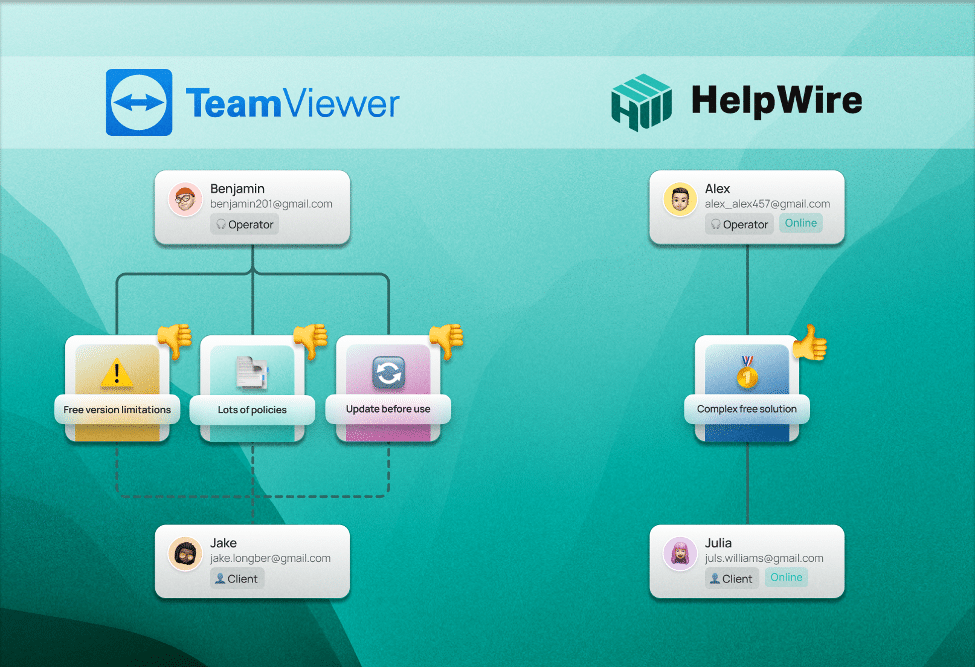
While TeamViewer has been a leader in the remote access space, its policies and technical limitations have left some macOS users struggling. The most common concerns include:
- Unpredictable Free Usage Limits: Many users report being disconnected without warning. A Reddit user noted, “TeamViewer keeps timing out after a few minutes even though I’m just using it for personal stuff.”
- False Commercial Use Flags: Even individual users have found themselves locked out. One post reads, “TeamViewer suddenly flagged me for commercial use, and their support won’t even respond. Now I’m locked out of my own devices.”
- Lack of Support Response: Many users describe slow or unhelpful responses from TeamViewer’s support team.
- Compatibility Issues with macOS: Some users have struggled with connectivity or stability after macOS updates, requiring troubleshooting to keep the software functional.
For users experiencing these problems, considering a TeamViewer alternative for Mac like HelpWire could be beneficial.
What HelpWire Offers to macOS Users
HelpWire has been gaining traction as a TeamViewer alternative Mac users might find more reliable. It simplifies the remote access experience while addressing some of TeamViewer’s biggest pain points. Here’s what sets it apart:
- No hidden fees or restrictions: While many remote access tools limit their free plans, HelpWire remains fully free for personal and business use.
- Designed for macOS compatibility: HelpWire supports macOS natively and works smoothly with recent macOS updates.
- Unattended access for macOS: A valuable feature for IT professionals and businesses, HelpWire allows remote access even when no one is present at the other end.
- Seamless connectivity across versions: HelpWire avoids version conflicts, allowing users to connect without worrying about forced updates.
- Privacy and security considerations: HelpWire prioritizes security by implementing end-to-end encryption, ensuring that remote sessions remain private and protected from unauthorized access. HelpWire ensures secure access through secure data transfer protocols to safeguard sensitive information. These features make HelpWire a trustworthy option for those concerned about data safety and privacy.

What Users Think About HelpWire as a TeamViewer Alternative for Mac
Those who have tried HelpWire appreciate its simplicity and reliability. Some notable feedback includes:
- Better Stability on macOS: One reviewer on G2 mentioned, “HelpWire is a lifesaver for my Mac support needs. No more connection issues or unexpected disconnections!”
- Easy Setup Process: Another G2 reviewer highlighted the convenience of installation, stating, “The swift setup process and zero- configuration requirement for starting remote support sessions are what I appreciate most about HelpWire.”
- Consistently Free Usage: A Captera reviewer noted, “HelpWire really stands out for me because it’s free and works seamlessly on both Mac and PC. I love how easy it is to get started.”
Exploring a Remote Access Alternative for macOS
For those who rely on remote access for tech support, work, or personal use, the limitations of TeamViewer have become an increasing challenge. HelpWire provides a simple, stable, and free alternative that eliminates common frustrations and ensures seamless connectivity.
If you’re in need of a remote access tool that works effortlessly on macOS without restrictive policies, HelpWire is worth exploring. Since it’s currently free for all users, it may be a practical solution for those seeking a hassle-free experience.











