
iLoungeiLounge
  • News
    • Apple
      • AirPods Pro
      • AirPlay
      • Apps
        • Apple Music
      • iCloud
      • iTunes
      • HealthKit
      • HomeKit
      • HomePod
      • iOS 13
      • Apple Pay
      • Apple TV
      • Siri
    • Rumors
    • Humor
    • Technology
      • CES
    • Daily Deals
    • Articles
    • Web Stories
  • iPhone
    • iPhone Accessories
  • iPad
  • iPod
    • iPod Accessories
  • Apple Watch
    • Apple Watch Accessories
  • Mac
    • MacBook Air
    • MacBook Pro
  • Reviews
    • App Reviews
  • How-to
    • Ask iLounge
Font ResizerAa
iLoungeiLounge
Font ResizerAa
Search
  • News
    • Apple
    • Rumors
    • Humor
    • Technology
    • Daily Deals
    • Articles
    • Web Stories
  • iPhone
    • iPhone Accessories
  • iPad
  • iPod
    • iPod Accessories
  • Apple Watch
    • Apple Watch Accessories
  • Mac
    • MacBook Air
    • MacBook Pro
  • Reviews
    • App Reviews
  • How-to
    • Ask iLounge
Follow US

Articles

Articles

Get hands-on with your favorite music with the MP3 Studio app

Last updated: May 22, 2021 8:22 am UTC
By Lucy Bennett
Get hands-on with your favorite music with the MP3 Studio app

In the present era, lots of music apps are out there that allow you to stream your favorite mp3 files and video files on your device with the app’s help. Some people are there, always in need of downloading the music. They want to make ringtones for their phones with the music or alarm tunes with the music. Have you heard of musical therapy? The musical treatment will soothe your mind and body. Listening to the right track according to your mood can change your life. You can become a happier person!


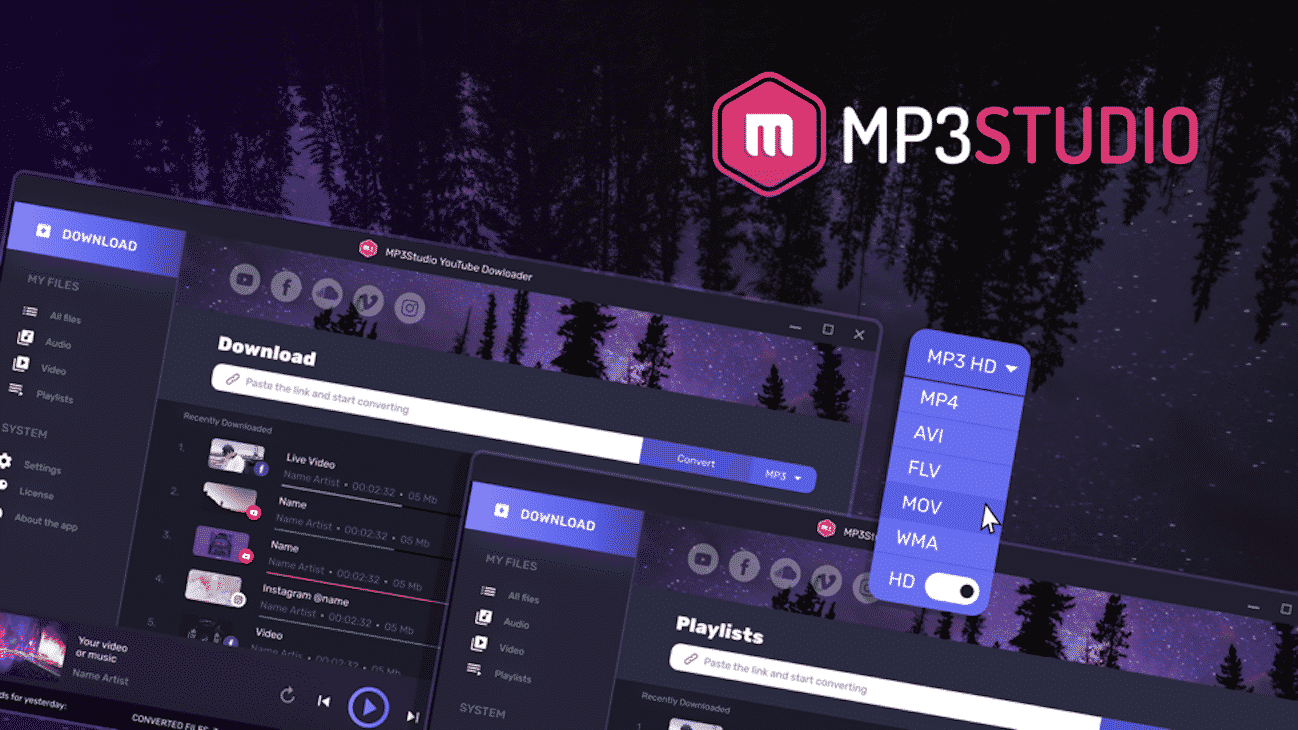
With the help of MP3Studio YouTube Downloader, you can now convert any video files into high-class mp3 files for your offline experience. You need to convert the file, and the conversion is effortless to do. You can now download various tunes or videos or mp3 files from Facebook, YouTube, or Instagram, in your system with the app’s help. So, if you do not have internet while traveling or in remote areas, you can listen to music in your own way. This process of downloading is very convenient for everyone out there.

Get hands-on with your favorite music with the MP3 Studio app

MP3 Studio YouTube Downloader: your one-stop solution to offline music

A music file has lots of purposes. People use non-copyright music files for several reasons. If you make vlogs, you know how important it is to have some free music for your video’s background. If you are a restaurant owner, you can play some soothing music there. People love to keep these tracks as their ringtones and for alarm tones as well. With only one app, MP3 Studio, you can get any of these music files straight on your device with just a single click! See how useful the app is!


Salient features of MP3 Studio YouTube Downloader:

  • Even if you are not accustomed to the software and downloading, you can also do this easily. The app is very user friendly. You can easily click on the app and finish your job. The app will complete all the work by itself only.
  • It will not take much time of your day. You can also download up to 99 files at the same time with this single app!
  • Conversion is a tiresome task sometimes. You need to convert a lot of music, and you do not have anything to play to entertain yourself! That time is over, and now you can play the same track when you are converting it. You will work and will not get bored for sure.
  • You can get any video and audio format available on the app. Choose the correct format you want to use, and you are good to go.

Process of saving music with MP3 Studio:

  • Copy the URL of the video from YouTube, Facebook, or Instagram.
  • Please put it in the input section of MP3 Studio.
  • The conversion process will start with a single click.
  • You can repeat the process for all the files you want to convert.

Please visit http://mp3.studio/ soon and get your hands on this fantastic piece of product.


Latest News
The 14-inch MacBook Pro with M5 Chip 16GB RAM/512GB is $250 Off
1 Min Read
Noise and Static on AirPods Pro 3 Still Unfixed
1 Min Read
New iMac with 24-inch OLED Display May be Brighter With 600 Nits
1 Min Read
The 15-inch M4 MacBook Air 256GB Is $250 Off
1 Min Read
Internal Kernel Debug Kit from Apple Reveals Tests for a MacBook with A15 Chip
1 Min Read
Apple Currently In Talks With Suppliers for Chip Assembly & Packaging of iPhones in India
1 Min Read
Apple Allows Easier Battery Replacement For M5 MacBook Pro with 14-inch Display
1 Min Read
The Apple Watch SE 3 44mm GPS is $50 Off
1 Min Read
20th Anniversary iPhone May Launch in Two Years
1 Min Read
Better Image Generation Capabilities and Apple Music Integration Coming to ChatGPT
1 Min Read
A20 Pro Chip Coming to Next Gen iPad Mini OLED
1 Min Read
Amazon has the AirTag 4 Pack Marked $29 off
1 Min Read

iLounge logo

iLounge is an independent resource for all things iPod, iPhone, iPad, and beyond. iPod, iPhone, iPad, iTunes, Apple TV, and the Apple logo are trademarks of Apple Inc.

This website is not affiliated with Apple Inc.
iLounge © 2001 - 2025. All Rights Reserved.
  • Contact Us
  • Submit News
  • About Us
  • Forums
  • Privacy Policy
  • Terms Of Use
Welcome Back!

Sign in to your account

Lost your password?










