
iLoungeiLounge
  • News
    • Apple
      • AirPods Pro
      • AirPlay
      • Apps
        • Apple Music
      • iCloud
      • iTunes
      • HealthKit
      • HomeKit
      • HomePod
      • iOS 13
      • Apple Pay
      • Apple TV
      • Siri
    • Rumors
    • Humor
    • Technology
      • CES
    • Daily Deals
    • Articles
    • Web Stories
  • iPhone
    • iPhone Accessories
  • iPad
  • iPod
    • iPod Accessories
  • Apple Watch
    • Apple Watch Accessories
  • Mac
    • MacBook Air
    • MacBook Pro
  • Reviews
    • App Reviews
  • How-to
    • Ask iLounge
Font ResizerAa
iLoungeiLounge
Font ResizerAa
Search
  • News
    • Apple
    • Rumors
    • Humor
    • Technology
    • Daily Deals
    • Articles
    • Web Stories
  • iPhone
    • iPhone Accessories
  • iPad
  • iPod
    • iPod Accessories
  • Apple Watch
    • Apple Watch Accessories
  • Mac
    • MacBook Air
    • MacBook Pro
  • Reviews
    • App Reviews
  • How-to
    • Ask iLounge
Follow US

Articles

Articles

Forgotten Passcode? Here are 4 Ways to Unlock your iPhone

Last updated: Aug 12, 2021 2:16 am UTC
By Lucy Bennett
Forgotten Passcode? Here are 4 Ways to Unlock your iPhone

It’s easy to mess up our iPhone unlock passcodes whenever we’re stressed, busy or doing two things at once. The problem however, is when your smartphone has had enough and decides to not let you in even when you’ve remembered the correct one.


Thankfully, there are several ways on how you can unlock your iPhone without passcode.

Forgotten Passcode? Here are 4 Ways to Unlock your iPhone

Use FoneGeek iPhone Passcode Unlocker

FoneGeek will save you a trip to the nearest Apple Store with its iPhone Passcode Unlocker. You can instantly regain access to your iOS device and move on to your daily routine without skipping a beat.

The unlocker works on both iPad and iPhone and takes care of the most common screen lock problems, such as iPad or iPhone disabled or locked, iCloud activation lock and more. What’s great is that you won’t be blocked afterwards and can continue using your device.


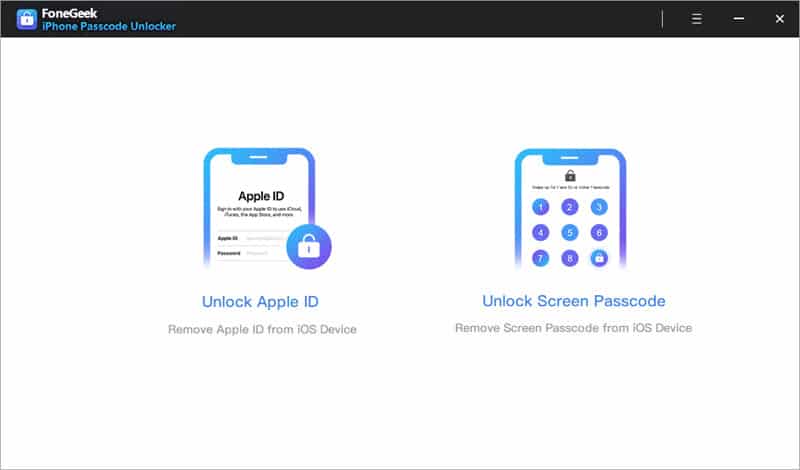
Step 1. Select Unlock Mode
Forgotten Passcode? Here are 4 Ways to Unlock your iPhone

Install the FoneGeek iPhone Unlock and let it run for the first time. Connect your iPhone to the computer and choose ‘Unlock Mode’ as soon as you get to the home screen.

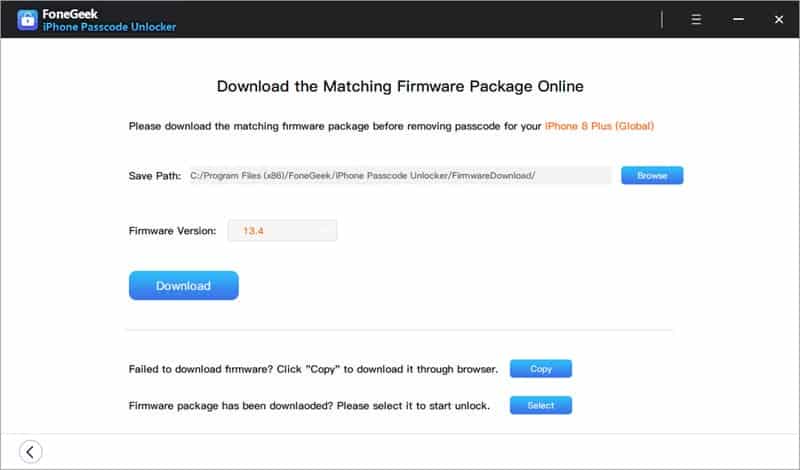
Step 2. Firmware Package Download
Forgotten Passcode? Here are 4 Ways to Unlock your iPhone

FoneGeek will auto-detect the iOS device and download the matching firmware. Wait a few minutes for the app to do its job, then it will know that you can proceed to the next step.

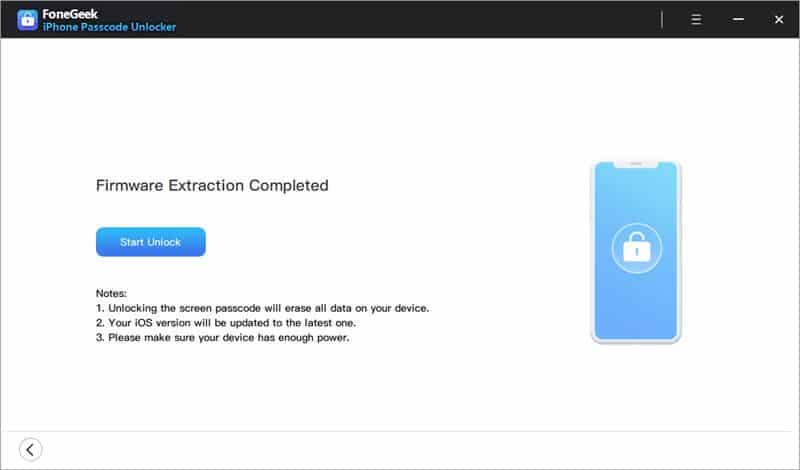
Step 3. Let FoneGeek Unlock Your iOS Device
Forgotten Passcode? Here are 4 Ways to Unlock your iPhone

Click the ‘Start Unlock’ button to proceed. There’s a warning that shows how all your data will be erased, and that your phone will be updated to the latest iOS version. Last but not least, your iPhone or iPad must have enough charge to complete the unlocking procedure.


Use ‘Find My iPhone’

You can unlock your iPhone passcode via the Find My iPhone feature. You’ll need a computer or another iPhone or iPad to complete this.

Sign in to iCloud with your Apple ID and password, then choose ‘All Devices’. Your iPhone will be listed in the selection. All you need is to choose the option ‘erase iPhone’, which will erase all data including your current passcode on the device. You won’t require Siri in this process.

When successful, you’ll see that your iPhone will reboot and afterwards you can get into it without a passcode. Your data will be restored and it will be like a brand new smartphone.


Use iTunes

iTunes is the system where a lot of things get transferred to and from the iPhone. It can also be used to unlock iPhone without password, albeit deleting all your data to do so.

On a computer with iTunes installed, connect your iOS device via cable and wait for it to be recognized. Open the app, then look for the option that says ‘restore iPhone’.

Using iTunes gives you the ability to back up the data first before the wipe, which means you can transfer your photos, videos and music back to the device after a restoration.


Click the ‘restore iPhone’ button, then wait for the software to do its job. Depending on the computer speed and size of data, restoring can take anywhere between 15 minutes to an hour.

Unlock iPhone with Siri

Believe it or not, Siri can unlock your iPhone with a neat trick and won’t wipe your data in the process.

The first step is to call up Siri by pressing and holding the Home button. Tell the AI, ‘Hey Siri, what time is it?’, to which a clock will show up. Tap it and then you’ll be directed to the World clock, where you’ll have an option to ‘Buy more Tones’. Then, choose the Back button and you’ll be redirected to your iPhone’s home screen.



Latest News
The 14-inch MacBook Pro with M5 Chip 16GB RAM/512GB is $250 Off
1 Min Read
Noise and Static on AirPods Pro 3 Still Unfixed
1 Min Read
New iMac with 24-inch OLED Display May be Brighter With 600 Nits
1 Min Read
The 15-inch M4 MacBook Air 256GB Is $250 Off
1 Min Read
Internal Kernel Debug Kit from Apple Reveals Tests for a MacBook with A15 Chip
1 Min Read
Apple Currently In Talks With Suppliers for Chip Assembly & Packaging of iPhones in India
1 Min Read
Apple Allows Easier Battery Replacement For M5 MacBook Pro with 14-inch Display
1 Min Read
The Apple Watch SE 3 44mm GPS is $50 Off
1 Min Read
20th Anniversary iPhone May Launch in Two Years
1 Min Read
Better Image Generation Capabilities and Apple Music Integration Coming to ChatGPT
1 Min Read
A20 Pro Chip Coming to Next Gen iPad Mini OLED
1 Min Read
Amazon has the AirTag 4 Pack Marked $29 off
1 Min Read

iLounge logo

iLounge is an independent resource for all things iPod, iPhone, iPad, and beyond. iPod, iPhone, iPad, iTunes, Apple TV, and the Apple logo are trademarks of Apple Inc.

This website is not affiliated with Apple Inc.
iLounge © 2001 - 2025. All Rights Reserved.
  • Contact Us
  • Submit News
  • About Us
  • Forums
  • Privacy Policy
  • Terms Of Use
Welcome Back!

Sign in to your account

Lost your password?








