
iLoungeiLounge
  • News
    • Apple
      • AirPods Pro
      • AirPlay
      • Apps
        • Apple Music
      • iCloud
      • iTunes
      • HealthKit
      • HomeKit
      • HomePod
      • iOS 13
      • Apple Pay
      • Apple TV
      • Siri
    • Rumors
    • Humor
    • Technology
      • CES
    • Daily Deals
    • Articles
    • Web Stories
  • iPhone
    • iPhone Accessories
  • iPad
  • iPod
    • iPod Accessories
  • Apple Watch
    • Apple Watch Accessories
  • Mac
    • MacBook Air
    • MacBook Pro
  • Reviews
    • App Reviews
  • How-to
    • Ask iLounge
Font ResizerAa
iLoungeiLounge
Font ResizerAa
Search
  • News
    • Apple
    • Rumors
    • Humor
    • Technology
    • Daily Deals
    • Articles
    • Web Stories
  • iPhone
    • iPhone Accessories
  • iPad
  • iPod
    • iPod Accessories
  • Apple Watch
    • Apple Watch Accessories
  • Mac
    • MacBook Air
    • MacBook Pro
  • Reviews
    • App Reviews
  • How-to
    • Ask iLounge
Follow US

Articles

Articles

FlashGet Kids Parental Control App: Keeping Kids Safe Online

Last updated: Sep 13, 2024 11:03 am UTC
By Lucy Bennett
FlashGet Kids Parental Control App: Keeping Kids Safe Online

With the ever-increasing risks of cyberbullying, inappropriate content, and online predators, parents need to take proactive measures to protect their kids. That is parental control app come into play, offering monitor and manage kids online activities.


Why should protect children online safety?

Sometimes internet is a dangerous place for children. If kids have not proper guidance and supervision, Maybe they will upon not age-appropriate content, Engaging in unsafe online behavior, or experiencing cyberbullying, harassment online, etc.

FlashGet Kids Parental Control App: Keeping Kids Safe Online

Besides, too much screen time will make many health issues, such as poor sleep, decreased vision, can’t concentrate. Keeping kids safe online not only to protect their online activities, but also enable children reasonably use Internet, Not overuse and harm their health.


FlashGet Kids Features

  • Content Filtering: FlashGet Kids allows parents to set age-appropriate filters to block access to inappropriate websites, apps, and online content.
  • Time Management: Enables parents set daily or weekly time limits for device usage, ensuring healthy balance between screen time and other activities.
FlashGet Kids Parental Control App: Keeping Kids Safe Online
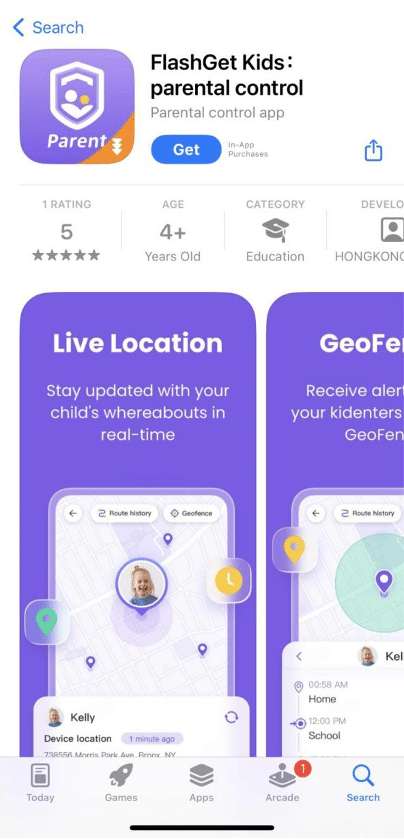
  • Location Tracking: Using FlashGet Kids, parents can monitor their child’s location in real-time, make sure safety when children away from home.
  • App Monitoring and Blocking: Parents can view and manage the apps installed on their child’s device, block or restrict access some apps that may be inappropriate or distracting.

How to install and set up FlashGet Kids

  1. Download FlashGet Kids from app store (Google Play Store for Android or App Store for iOS).
FlashGet Kids Parental Control App: Keeping Kids Safe Online
  • Install app on kids device and follow the instructions to create account.
  • After account set up, parent can link kids device to parental account.
FlashGet Kids Parental Control App: Keeping Kids Safe Online
  • Customize the app’s settings according to parent preferences, such as age-appropriate filters, time limits, and app restrictions.

Frequently asked questions about FlashGet Kids

1.FlashGet Kids compatible with different devices?

Yes, FlashGet Kids supports Android and iOS devices, monitor and manage kids online activities on these devices.


2.Parent can customize app settings for each child?

Of course. FlashGet Kids allows parent to create separate profiles for each child, tailor the settings and restrictions according kids age and needs.

3.How does FlashGet Kids protect child’s privacy?

FlashGet Kids app does not store or share child’s information with third parties. All data is securely stored, Only used to monitoring and managing child’s online activities.

4.Parent can remotely lock or unlock child’s device?

Yes, FlashGet Kids provides remote device management feature, Allows parent lock or unlock child’s device from dashboard.

FlashGet Kids is a Great Solution

FlashGet Kids has a professional customer support team that can help users with any issues regarding the app.

There is no doubt, FlashGet Kids can help parents create a safe, age-appropriate online environment. By content filtering, time management, app monitoring, social media monitoring, and location tracking features, FlashGet Kids ensure kids online safety while healthy internet habits.



Latest News
The 14-inch MacBook Pro with M5 Chip 16GB RAM/512GB is $250 Off
1 Min Read
Noise and Static on AirPods Pro 3 Still Unfixed
1 Min Read
New iMac with 24-inch OLED Display May be Brighter With 600 Nits
1 Min Read
The 15-inch M4 MacBook Air 256GB Is $250 Off
1 Min Read
Internal Kernel Debug Kit from Apple Reveals Tests for a MacBook with A15 Chip
1 Min Read
Apple Currently In Talks With Suppliers for Chip Assembly & Packaging of iPhones in India
1 Min Read
Apple Allows Easier Battery Replacement For M5 MacBook Pro with 14-inch Display
1 Min Read
The Apple Watch SE 3 44mm GPS is $50 Off
1 Min Read
20th Anniversary iPhone May Launch in Two Years
1 Min Read
Better Image Generation Capabilities and Apple Music Integration Coming to ChatGPT
1 Min Read
A20 Pro Chip Coming to Next Gen iPad Mini OLED
1 Min Read
Amazon has the AirTag 4 Pack Marked $29 off
1 Min Read

iLounge logo

iLounge is an independent resource for all things iPod, iPhone, iPad, and beyond. iPod, iPhone, iPad, iTunes, Apple TV, and the Apple logo are trademarks of Apple Inc.

This website is not affiliated with Apple Inc.
iLounge © 2001 - 2025. All Rights Reserved.
  • Contact Us
  • Submit News
  • About Us
  • Forums
  • Privacy Policy
  • Terms Of Use
Welcome Back!

Sign in to your account

Lost your password?








