

iLoungeiLounge
  • News
    • Apple
      • AirPods Pro
      • AirPlay
      • Apps
        • Apple Music
      • iCloud
      • iTunes
      • HealthKit
      • HomeKit
      • HomePod
      • iOS 13
      • Apple Pay
      • Apple TV
      • Siri
    • Rumors
    • Humor
    • Technology
      • CES
    • Daily Deals
    • Articles
    • Web Stories
  • iPhone
    • iPhone Accessories
  • iPad
  • iPod
    • iPod Accessories
  • Apple Watch
    • Apple Watch Accessories
  • Mac
    • MacBook Air
    • MacBook Pro
  • Reviews
    • App Reviews
  • How-to
    • Ask iLounge
Font ResizerAa
iLoungeiLounge
Font ResizerAa
Search
  • News
    • Apple
    • Rumors
    • Humor
    • Technology
    • Daily Deals
    • Articles
    • Web Stories
  • iPhone
    • iPhone Accessories
  • iPad
  • iPod
    • iPod Accessories
  • Apple Watch
    • Apple Watch Accessories
  • Mac
    • MacBook Air
    • MacBook Pro
  • Reviews
    • App Reviews
  • How-to
    • Ask iLounge
Follow US

Articles

Articles

Drag and Drop PDF Organizer

Last updated: Jun 22, 2024 3:21 pm UTC
By Lucy Bennett
Drag and Drop PDF Organizer

If you need a quick and easy method to organize, collate or merge files File Splice functions as a simple PDF organizer. Drag and drop PDF JPG or PNG files into the app, and sort them in whatever order you need. Ordering files is basically collating. Collating it basically means “putting something in a specific order”.


A Simple Solution to Placing Files In Order

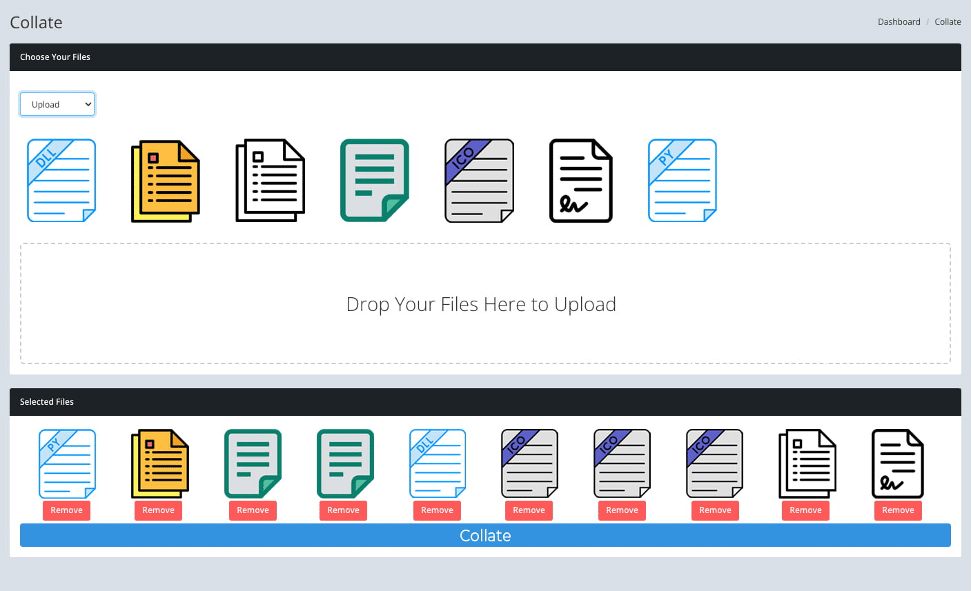
Here’s how it works. You can drag and drop your files into the app or if you have a large amount, connect via ftp and bulk upload files. The system will then display thumbnails of the file, if the file is multiple pages it will only show the first page. Click on the first file you want in your new collated document and it will appear in a new row below. Repeat this process with as many files as you want. You can click on the same file multiple times if you want more than one of them. Once you have all the files in the order you need simply click the collate button and you’ll get a new file built from your selections in that order.

Drag and Drop PDF Organizer

Organize Multi Page Files With Single Files

A unique function of the app is that you can merge together multi paged files with single files if needed. So for example if you have a PDF file that’s three pages you can collate it together with a single jpg file. This can be a very handy tool when organizing projects, case files or legal documents. Additionally you can collate files from builds you have done within the system that are multi paged cut & stack or step and repeat documents. So essentially you can collate together other collated documents.


PDF Organizer In The Cloud

Because File Splice lives in the cloud you can access it from anywhere to get documents collated. Work with your remote team to build documents from files scattered across the world. The team feature allows you to collaborate with as many people as you want, simply add them as a member of your team and they can log in and view your files and work with you. This also means there are no maintenance or security issues. Simply login and get to work.



Latest News
The AirPods Pro 3 is $20 Off
1 Min Read
Exynos 2600 Chip 2nm Process Revealed by Samsung
1 Min Read
New Celebrity Ad Campaign Featuring Travis Scott Released by Beats
1 Min Read
Australia Getting Hypertension Notification Feature
1 Min Read
The 14-inch MacBook Pro with M5 Chip 16GB RAM/512GB is $250 Off
1 Min Read
Noise and Static on AirPods Pro 3 Still Unfixed
1 Min Read
New iMac with 24-inch OLED Display May be Brighter With 600 Nits
1 Min Read
The 15-inch M4 MacBook Air 256GB Is $250 Off
1 Min Read
Internal Kernel Debug Kit from Apple Reveals Tests for a MacBook with A15 Chip
1 Min Read
Apple Currently In Talks With Suppliers for Chip Assembly & Packaging of iPhones in India
1 Min Read
Apple Allows Easier Battery Replacement For M5 MacBook Pro with 14-inch Display
1 Min Read
The Apple Watch SE 3 44mm GPS is $50 Off
1 Min Read

iLounge logo

iLounge is an independent resource for all things iPod, iPhone, iPad, and beyond. iPod, iPhone, iPad, iTunes, Apple TV, and the Apple logo are trademarks of Apple Inc.

This website is not affiliated with Apple Inc.
iLounge © 2001 - 2025. All Rights Reserved.
  • Contact Us
  • Submit News
  • About Us
  • Forums
  • Privacy Policy
  • Terms Of Use
Welcome Back!

Sign in to your account

Lost your password?








