

It is pretty convenient to stream Netflix on your MacBook. But Netflix does not offer a straightforward way to download Netflix for MacBooks. Netflix doesn’t provide a native macOS app that supports offline downloads. If you frequently travel or have limited access to WiFi, you may find it somewhat annoying. This article will share some of the best methods to download Netflix movies on a MacBook. We will share tools like a dedicated one and some recording options as well. Keep reading.
Best Netflix Downloader for Mac Recommended
As we just discussed, there is no official macOS app available to download movies or TV shows directly from Netflix. To save content for offline viewing on your Mac, you need a reliable third-party downloader. One of the top tools we recommend is iDownerGo Netflix Video Downloader. This powerful software lets you download any Netflix content in MP4 or MKV formats without losing quality. It also preserves 5.1 surround sound, keeps multilingual subtitles intact, and provides DRM-free videos that you can watch anytime on any device.

The batch download feature lets you grab a whole season or multiple episodes at once, saving time. Also, it removes ads for uninterrupted viewing. It’s built-in browser makes browsing and downloading Netflix content simple, while DRM-free files let you watch offline on any device. Fast, reliable, and easy to use, it’s one of the best tools for downloading movies or TV shows directly from Netflix on your MacBook.
Key Features of iDownerGo Netflix Video Downloader:
- Download Netflix movies, shows, and episodes for offline use
- Convert Netflix videos to MP4 or MKV in FHD/UHD
- Keep 5.1 surround sound and multilingual audio tracks
- Save subtitles as embedded or independent SRT files
- Built-in browser for easy Netflix browsing and downloading
- Batch download full seasons or multiple videos at once
How to Download Netflix Videos to MP4 on a MacBook?
First, download and install iDownerGo Netflix Video Downloader on your device, and then follow the simple steps below to download Netflix videos to MP4 on your MacBook.
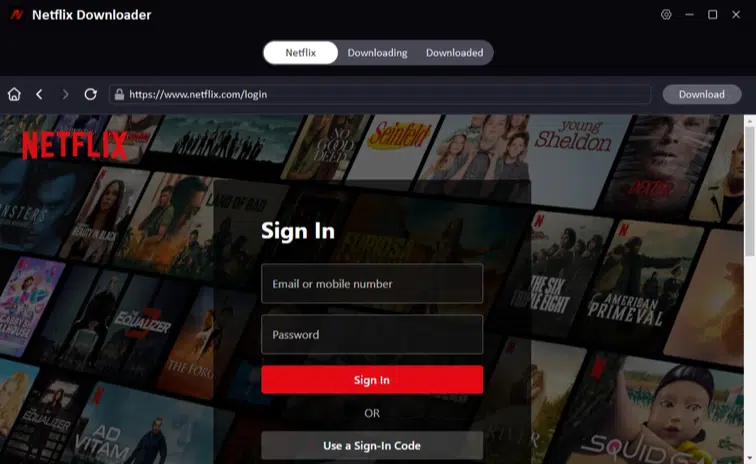
Step 1: Access the built-in browser in the Premium Video Section and log in with your Netflix account.
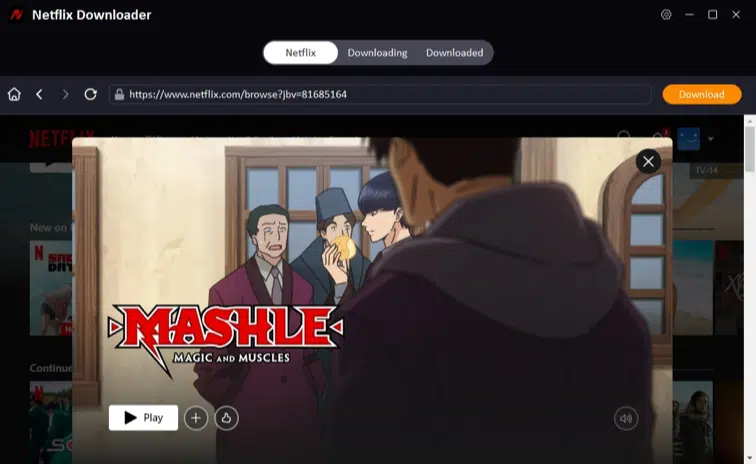
Step 2: Next, search for the Netflix movie or TV show you want to download.
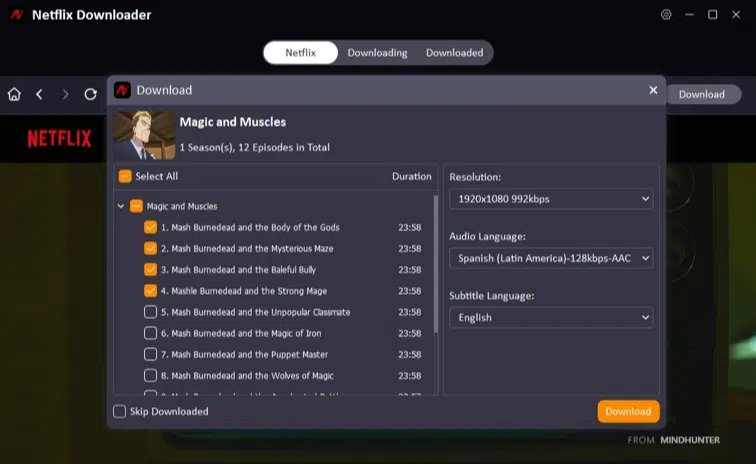
Step 3: Go ahead and set the resolution, audio, and subtitle options from the pop-up window.
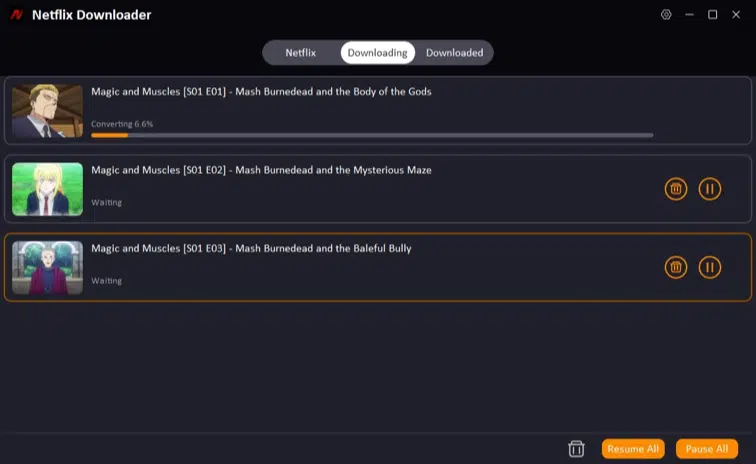
Step 4: Click the Download button to save the Netflix video to your Mac.
Record Netflix Movies on Macbook
If you don’t want to use a downloader, you can record Netflix movies and shows on your Mac with QuickTime Player, which is already on macOS. It captures your screen in real-time, so you can record any Netflix video while it plays. It’s easy to use and requires no extra installation, though it has some limits like large file sizes and possible audio issues due to DRM. Still, it’s a handy option for occasional recordings.
How to Record Netflix on Mac with QuickTime Player?
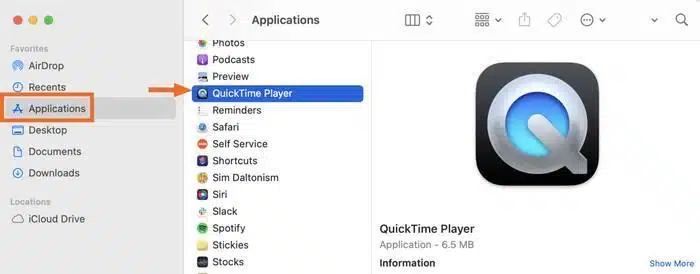
Step 1: Open the Applications folder on your Mac and launch QuickTime Player.
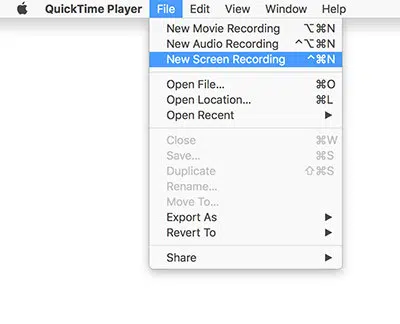
Step 2: In the top menu bar, click File > New Screen Recording.
Step 3: A small recording window will appear. Click the arrow next to the record button to adjust settings, such as audio input source and recording quality.
Step 4: Open your browser, go to the Netflix website, and start playing the movie or show you want to record.
Step 5: Click the Record button. You can choose to record the full screen or drag to select a specific area.

Step 6: When finished, click the Stop button in the menu bar to end the recording. The video will automatically open in QuickTime for preview and saving.
FAQs About Downloading Movies from Netflix to MacBook
Q1. Can you download Netflix movies on a MacBook?
Officially, Netflix doesn’t allow direct downloads on Mac computers. You can watch offline on iOS, Windows, or Android apps, but on macOS, you’ll need third-party tools like iDownerGo Netflix Video Downloader to download movies in MP4 format.
Q2. Can I transfer downloaded Netflix videos from an iPhone or iPad to a Mac?
Netflix’s official app encrypts downloads, so they only work on the device you used. To get Netflix content on your Mac, you need a tool like iDownerGo Netflix Video Downloader, which saves DRM-free MP4 or MKV files that can be transferred and played freely on any Mac.
Q3. What is the best Netflix downloader for Mac?
iDownerGo Netflix Video Downloader is the most reliable choice. It allows you to download full movies, TV shows, and episodes in high-definition, keeps 5.1 audio and subtitles intact, and provides batch downloading. It’s faster, more flexible, and produces DRM-free files compared to other solutions.
Conclusion
It’s easy to download Netflix movies on a Mac with the right tool. While QuickTime Player can record content in real-time, it’s limited by file size and audio issues. For a fast, reliable, and high-quality solution, iDownerGo Netflix Video Downloader is the best choice. It supports batch downloads, HD or UHD video, multiple subtitle options, and keeps all metadata intact. With this tool, you can build your personal offline library and enjoy your favorite Netflix content anytime, anywhere, without restrictions. So, download it today and enjoy your Netflix shows anywhere without usual platform restrictions.











