
iLoungeiLounge
  • News
    • Apple
      • AirPods Pro
      • AirPlay
      • Apps
        • Apple Music
      • iCloud
      • iTunes
      • HealthKit
      • HomeKit
      • HomePod
      • iOS 13
      • Apple Pay
      • Apple TV
      • Siri
    • Rumors
    • Humor
    • Technology
      • CES
    • Daily Deals
    • Articles
    • Web Stories
  • iPhone
    • iPhone Accessories
  • iPad
  • iPod
    • iPod Accessories
  • Apple Watch
    • Apple Watch Accessories
  • Mac
    • MacBook Air
    • MacBook Pro
  • Reviews
    • App Reviews
  • How-to
    • Ask iLounge
Font ResizerAa
iLoungeiLounge
Font ResizerAa
Search
  • News
    • Apple
    • Rumors
    • Humor
    • Technology
    • Daily Deals
    • Articles
    • Web Stories
  • iPhone
    • iPhone Accessories
  • iPad
  • iPod
    • iPod Accessories
  • Apple Watch
    • Apple Watch Accessories
  • Mac
    • MacBook Air
    • MacBook Pro
  • Reviews
    • App Reviews
  • How-to
    • Ask iLounge
Follow US

Articles

Articles

DoCast Delivers a Smooth Mirroring Experience

Last updated: Jun 1, 2023 6:34 pm UTC
By Lucy Bennett
DoCast Delivers a Smooth Mirroring Experience

DoCast, available on the App Store, is a recently-released iOS app by Electronic Team that does photo casting, video streaming, and screen mirroring iPhone to TV via Chromecast. What makes it special is great performance, a perfect UI, and opportunities for new users to fully try it out before deciding to upgrade. Let’s get into specifics.


What is DoCast Capable Of?

This impressive app can wirelessly connect to a Chromecast from your iPhone or iPad and mirror the device’s screen to TV, or stream videos and cast photos. When you cast and stream from iPhone to TV, DoCast also provides a convenient gallery to browse and select media. Adjustable options include mirroring quality and toggles for audio and screen auto-rotation.
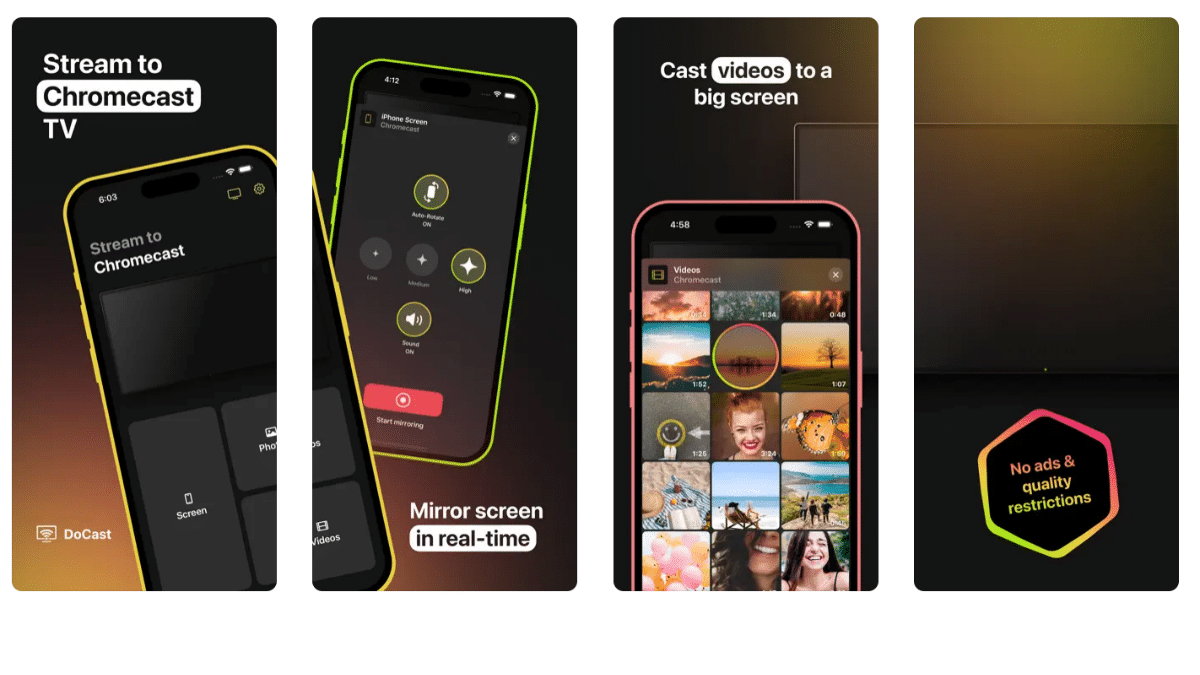
DoCast Delivers a Smooth Mirroring Experience

All functionality is implemented perfectly, the app is put together nicely, and this is also reflected in the UI. The interface is completely intuitive, easy to navigate, and its layout makes sense. It was never a hindrance to everyday streaming and mirroring, and that’s all users need.


What about performance? It’s astounding. The low mirroring delay when you cast phone to TV – less than a second – opens up many alternative use cases for DoCast, like gaming. The quality is great, which is important when streaming movies.

Why DoCast?

iPhones and iPads already have an AirPlay mirroring feature built in. But alas, not every TV is compatible with the AirPlay protocol. Many of them, like some Sony models, run on Chromecast. And it’s also very common for users to have this attachment. Still, just having Chromecast is not enough – you also need an app to make your device compatible with it. And that’s where DoCast comes in. It can mirror, stream, and cast to any Chromecast device, including Chromecast Ultra and any TV model compatible with the protocol.


Is It a Paid App?

DoCast actually has a free version. It has some restrictions – mirroring sessions can only last for 15 minutes, and video streaming sessions are even shorter at 3 minutes – although you can skip to a different spot using the timeline. However, this turned out to be more than enough to get a feel for the app, especially considering that the highest quality setting and audio are already available for free. Plus, all versions have unlimited photo casting, and don’t have any ads.


The Premium Upgrade can be purchased in the Monthly, Yearly, or Lifetime form. It removes the mirroring and streaming limits. In addition, since DoCast is in active development, any features added in the future will only be available with the Premium Upgrade.

In Conclusion

DoCast is, overall, an innovative and refined Chromecast iPhone app, and a great competitor to existing mirroring solutions. The quality of the app, initial availability of settings, and the absence of ads are the main points that can be highlighted. If you’re interested in DoCast, you can discover more information on its official website.



Latest News
The AirPods Pro 3 is $20 Off
1 Min Read
Exynos 2600 Chip 2nm Process Revealed by Samsung
1 Min Read
New Celebrity Ad Campaign Featuring Travis Scott Released by Beats
1 Min Read
Australia Getting Hypertension Notification Feature
1 Min Read
The 14-inch MacBook Pro with M5 Chip 16GB RAM/512GB is $250 Off
1 Min Read
Noise and Static on AirPods Pro 3 Still Unfixed
1 Min Read
New iMac with 24-inch OLED Display May be Brighter With 600 Nits
1 Min Read
The 15-inch M4 MacBook Air 256GB Is $250 Off
1 Min Read
Internal Kernel Debug Kit from Apple Reveals Tests for a MacBook with A15 Chip
1 Min Read
Apple Currently In Talks With Suppliers for Chip Assembly & Packaging of iPhones in India
1 Min Read
Apple Allows Easier Battery Replacement For M5 MacBook Pro with 14-inch Display
1 Min Read
The Apple Watch SE 3 44mm GPS is $50 Off
1 Min Read

iLounge logo

iLounge is an independent resource for all things iPod, iPhone, iPad, and beyond. iPod, iPhone, iPad, iTunes, Apple TV, and the Apple logo are trademarks of Apple Inc.

This website is not affiliated with Apple Inc.
iLounge © 2001 - 2025. All Rights Reserved.
  • Contact Us
  • Submit News
  • About Us
  • Forums
  • Privacy Policy
  • Terms Of Use
Welcome Back!

Sign in to your account

Lost your password?








