iLoungeiLounge
  • News
    • Apple
      • AirPods Pro
      • AirPlay
      • Apps
        • Apple Music
      • iCloud
      • iTunes
      • HealthKit
      • HomeKit
      • HomePod
      • iOS 13
      • Apple Pay
      • Apple TV
      • Siri
    • Rumors
    • Humor
    • Technology
      • CES
    • Daily Deals
    • Articles
    • Web Stories
  • iPhone
    • iPhone Accessories
  • iPad
  • iPod
    • iPod Accessories
  • Apple Watch
    • Apple Watch Accessories
  • Mac
    • MacBook Air
    • MacBook Pro
  • Reviews
    • App Reviews
  • How-to
    • Ask iLounge
Font ResizerAa
iLoungeiLounge
Font ResizerAa
Search
  • News
    • Apple
    • Rumors
    • Humor
    • Technology
    • Daily Deals
    • Articles
    • Web Stories
  • iPhone
    • iPhone Accessories
  • iPad
  • iPod
    • iPod Accessories
  • Apple Watch
    • Apple Watch Accessories
  • Mac
    • MacBook Air
    • MacBook Pro
  • Reviews
    • App Reviews
  • How-to
    • Ask iLounge
Follow US

Articles

Articles

Do Your Data Recovery Pro Review

Last updated: Jul 14, 2020 6:23 am UTC
By Lucy Bennett
Do Your Data Recovery Pro Review

How much would you give to get back files that have been deleted some time ago? If there has been more than one instance that you emptied your computer’s Recycle Bin or accidentally removed a partition, Do Your Data is for you.


Today we take a look at Do Your Data, a powerful file recovery software that works on all kinds of storage media.

Do Your Data Recovery Pro Review

What is Do Your Data?

A screenshot of a cell phone

Description automatically generated

Do Your Data Recovery Pro is an excellent solution when you’ve lost an important file, deleted or formatted a hard drive, laptop or external media such as a USB drive and more.

The latest version, Do Your Data Pro 7.5 on Windows and 7.6 on Mac works on a variety of popular consumer storage media, including RAID configurations, digital cameras, memory cards, flash drives and more.


Powerful File Recovery Capability

Do Your Data can recover lost files on a number of partitions, including FAT32, NTFS and macOS. The robust software can also get back data from an external HDD and even recover deleted files which were deleted a long time ago. Moreover, the app can retrieve emails, audio, archives, folders, documents, video, images and more.

Deep Data Scanning

Do Your Data offers 3 scanning types, with Quick Scan being the fastest and Advanced Deep Scan being the most comprehensive. Depending on your erased data circumstances, you can choose a read-only scan so there won’t be any overwriting or a deep dive for severely damaged or corrupted hard drives.


Easy Recovery Process

Do Your Data is more than just a simple recovery software for Mac and Windows. It has a wealth of quality of life features that you’re sure to appreciate. For one, you can stop and pause scans quickly, or tell the software exactly what it is you’re looking for. Once the file is found you’ll have a variety of export options and skip several steps.

Do Your Data Recovery Software Special Offer

A sign attached to a can

Description automatically generated

The free trial lets you view the lost files you want to get. You can then purchase a license to proceed further.


Get a whopping 50% discount on Do Your Data Recovery Software when you visit https://www.doyourdata.com/special-offer/

Once you’ve unlocked the pro version, you get to enjoy unlimited recoveries on all your devices and storage media.

Lost Data Recovery Steps

Download and install Do Your Data Recovery Pro then run the software on your PC or Mac.

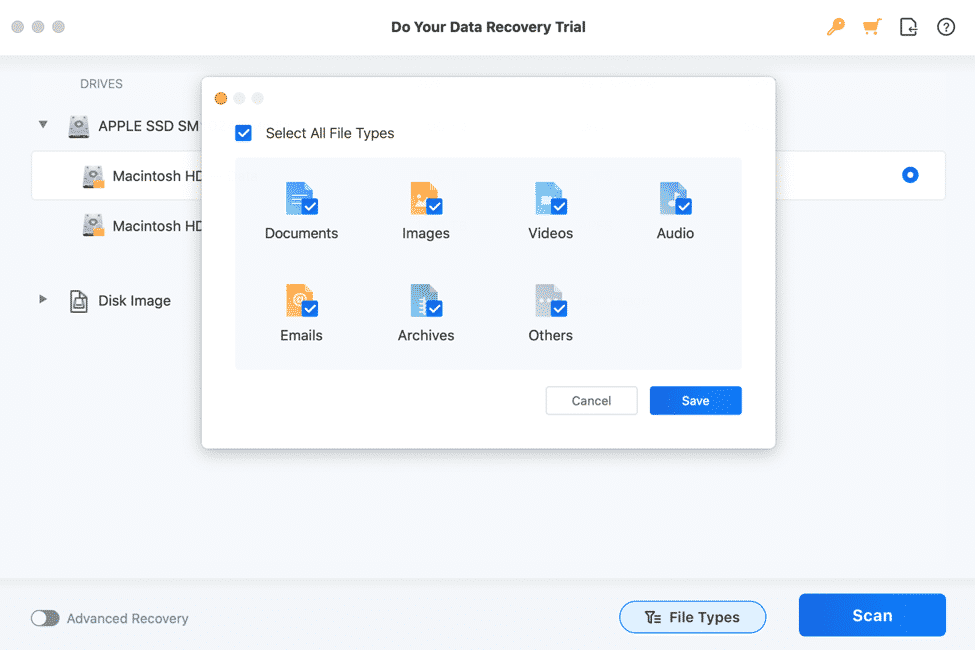
Step 1. Choose the device or storage you’d want to scan.

Step 2. Click on ‘Scan’ and wait for the results to show

Step 3. Choose the file(s) you want in the preview section. Choose where you want it to go then click on ‘Complete’. You’re done!


Should You Get Do Your Data?

It’s impressive how Do Your Data Recovery Pro can make recovering deleted or lost files so easily. In our Do Your Data review, the whole process just took less than 10 minutes on a 250GB SSD, and we were able to retrieve a 1GB video file that was deleted from the Recycle Bin a few days ago.

The 50% off deal is the icing on the cake. Try Do Your Data today to get back your important files.



Latest News
The Apple Watch Series 11 46mm GPS Is $100 Off
1 Min Read
Clamshell Style iPhone Being Looked Into By Apple
1 Min Read
Foldable iPhones May Have the Largest Battery Ever
1 Min Read
Apple and TSMC’s 10-Year Collaboration May Be Ending
1 Min Read
The 13-inch M5 iPad Pro 256GB Wi-Fi Is $149 Off
1 Min Read
M5 Pro and M5 Max Chips for the MacBook Pro could Roll Out with macOS 26.3
1 Min Read
Mac Ordering Process Revamped
1 Min Read
Check Signed By Steve Wozniak and Steve Jobs Sold For $2.4 Million
1 Min Read
The Anker 140W 4-Port GaN USB-C Charger is $35 Off
1 Min Read
No iPhone Air 2 This Year, according to Latest Report
1 Min Read
New Report Corroborates Split iPhone Release Dates
1 Min Read
Apple Losing More Researchers As They Plan To Release 2 Siri Versions
1 Min Read

iLounge logo

iLounge is an independent resource for all things iPod, iPhone, iPad, and beyond. iPod, iPhone, iPad, iTunes, Apple TV, and the Apple logo are trademarks of Apple Inc.

This website is not affiliated with Apple Inc.
iLounge © 2001 - 2025. All Rights Reserved.
  • Contact Us
  • Submit News
  • About Us
  • Forums
  • Privacy Policy
  • Terms Of Use
Welcome Back!

Sign in to your account

Lost your password?